What Is On-Page SEO? A Guide and Checklist
On-page SEO is everything you do on the page itself so it answers a search better. How to handle keywords, titles, copy and speed, with a checklist.

On-page SEO, or on-page optimisation, is everything you do on a page itself so that it answers a search better: the text, the headings, the metadata, the images, the internal links and how fast the page loads. The aim is to give both the reader and Google the best answer to the search you want to rank for. Unlike off-page SEO (links and mentions on other websites), all of it is within your own control.
What This Guide Covers
This guide sets out the practical steps that help a page rank and sell:
- What on-page SEO is and why it affects your sales
- How to choose and place keywords
- How to work with titles, metadata, copy and images
- How user signals and page speed shape your rankings
- A checklist to work through, page by page
If you already know the basics, go straight to the on-page SEO checklist near the end and tick off what you have covered.
We are an SEO agency that judges its work by enquiries and sales, and every engagement starts with a free search audit.
Key Takeaways
- Keyword density is outdated. Google understands context and related concepts, so write naturally instead of counting percentages.
- Google sometimes replaces your title tag with other text from the page; a title and H1 that say the same thing give it less reason to.
- Clicks matter. Evidence from the US antitrust case shows that Google’s NavBoost ranking system draws on 13 months of click data.
- Page speed is part of the baseline: in 2025, only 48 per cent of websites passed all three Core Web Vitals on mobile.
What Is On-Page SEO?
On-page SEO is mostly about the copy and content of each page, while the website’s technical foundations (crawling, indexing, site speed and structure) belong to technical SEO.
A few principles run through everything that follows:
- Don’t over-optimise. Start with a moderate use of your keywords and add to it in a later update if the page needs it. Pulling back from over-optimisation is harder.
- Length is not the goal. Word count is not a ranking factor in itself. Cover what the reader needs to know and show that you know the subject; where you rank is decided by Google’s ranking factors as a whole.
- Clicks count. Google records how searchers respond to its results, so a page that disappoints the people who click on it will slip.
- There are no lasting shortcuts. Anything that looks too good to be true stops working sooner or later.
- Be patient. Changes take time to show in rankings, and so does recovering from a mistake you have corrected.
Keep Your URLs Short and Descriptive
Unless you are working on your home page, you choose the URL yourself, and a URL that contains the keyword tells both the reader and Google what the page is about. For example: yoursite.co.uk/exact-match-keyword. Leave out filler words such as “to”, “for” and “and” where the URL still reads clearly without them.
Think carefully before changing a URL once the page has been indexed. If you do change it, set up a 301 redirect from the old address to the new one, or you lose the rankings and links the old URL had earned.
Less important pages, such as blog posts or job vacancies, can sit further down the site’s hierarchy than your service pages.
Put the Keyword in Your Headings
Your main heading (the H1) should contain the keyword, and so should the subheadings (H2, H3 and so on) where it fits naturally.
- Put the keyword near the start of the heading
- Keep out keywords that another of your pages should rank for
- Look at the pages that rank highest and broadly follow how they frame the topic
- Keep the heading levels in order, for example H1, H2, H3, H2, H3, H4
The words you add around the keyword matter as much as the keyword itself. “On-page SEO checklist” and “what is on-page SEO” share a keyword but answer different questions, and Google ranks them differently.
How to Write Title Tags and Meta Descriptions
You set the meta title and meta description in your CMS; in WordPress that usually means a plugin such as Yoast or Rank Math.
The keyword belongs in the title. In the description it helps too, mainly because Google shows the words that match the search in bold, which makes your listing stand out and more likely to be clicked.
Writing a title does not guarantee what searchers see. Google sometimes replaces the title tag with other text, and its documentation lists the H1 and the main visible title on the page among the sources it uses. A title and H1 that say the same thing give it less reason to look elsewhere.
Google sets no character limit for titles, but it cuts long ones to fit the width of the screen. What counts is pixel width, not characters: sixty “m”s take up far more room than sixty “i”s. Many SEOs work to around 60 characters as a rule of thumb, with the most important words first.
To separate the parts of a title, use a simple delimiter. Google’s guidance names a hyphen, a colon or a pipe (|) between the page name and your brand. A simple template is “Keyword: what the reader gets | Brand”.
Write the title so that people want to click, and so that the page delivers what it promised. When the title, the landing page and the offer all match what the search was looking for, more of those clicks turn into sales.
There is no fixed length for the meta description either; Google truncates it to fit the device. Include the keyword or a close variant and put the main point first. Google often writes its own snippet from the page copy when that suits the search better, so you do not always control what is shown. When your description does appear, it decides whether people click, so write it for the reader rather than to fit in more keywords.
Choose Images That Match the Search
Images support the text, and most of their value lies in the reader’s experience. How many you need depends on the search: a definition rarely needs any, while a search for a product may be answered mostly in pictures.
Search for your keyword and look at the results. If they are full of images, as they are for designer table lamps, your page should be rich in images too:
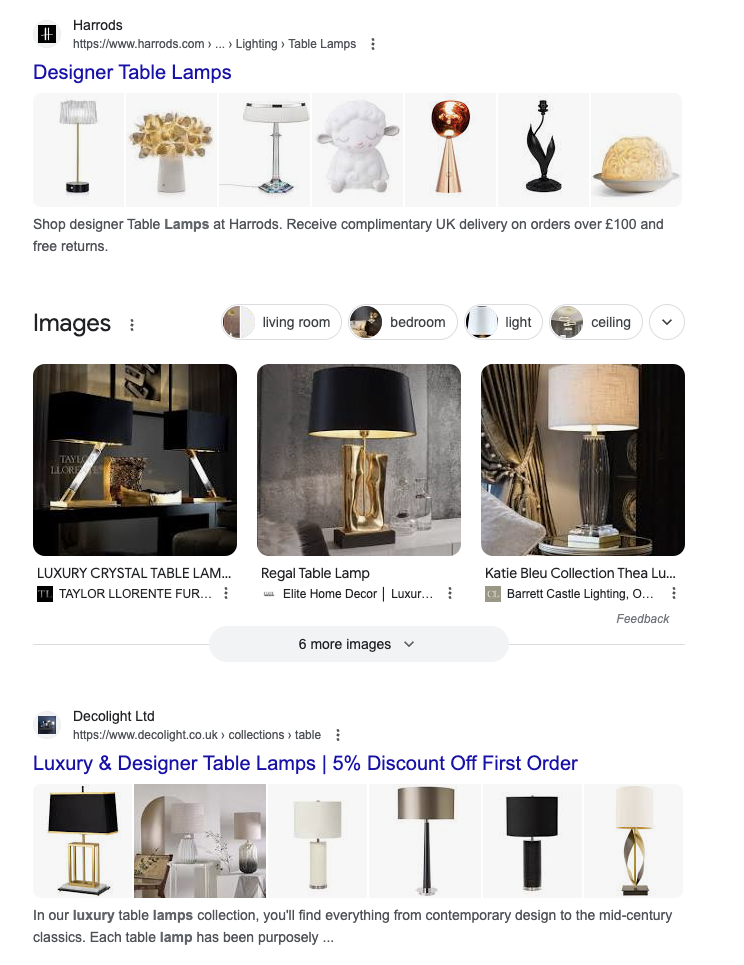
Treat images as part of what makes the page good to use. Pages that serve the reader well earn better user signals, and those feed back into rankings.
Alt text is the other part of image optimisation. In the code, it looks like this: <img src="example.gif" alt="The keyword you are working on">. Describe what the image shows and, where it fits, include the keyword or a related term. In WordPress you add it in the Alternative Text field when you select the image.
If WordPress is your CMS, our guide to WordPress SEO covers the settings in more detail.
Write Content That Adds Something New
Google rewards pages that answer the reader well, and that is a different thing from long pages.
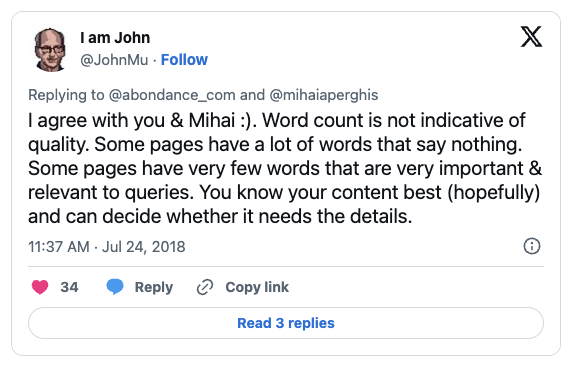
Word count is not a ranking factor in itself. A common mistake is to pad a page with more words and dilute its relevance to the search. As Google’s John Mueller put it, some pages say a great deal in few words, and you can decide whether yours needs the detail.
More text can work against you. Google’s patent on information gain (US20200349181A1) describes scoring how much new information a document adds beyond what the user has already seen, and Google’s own guidance on helpful content asks whether a page provides “original information, reporting, research, or analysis”. If your 2,500 words only repeat what the top five results already say, you have added little. Bring something of your own instead: your own data, your experience or an angle the competition has missed, and put it high up on the page.
Content that covers a subject well, built around the keywords that matter, also picks up relevant long-tail traffic: the longer, more specific searches around the main term.
Why Quality Across the Whole Site Matters
Quality is judged across your whole website, not one page at a time. A weaker page can still outrank competitors because the rest of your site makes you the better answer, and a strong page can be held back by a site full of thin ones.
- Answer the question. Every page should solve the problem the reader searched for.
- Keep going. Your competitors keep publishing and updating, so a site that stops will slowly fall behind, however good its existing posts.
Can You Use ChatGPT for SEO Content?
ChatGPT is a useful tool. The question is how much it helps a page rank.
Google’s guidance points the same way for AI and human writing alike: it asks whether content adds substantial value and originality, rather than simply copying or rewriting other sources. A summary of what already exists on many other pages adds little.
ChatGPT is trained largely on content that is already public, much of it already in Google’s index. That limits how much new value its first draft can bring.
AI-generated content is not automatically duplicate content. But it is rarely as original as it looks, because it reworks what is already out there.
Use ChatGPT where it does the job as well as you, or better: outlines, first drafts, rewording. Then read it through, add what only you know and make sure the page covers something new. Our guide to AI content and SEO goes into more detail.
How to Use Keywords on the Page
Forget Keyword Density
Keyword density, meaning how often the keyword appears relative to the total number of words, was once a signal SEOs watched closely. It is outdated. Don’t count percentages and don’t force the keyword in to hit a formula. Google’s language models understand context, synonyms and different word forms, and mechanical repetition is more likely to read as over-optimisation than to help.
A page should usually target a group of related keywords rather than one. Thorough keyword research shows which searches belong on the same page and which need a page of their own.
Tip: look at the top-ranking pages that are comparable to yours (not Wikipedia, for example). Note which subtopics they cover and make sure your page covers the ones that are relevant to your reader.
Where to Place the Keyword
Where the keyword sits matters as well as which keyword you choose. Put it where both readers and Google look first: the title, the H1, the opening paragraph and the subheadings that introduce the main sections.
Don’t overthink the rest. Write naturally and check that you have not over-optimised. If you are unsure, use the keyword slightly too rarely to begin with and add to it later, alongside other changes to the page.
Should You Bold Keywords?
Bold, italics and underlining help readers who skim pick out the main points, so use them for those points. Bolding the keyword because you think Google will notice is a different matter: a page dotted with bolded keywords reads as written for a search engine.
If a sentence deserves emphasis and it happens to contain the keyword, bold it. Otherwise leave the formatting to the reader’s needs, especially if your site is new and has not yet built up much trust with Google.
How to Use Internal Links
Internal links help readers move through your site and tell Google which pages matter most. They can also be done badly.
Treat a link as a vote. Linking most often to your most important pages tells Google which ones they are. Link to everything equally often and you say that everything is equally important, which weakens the signal.
Make the context relevant. Don’t link for the sake of it. Place the link in text that is relevant to the page you link to and the searches it should rank for.
Think about placement. Links in prominent places, such as the main menu or the body of your home page, are the ones visitors use most, and they show which pages you consider important. A link buried in the footer of an old blog post carries less weight.
Choose Anchor Text That Describes the Page
Anchor text, the clickable words in a link, tells both readers and Google what the linked page is about. Three things to keep in mind:
- Use anchor text that matches the keywords the linked page should rank for, but vary it so it reads naturally rather than repeating the exact keyword every time.
- Avoid anchor text that has nothing to do with the linked page.
- Don’t link to one page with anchor text that another of your pages is trying to rank for.
A natural mix includes:
- Exact match: the keyword itself
- Partial match: the keyword with other words around it
- A call to action, such as “read the guide”
- Your brand name, such as “Sunbird”
Whatever the wording, the page the link sits on should be relevant to the page it points to.
Match the Search Intent
Google works out what the searcher is trying to do and shows the pages it judges to answer that best. The results page is therefore your best guide to what is expected of your page.
Search for the keyword you want to rank for and look at what comes up. If every result is an informational article, write one. If the results are product pages or comparisons, build your page in that form instead.
You cannot win every keyword. Sometimes Google simply expects a different kind of page from the one you have, such as a comparison. But it is rare to find a keyword where you cannot rank at all.
Google also likes some variety in its results, so there can be room for a page that takes a different angle, even if that is harder.
Cover Synonyms and Close Variants
Don’t write only for the exact phrase. A page that ranks well usually also picks up many longer, more specific searches around the main term.
Exact-match keywords still matter, but so do the close variants that belong on the same page. If you were writing about “cat pictures”, you would also use “pictures of cats” and “cat photos”, because they mean the same thing.
A page can even rank for searches whose exact wording it never uses. A recipe titled “Classic carbonara” can rank for “how to make carbonara”, because Google understands that it answers the question.
The text also reads better when you stop thinking only about exact keywords and write as you would if SEO did not exist.
Answer the Questions People Ask Next
Google favours pages that answer a topic thoroughly. Two good sources of ideas sit on the results page itself: the “People also ask” box and the related searches at the bottom.
Google used to show FAQ blocks directly in the search results. It stopped showing FAQ rich results on 7 May 2026, so FAQ markup no longer wins you extra space there. Answering the common follow-up questions on your page is still worth doing.
Cover those questions well and you raise your chances of long-tail traffic, and often of ranking better for the main keyword as well.
Cover the Terms That Belong Together
Don’t overthink this one: write naturally and cover everything that is relevant to the reader, and most of it takes care of itself.
Google expects certain terms and concepts to appear together. “George III”, for example, belongs with “British monarchs of the 18th century”, and a page about one would naturally mention the other. Covering the people, places, concepts and products that belong to a subject shows that the page treats it properly, without counting a single keyword.
If a page is not ranking for a keyword, more mentions of that keyword are rarely the answer. More often something the reader expects is missing, and the pages that rank above you show what it is.
How to Avoid Keyword Cannibalisation
People who start doing SEO themselves hear that keywords matter and put their most important ones on almost every page. That can backfire. Your pages end up competing with each other, and Google cannot tell which one should rank. This is known as keyword cannibalisation.
A keyword can appear on more than one page. But make sure one page is clearly the one that should win it. When you mention the keyword on other pages, link from there to the page that owns it.
It is the search intent, more than the keyword, that causes cannibalisation. Two pages with different keywords but the same intent are a bigger problem than two pages that share a keyword but answer different questions.
How User Signals Affect Rankings
Google watches how searchers respond to its results. Evidence in the US Department of Justice’s antitrust case against Google described a system called NavBoost, which remembers which pages people clicked after a given search. The judge’s ruling of August 2024 records that Google has trained NavBoost on 13 months of user data since 2017, down from 18 months before that. Internal documentation that leaked in 2024 lists click measures such as good clicks, bad clicks and last longest clicks, and splits the data by country and device. Neither source says how much weight these signals carry.
The practical point is simple. If your title promises something the page does not deliver, people click, go straight back and choose another result, and that is the kind of behaviour these systems are built to notice.
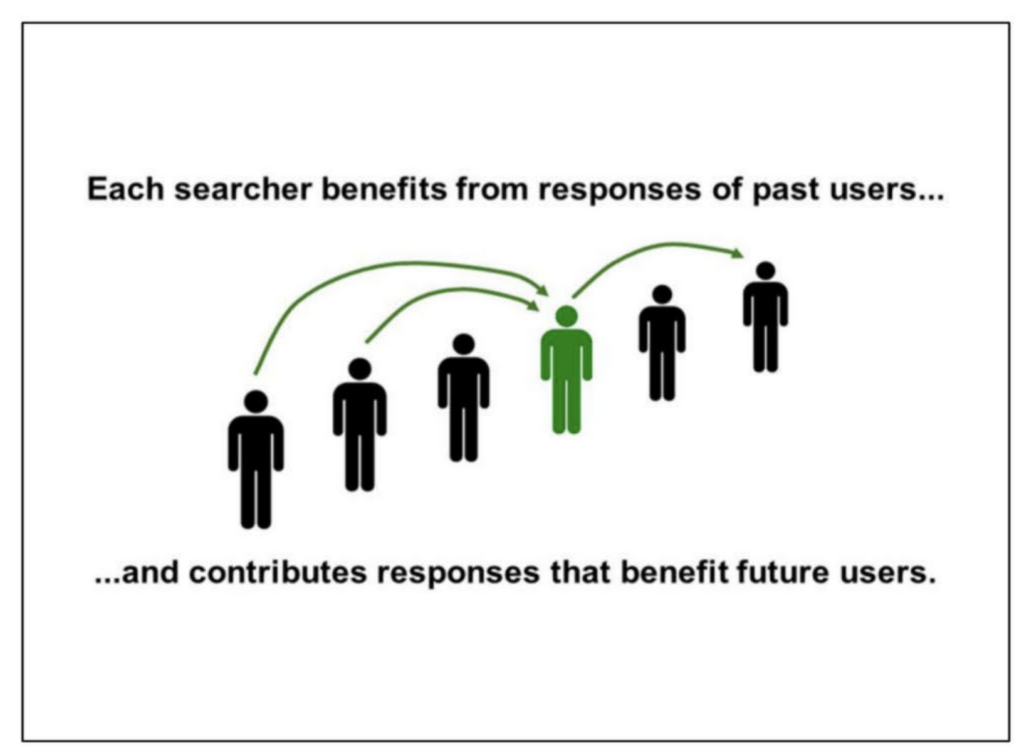
Slide from an internal Google presentation on ranking, published as exhibit UPX0203 in the US antitrust case against Google.
User signals that matter for SEO include:
- Long clicks: the searcher clicks your result and does not come back to search for the same thing
- Pogo-sticking: the searcher clicks through, goes straight back and clicks a competitor
- Returning visitors and searches for your brand
GA4’s bounce rate is a different measure: the share of sessions that were not engaged. It is a useful on-site check, but it is not the same as what Google sees in its own results.
Work on user signals goes hand in hand with work on your conversion rate. A page that answers the search well tends to keep visitors and turn more of them into customers.
Check the Mobile Version
Your rankings on desktop and on mobile are not the same. Google uses the mobile version of your site for indexing and ranking, so that is the version that counts. Common mistakes:
- Links that exist on desktop are missing on mobile, because the menu is built differently
- Text or headings that appear on desktop are hidden or left out on mobile
- Weaker PageSpeed scores on mobile
- A poorer experience overall, which leads to poor user signals
If your website is a few years old and was not built for mobile, check this first.
How Fast Does Your Page Need to Be?
Core Web Vitals are Google’s measures of how real visitors experience a page, and Google says its ranking systems use them. Relevance still comes first: in Google’s words, it “always seeks to show the most relevant content, even if the page experience is sub-par”. But where several pages answer a search equally well, a good page experience can make the difference, which makes Core Web Vitals a baseline in competitive markets.
There are three measures to watch:
- LCP (Largest Contentful Paint): how quickly the largest element on the page loads. Google’s threshold is 2.5 seconds, and heavy hero images are a frequent cause of slow LCP.
- INP (Interaction to Next Paint): how quickly the page responds when someone clicks or taps. INP replaced the older FID metric on 12 March 2024, and the threshold is 200 milliseconds.
- CLS (Cumulative Layout Shift): how much the content jumps about while the page loads. Aim for less than 0.1.
This is harder than it sounds. According to the HTTP Archive’s Web Almanac 2025, only 48 per cent of websites passed all three on mobile. Because Google indexes mobile-first, mobile is where you should measure.
To improve your scores, compress and preload the hero image, set a width and height on every image so that nothing shifts, and keep heavy JavaScript that delays responses to a minimum. Faster pages also tend to keep more of their visitors and convert more of them.
Add Structured Data (JSON-LD)
Structured data is code that tells Google what the content on a page is: a product, an article, an event or an organisation. It lets the search engine read those facts directly instead of inferring them from the text.
It is widespread. According to the HTTP Archive’s Web Almanac 2024, JSON-LD was used on 41 per cent of pages, up from 34 per cent in 2022. If you use WordPress, plugins such as Yoast and Rank Math add a good deal of it automatically, but check that the right type (Product or Article, for example) is used and that the code validates in Google’s Rich Results Test.
The right markup can make a page eligible for rich results, such as prices and review stars on product listings, which make it stand out in the results.
Write for Readers, Not for the Search Box
A common mistake is to write keywords into headings and copy exactly as people type them into Google, such as “plumber Leeds” instead of “plumber in Leeds”, on the grounds that this is what people search for. Drop the habit. Google’s language models understand grammar and word order, and they know that a search for the bare phrase matches the properly written one.
Awkward, keyword-shaped phrasing only makes the page look less credible, to readers and to anyone judging its expertise. Write good, natural English and trust Google to work out the match. A page that reads professionally earns more trust from readers, and that shows in how they behave on it.
Show Experience and Expertise (E-E-A-T)
E-E-A-T stands for Experience, Expertise, Authoritativeness and Trustworthiness. It reaches beyond on-page SEO and is an overall assessment of a site and its authors rather than a single ranking factor. In practice, it comes down to things such as:
- Keeping your content up to date, older posts included
- Naming the author and showing why they know the subject
- Being mentioned on relevant external websites
- Showing the industry certifications and memberships that matter to your buyers
- Including examples, data and judgements that only someone with real experience could provide
On-Page SEO Checklist
Use this list to check that a page has been properly worked through:
- [ ] The keyword is in the URL, the title and the H1
- [ ] The title and the H1 say the same thing
- [ ] The title uses a simple separator such as a hyphen, colon or pipe before the brand
- [ ] The copy answers the search intent directly
- [ ] The page covers related concepts and synonyms naturally
- [ ] The keyword appears early in the first paragraph
- [ ] Internal links point to the most important pages with relevant anchor text
- [ ] Images have descriptive alt text
- [ ] The page passes Core Web Vitals (LCP, INP, CLS) on mobile
- [ ] No other page targets the same search intent (no keyword cannibalisation)
- [ ] Structured data (JSON-LD) is in place and validates
Frequently Asked Questions About On-Page SEO
What Is the Difference Between On-Page and Off-Page SEO?
On-page SEO is everything you do on the page itself: copy, headings, metadata, images, internal links and load time. Off-page SEO is what happens away from your website, above all links and mentions from other websites. On-page is within your own control; off-page is something you build over time.
Which Meta Tags Matter Most for On-Page SEO?
The title tag matters most, because it affects both rankings and clicks. The meta description does not affect rankings directly; it works like ad copy that persuades people to click. Other tags, such as canonical and noindex, are more technical but control how Google handles the page.
How Do I Use Keywords in Copy and Headings?
Put the keyword in the title, the H1 and, ideally, early in the first paragraph. Then use it naturally in the body alongside synonyms and related terms. Don’t calculate density and don’t force phrases in. Write for the reader and let Google work out the context.
What Are the Most Common On-Page SEO Mistakes?
The most common are padding the copy with words that add nothing, over-optimising keywords, letting several pages compete for the same search intent (keyword cannibalisation), neglecting mobile and page speed, and writing keywords in awkward, ungrammatical form because that is how people type them.
Where to Start with On-Page SEO
On-page SEO is not what it used to be. There is no formula to follow. Keywords in the right places are a necessary start, but not always enough. To win, you have to write for the reader and give them a website that is good to use.
If you remember three things from this guide, make it these:
- Google sees how searchers respond to your page. Tricks to fool it do not last; satisfied visitors do.
- Covering the topic and matching the search intent matter more than repeating keywords.
- Write for the reader, and be deliberate about where the keyword goes.
If you would like help turning more of your search traffic into enquiries, see how we work as an SEO agency, or start with a free search audit of your website.