
Keyword Research for SEO: What It Is and How to Do It
Search volume is a blunt measure. Buying intent decides whether traffic turns into business. How to find, cluster and prioritise keywords that bring in leads.

Keyword research is the process of finding the keywords and questions your audience types into Google, measuring their search volume and competition, and deciding which ones to go after. The aim is to tie search behaviour to revenue, not to chase volume for its own sake. Now that AI answers many searches on the results page, a top ranking is no longer enough on its own. You also need keywords that lead to clicks and sales.
This guide takes you through keyword research step by step, including how to decide which keywords come first. Because the point is sales, it also shows how the research turns into leads.
What this guide covers:
- The process step by step, from the first keywords to finished clusters
- How to find keywords with Google’s own tools
- Prompts for using ChatGPT in keyword research
- The free and paid SEO tools worth using
- How to work with long-tail keywords
- How to analyse competitors
- How to tell keywords with buying intent from purely informational searches
- How to prioritise keywords by business value rather than search volume alone
- How to choose keywords for SEO and for Google Ads
- How AI Overviews and information gain change the picture
We are a search marketing agency working across SEO and Google Ads. If you would like help with your keyword research, get in touch or start with a free search audit.
What Is Keyword Research?
Keyword research underpins all SEO: it shows which keywords matter most to your business and which will bring organic traffic that turns into enquiries. It should establish three things:
- Relevant keywords: the terms and phrases that best describe what you offer.
- Search volume: how many times a month people search for each keyword.
- Competition: how hard it is to rank for a keyword on Google.
Traditionally, the job ended once you had found good keywords and checked their volumes. That is no longer enough. Your research also has to account for search intent, buying intent and the effect of AI Overviews on traffic (more on that below). In short, it should answer four questions:
- Which keywords do people actually use?
- How much demand is there?
- Which ones should we target?
- Which still bring in business when an AI answer sits above the results?
How to Do Keyword Research Step by Step
Keyword research has seven steps, from a first list of seed keywords to finished clusters, each with its own page. The tools later in this guide fit into different steps, so treat this list as the map and the rest as the toolkit.
- Gather seed keywords. Write down the words that describe what you sell, and ask your sales and customer service teams which words customers use themselves. They are rarely the words in your navigation.
- Widen the list. Put the seeds into Keyword Planner, check in Search Console which keywords you already appear for, and look at the related searches at the bottom of Google’s results.
- Clean it up. Remove job searches, support questions and competitors’ brand names.
- Check the search results. Search for the most important keywords and see what kind of page ranks: guides, service pages or product pages. If an AI Overview appears, expect fewer clicks.
- Cluster by the search results. Let Google decide which keywords belong together. If they share top results, they belong on the same page.
- Prioritise. Weigh buying intent and business value against competition, not just search volume.
- Map each cluster to a URL. One primary keyword drives the meta title and the H1, and the closely related keywords go into the H2s and body copy.
How We Cluster Keywords
Step 5 is where most people cut corners. They group keywords by feel, yet two keywords that sound almost identical can return completely different results.
We cluster strictly by the results Google is showing at the time. Two keywords go into the same cluster only if they share at least two URLs in the top five, and every keyword in a cluster has to share with all the others, not just with one of them (complete linkage, for anyone who likes the statistical term). No overlap means two different pages.
We also check where the top results come from. If most are American or global pages rather than UK ones, you are up against the whole English-speaking world, and that is a different job.
A small cluster is not a failure. It means your own pages are not competing with each other, and you can put your effort into one page that can genuinely rank.
How AI Overviews Change Keyword Research
Keyword research now has to allow for the fact that a large share of searches never lead to a visit to your website. Google has moved from a list of links to finished answers in AI Overviews and AI Mode, so position and click-through rate no longer tell the whole story.
The shift is large. SparkToro’s 2026 study found that 68 per cent of Google searches in the US ended without a click in the first four months of the year. And when an AI Overview appears, Ahrefs found that the top-ranking page has a 58 per cent lower click-through rate on average (December 2025 compared with December 2023).
None of this means SEO is dead. Google still had 91.75 per cent of the UK search market in August 2026, according to Statcounter. But the question behind your keyword research has to change. It used to be “Which keyword has the highest volume?” Now it is “Which keyword builds our brand or brings in sales, even when nobody clicks?”
In practice, that means three things:
- Put keywords with clear buying intent ahead of informational searches that rarely convert.
- Write to be cited in AI answers, not only to rank as a blue link.
- Track how often you appear in AI-generated answers alongside your traditional rankings.
The last point is often called share of voice in AI search: how often your brand is mentioned or cited in AI-generated answers. To check it, search for your priority keywords regularly and note which sources AI Overviews cite. Do you appear among them? Do your competitors? That tells you more about your future traffic and business than your position as a blue link.
Losing traffic does not mean losing business. Shift the focus from volume to value and visits may fall, but the people who do click tend to be better qualified.
What Are the Four Types of Search Intent?
Every keyword falls into one of four search intents: informational, navigational, commercial investigation and transactional. Sort your keywords by intent and you know which type of page to create and what to expect from each one.
| Search intent | What the searcher wants | Example | Suitable page type |
|---|---|---|---|
| Informational | To learn something | "what is keyword research" | Guide or blog post |
| Navigational | To find a specific page | "sunbird seo" | Home page or category page |
| Commercial | To compare options before buying | "best seo agency leeds" | Comparison article |
| Transactional | To buy or book | "hire seo agency" | Service page or product page |
An informational keyword such as “what is keyword research” rarely converts directly, but it can build the brand and reach people early in the buying journey. A transactional keyword such as “hire seo agency” has low volume but strong buying intent. You want a mix, but your priorities should follow where your business is actually won.
Intent is usually the first filter I apply to a keyword list: anything without a clear intent that matches the business comes out.
How to Spot Keywords with Buying Intent
Keywords with buying intent are searches where the person already wants to hire, book, buy or ask for a quote. As a rule, these are the keywords that turn into leads. Informational keywords have their place, but they rarely pay the bills.
How to recognise them:
- The keyword contains words such as “hire”, “price”, “cost”, “quote” or a place name.
- The search results show ads, maps and service pages rather than guides.
- The cost per click in Google Ads is high (more on that below).
- The search describes a specific problem that only a handful of companies solve.
Why is volume not enough? It measures demand, not willingness to buy. Take two keywords, where the figures are assumptions rather than data:
| Keyword A: "what is [service]" | Keyword B: "hire [service] [town]" |
|---|---|
| Monthly search volume | 1,000 |
| Clicks to you (assumption) | 50, when an AI Overview appears |
| Clicks that become leads (assumption) | 1 in 100 |
| Leads per month | 0.5 |
Which would you go after first? I would choose B: it brings in more leads with a twentieth of the volume. Volume alone should never decide.
Volume tends to be overstated anyway. Keyword Planner is Google’s tool for selling ads, not a traffic forecast. Its figures are estimates, and when you compare them with Search Console, the real numbers are often lower.
If nearly everything on your list is an informational question, you will build traffic that Google is happy to answer itself. Bring in the keywords close to a purchase early, even if they look small in the tool.
How to Use Google Keyword Planner for Keyword Research
Keyword Planner in Google Ads is free, capable and the natural place to start your keyword research. You need a Google Ads account to use it.
Bear in mind that people also put their questions to AI tools such as ChatGPT and Gemini, and Keyword Planner does not capture that demand, so add qualitative sources such as forums, customer service logs and conversations with your own sales team.
How to Find Keywords from a Website in Keyword Planner
A good first step is to give Keyword Planner a website: your own or a competitor’s. Google reads the content on that site and suggests keywords related to it, which shows you how the site comes across and turns up ideas you had not thought of. It does not list the keywords a site already ranks for; for your own site, Search Console shows those.
- Log in to Google Ads
- Open the “Tools” menu, choose “Keyword Planner”, then “Discover new keywords” and the “Start with a website” tab
- Paste in the URL you want to check
- Make sure the right language and location are selected (for a UK audience, English and United Kingdom), then click “Get results”
We usually choose “Use the entire site”, but for a narrow analysis you can switch to “Use only this page”. Download the ideas with “Download keyword ideas” and choose Google Sheets, which makes them easier to work with.
Repeat this for every website you want to examine and merge the files into one. Leave out very large competitors with little overlap and focus on relevant competitors in your niche.
To keep irrelevant suggestions out, use “Refine keywords” on the right, where you can exclude whole categories and brands. Leave out terms you would not use on your own pages, such as a competitor’s name, their products or outdated methods: you are unlikely to rank for them anyway.
Then copy the keywords and search volumes from every file into one sheet and delete everything else. You should end up with two columns: the keyword in column A and the average monthly searches in column B.
- Select columns A and B
- Click “Data” → “Data cleanup” → “Remove duplicates”
How to Expand a Keyword List in Keyword Planner
Instead of a website, you can enter the keywords you want to analyse. They may come from the previous step, from your own list or from ChatGPT, which we cover below.
- Log in to Google Ads
- Open the “Tools” menu, choose “Keyword Planner”, then “Discover new keywords” and the “Start with keywords” tab
- Add a handful of relevant keywords, separated by commas
- Choose the right language and location, then click “Get results”
Keyword Planner takes only a limited number of seed keywords at a time, so for a longer list, run it in batches, merge the files and remove duplicates as above.
Combine Your Services with the Places You Cover
Many keywords follow a predictable pattern and can be combined into relevant variants. The most common is your services combined with the towns and cities you cover.
Services
- Service 1
- Service 2
- Service 3
Towns
- Town 1
- Town 2
That gives six combinations. Do not second-guess whether each one seems likely: Keyword Planner shows the search volume and competition for all of them, so let the figures decide.
- Log in to Google Ads
- Open the “Tools” menu, choose “Keyword Planner”, then “Get search volume and forecasts”
- Paste in all the keywords and click “Get started”
- Make sure the right location and language are selected
To work with the keywords, click the download icon at the top right:

Then choose “Google Sheets” or “.csv” under “Plan historical metrics”.
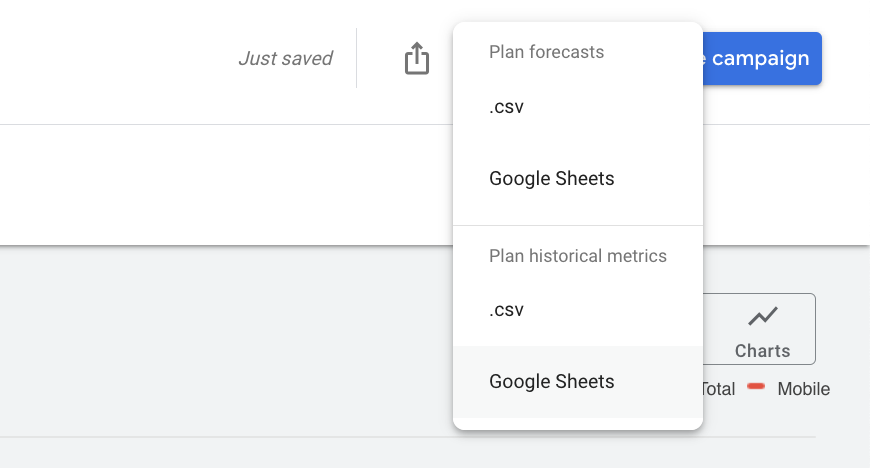
A very long list may need splitting into several uploads; if so, repeat the steps for each part.
Finally, merge the keywords from the three methods above and remove duplicates. You now have your keywords and their search volumes.
How to Check Keyword Competition
SEO tools have their own measure of keyword competition, usually called keyword difficulty. As a rule, the harder a keyword is, the more it tends to matter to the businesses competing for it.
For a short list, Ahrefs’ free Keyword Difficulty Checker will do. For a long list, you probably already have a paid SEO tool, like those below, that can do it for you.
SEO Tools for Keyword Research
Plenty of SEO tools can help with keyword research, and the most useful ones for the research itself are free, so there is no need to buy one just for this. Once you work on SEO more actively, though, you will want to track your rankings, and then one of the paid tools below is worth having. If you work with an SEO agency such as Sunbird, the agency takes care of that for you.
Free Keyword Research Tools
Answer the Public – a long-standing favourite of ours. It gives you a broad overview of the questions people ask around your keywords.
Ubersuggest – Neil Patel’s tool, with a broad overview of keyword volumes and difficulty.
Keywordtool.io – suggests related and long-tail keywords from the ones you already have, drawn from Google’s and YouTube’s autocomplete among others. Useful for inspiration and for checking you have not missed anything, and the YouTube suggestions help if your buyers research by video.
Search Console is free too, and Google Analytics shows organic search queries once you link it to Search Console. Both only show searches where you already appear, though, so you probably know those keywords already.
Paid Keyword Research Tools
Semrush – a good choice if you want one tool that covers more than SEO.
SE Ranking – built mainly for SEO.
Mangools KWFinder – smaller than the two above, but good at finding keywords.
How to Use AI for Keyword Research
This could be an article in its own right, but here are the prompts we find most useful for widening keyword research. We mainly use AI to surface ideas we would not have come up with ourselves.
Prompt 1: Get Keyword Ideas for a Topic
Prompt: “Generate keyword suggestions around the topic ‘running shoes’.”
This is often one of the first things we do, especially in a field we do not know well. Then put the suggestions into Keyword Planner to get related keywords and their search volumes.
Prompt 2: Find Long-Tail Keywords
Prompt: “Suggest long-tail keywords for ‘yellow running shoes’.”
We use this for ideas. You get no search volumes, but the keywords it suggests can be worth checking in Keyword Planner.
A live Google Ads campaign tells you more about long-tail searches. Search Console leaves out rare queries to protect searchers’ privacy, while the search terms report in Google Ads lists many of the searches your ads appeared for (it also hides terms with too little search activity). Between them, they show you what to write about to pick up more long-tail searches.
Prompt 3: Find Keywords You Have Missed
Finally, paste in all your keywords and ask ChatGPT whether you have missed any.
Prompt: “Are we missing any keywords about running shoes in the list below?”
[Paste your list into ChatGPT]
Prompt: “For the topic ‘[topic]’, suggest 3 keywords for each of the personas involved.”
You get a short list of keywords for each persona. For running shoes, ChatGPT suggested personas such as beginners, professional runners, budget-conscious runners, environmentally minded runners and runners with injuries.
Once the research is finished, a popular extra step (strictly outside keyword research) is to ask ChatGPT to add a persona and a search intent to each keyword.
Prompt: “For the keywords in the list below, add persona and search intent:”
[List]
You get a table with three columns: keyword, persona and search intent. For “trail running shoes”, for instance, ChatGPT gave the persona “adventurous trail runners” and the intent “informational and buying interest”.
Why Long-Tail Keywords Often Show No Search Volume
Optimising for Google still revolves around keywords, but do not fixate on the keywords themselves. Think in topics.
A long-tail keyword might be “yellow men’s running shoes for road running”. Keywords like that usually show no search volume because they are so specific. But if you sell exactly that and the searcher lands on your website, the close rate is usually higher than for a broader keyword.
A zero in the tool does not mean nobody searches. It means the volume is too small or too scattered to measure. In B2B especially, this is often where the business is: specific questions your customers put to your sales team that no tool shows. Strike them out because the volume is zero and you are probably striking out your best leads.
Added up, long-tail searches bring in potential customers who are close to buying, and the competition for them is lighter. There is more on this in our guide to long-tail keywords.
If we were writing a product or category page for those shoes, we would want to include:
- All the colours
- Every size, written out
- All the suitable surfaces and terrain
- Who the shoe is for
Use keyword research to find topics worth covering, but do not settle for a longer version of what already exists. Broader is not enough: you have to add something new (more on information gain below).
Use Google’s Related Searches
An old trick still works: run a Google search and look at the “Related searches” at the bottom of the results page. It gives you ideas for new keywords and for long-tail variants.
How to Find Keywords by Analysing Competitors
Do not skip the competitor analysis. As well as putting their URLs into Keyword Planner, you can check by hand.
The quickest way to get a picture is their XML sitemap. You will usually find it at /sitemap.xml on their domain, for example competitor.co.uk/sitemap.xml.
Look at their navigation and the words they use on their main pages, too. Those keywords usually matter to them.
The point is to understand which keywords your competitors prioritise. If they have an active SEO plan, an experienced eye can read most of their strategy from it.
Build Topic Clusters Instead of Chasing Single Keywords
The companies that win in search tend to build topical authority through interlinked content clusters (several pages covering different aspects of the same broad topic) instead of chasing scattered individual keywords. The whole website is then seen as an expert in the field, not just one page.
Say you sell building materials. Ranking for “decking boards” is not enough. You also want to cover “how to build decking”, “decking handrails”, “how to treat decking” and so on, and link the pages together into one coherent resource.
That holds up better against algorithm updates and AI summaries than optimising individual landing pages. So when you analyse competitors, look beyond the individual keywords they rank for and see how their pages link together into topic clusters.
Information Gain: How to Write Content AI Cannot Copy
Information gain is what your content adds beyond what is already indexed. Writing a longer or “better” version of a competitor’s article is no longer enough. You risk becoming raw material for AI rather than a page people choose to visit.
To give your content value of its own, build in four kinds of information gain:
- Proprietary data: your own figures from your customers, campaigns or processes. Nobody else can copy them.
- Contrarian perspectives: challenge what the industry takes for granted, where you have grounds to.
- First-hand accounts: concrete experience from your own work, not opinions gathered from other people’s blogs.
- Original visual data: your own charts, comparison tables and illustrations, which AI cannot invent.
In keyword research, you apply this by asking one question of every priority keyword: “What can we say about this topic that nobody else can?” If the answer is “nothing”, the keyword is probably not worth pursuing yet.
If you say you are experts in a field, your keyword research should lead to content that proves it, in the same way that what you promise in an ad should be on the landing page. That is how you protect your SEO against AI summaries.
How Entities Change Keyword Research
Modern keyword research is about entities as well as strings of characters: the things and concepts in Google’s Knowledge Graph. An entity can be a person, a place, a product category or a concept such as “building decking”.
The difference in practice:
| Traditional keyword research | Entity-based keyword research |
|---|---|
| "Which exact keywords do people search for?" | "Which concepts and relationships do we cover?" |
| Optimises for matching words | Optimises for covering the topic |
| Vulnerable to synonyms and rephrasing | Holds up when AI rephrases the text |
| Rankings per keyword | Topical authority |
Once you have listed your priority keywords, go one step further and ask: “Which entities, questions and subtopics belong to this subject?” That is where you find the gaps your competitors have missed, and where you build a website that AI treats as an authority on the topic.
How to Choose Which Keywords to Target
Which keywords come first depends on the business value behind them, and on whether you are choosing for SEO or for Google Ads.
Not All Search Volume Is Worth the Same
It is tempting to put the high-volume keywords first. But not every service or product is worth the same to you, and a high-volume keyword can just as easily come with stiff competition, weak buying intent and a low order value. So rather than comparing raw volumes, give each keyword a value with this calculation:
Value = search volume × expected order value × close rate × margin × factor
- Search volume – from Google Keyword Planner
- Expected order value – where there are clear differences between keywords
- Close rate – where you can tell keywords apart
- Margin – as a percentage
- Factor – anything else that makes a keyword more attractive, such as less admin. If you sell to homeowners, for example, an area full of large detached houses might earn a higher factor
As an illustration: a keyword with 320 searches a month, a £10,000 order value, a 2 per cent close rate and a 30 per cent margin scores 19,200, while one with 590 searches, a £500 order value, a 4 per cent close rate and the same margin scores 3,540.
Multiplying the factors gives a much clearer picture of what each keyword means for sales. The figures do not need to be exact; a rough estimate is better than none.
Use Cost per Click to Gauge What a Keyword Is Worth
Another way to judge value is to look at the estimated cost-per-click (CPC) bids in Google Ads. Because ads are sold at auction, advertisers bid more on the keywords that matter to them, so a higher cost per click usually points to a more valuable keyword.
- Log in to Google Ads
- Open the “Tools” menu, choose “Keyword Planner”, then “Get search volume and forecasts”
- Paste in all the keywords
As well as helping you prioritise, this gives you a sense of what your SEO could be worth. Advertisers will not bid more than a click is worth to them, so adding up the estimated cost of the traffic gives you a rough idea of its value.
If you want help weighing high volume against keywords close to a purchase, that is where our SEO services start.
How to Choose Keywords for Each Channel
SEO and Google Ads call for different keyword choices.
How to Choose Keywords for Google Ads
Google Ads used to be largely about SKAGs (single keyword ad groups), with one ad group per keyword. Today it works better to group several keywords on the same topic in one ad group.
So you do not need to know every keyword, its search volume and its competition. Your keyword research gives you a good picture of the potential and of the topics you can build ad groups around.
The other big difference from SEO is that you pay for every click. Every keyword you add takes budget from another.
How to Choose Keywords for SEO
SEO has no direct trade-off of that kind: saying yes to one keyword does not take budget from another. You can only work on so many pages at once, though, so it becomes a question of priority and pace. Include more keywords than you would in Google Ads, but put them in a clear order: it is better to rank well for a few keywords with decent volume and strong buying intent than to rank poorly for many.
New websites that struggle to rank should steer clear of the most competitive keywords at first. Create the important pages anyway, but lower your expectations, and start with the slightly easier keywords. Once those are ranking, go back to the pages that face tougher competition.
Remove Keyword Variants Before You Start Tracking
Once you have found all your keywords and are about to start tracking them, remove the variants. It keeps the list short enough to work with and stops you over-reporting: rank tracking tools give you data on both variants even when they are effectively the same keyword.
Stop words: a stop word is, put simply, a word that does not change the meaning, such as “in”, “for” and “to”. If you have both “service in town” and “service town”, keep only one. The two do not always rank identically, but they are close enough that keeping one simplifies the analysis.
Reversed order: you do not need to track both “service town” and “town service”.
Plurals: if a keyword exists in both the plural and the singular, keep the variant that fits best, not both. If you want to be thorough, spot-check whether the rankings differ much between the two. If they do, it may be worth tracking both, but only for your most important keywords.
Watch for New Trends
New keywords do not get reliable search volumes straight away, so you cannot know in advance which ones will take off or how big they will get. If it is not obvious, write the best page you can and review the keywords once they have settled.
When a new service or product comes out, it usually pays to be first. It can lead Google to see you as a source of up-to-date information; read more in our guide to E-E-A-T for SEO.
Keyword Research FAQs
How Often Should You Update Your Keyword Research?
Keyword research is not a one-off job. Search intent shifts, Google adds AI Overviews to new searches and your competitors publish new content. Review your most important clusters whenever you plan new content, and check the search results again before you rewrite a page that has lost rankings.
How Many Keywords Should One Page Rank For?
A page should own a topic, not a single phrase (or, more precisely, one search intent). A page that ranks well for its primary keyword usually ranks for many closely related variants at the same time. Split similar keywords across several pages and they compete with each other, which is known as keyword cannibalisation, and usually none of them rises.
Should You Use Misspellings to Catch More Searches?
No. Plenty of people search with typos, missing hyphens or words run together, not least on mobile. But Google understands that “ecommerce” and “e-commerce” mean the same thing, and it connects forms such as “hire” and “hiring”. Write correct English. Headings with deliberate errors make a page look careless, and careful writing supports the trust that Google describes as E-E-A-T.
Can You Do Keyword Research with ChatGPT Alone?
Not all of it. ChatGPT is good for ideas, for finding long-tail keywords and for spotting keywords you have missed. But it gives no search volumes you can rely on, and it cannot see what Google’s results look like right now. Use AI to widen the list and the tools above to check it.
What Are the Most Common Keyword Research Mistakes?
The most common mistakes are:
- Choosing keywords on volume without checking buying intent.
- Creating a new page for every variant of the same keyword.
- Counting keyword density as a percentage, a habit from the days when Google matched words rather than topics.
- Treating the research as a document that is finished once it is written.
Should You Do Keyword Research Yourself or Get Help?
Keyword research is the foundation of your SEO, and it is never finished. Anyone can list keywords. What decides whether the research pays off is choosing the few that lead to business and mapping them to the right pages.
You can do it yourself with the steps above. Keyword research is part of every SEO package we offer: book a meeting with Nils and we will turn it into a plan for more leads. If you would like to see where you stand first, start with a free search audit.