
WordPress SEO: how to optimise your website for Google
A WordPress site does not rank well just because it runs on WordPress. It comes down to configuration: plugins, performance, structure and what core handles.

WordPress SEO is the work of configuring, technically optimising and structuring a WordPress website so that it is visible in Google and turns visitors into customers. The platform does not come search-optimised out of the box: your visibility depends on how you set up the technology, the server and the content structure. Configured properly, WordPress is one of the most flexible systems there is for ranking well.
The short version:
- A WordPress site does not rank well just because it is built on WordPress. It all comes down to configuration.
- SEO plugins such as Yoast and Rank Math are admin interfaces, not a shortcut to better rankings.
- Performance is measured in the visitor’s browser. Aim for an INP of 200 ms or less, and caching will not get you there.
- Set tags and auto-generated archives to noindex so they do not waste crawl budget.
- Modern WordPress core handles a lot by itself: the sitemap, AVIF images and preloading of the next page.
Is WordPress a good CMS for SEO?
First things first. Is WordPress good for SEO? Yes.
WordPress handles a lot of your SEO automatically and gives you a great deal of flexibility. The flexibility is what matters most to us: if you want to win and rank at the top, the website must not hold you back.
That said, it is usually a little more technical than other CMSs. You either handle that side yourself or bring in help. We have worked in search for 14 years, and if you want an outside view of where your WordPress site stands, a free search audit is a good place to start.
WordPress SEO plugins
An SEO plugin for WordPress is an admin interface that lets you control meta tags, canonical URLs, indexing and XML sitemaps without writing code. It does not improve your rankings by itself; it makes SEO work in WordPress practical to manage. There are two we use in our projects:
- Yoast: In short, we recommend Yoast if ease of use matters most to you.
- Rank Math: If you are a more advanced user and run WooCommerce, we recommend Rank Math.
In our experience, many people put too much weight on the score an SEO plugin gives them. As a rule, it does not matter much. Use plugins to cover things a developer would otherwise have had to build.
One thing to keep in mind: every plugin you install is both a performance risk and a security risk. In Patchstack’s report on 2025, 91 per cent of the new vulnerabilities found in the WordPress ecosystem were in plugins and 9 per cent in themes, while core accounted for only six vulnerabilities. At the same time, many websites carry a heavy page builder and a dozen marketing scripts, which hurts both performance and security.
A good rule of thumb is no more than 12–15 well-built plugins on a typical website. If a function can be handled with a few lines of code instead of a whole plugin, do that. Fewer plugins mean fewer security holes and a faster website, and both have a direct bearing on how you rank.
Some of the things you can do with an SEO plugin in WordPress:
- Meta titles and meta descriptions
- Optimise basic on-page SEO factors in the text
- 301 redirects
- Link counter (not always accurate)
- Structured data
- Track 404 errors
- WooCommerce optimisation (a separate add-on for Yoast)
- Local SEO
- Technical audit
- Verify your site with Google and other search engines
There are also some more advanced features that depend on the situation.
Page titles and meta descriptions
Page titles and meta descriptions are essential for SEO. In WordPress, the easiest way to set them is with an SEO plugin such as Rank Math or Yoast.
Once you have installed one of these plugins, open the category, page, post, product or similar item you want to edit.
If you leave the fields empty, they are filled in automatically. Usually that means the page title is the same as the page name.
On a large website or online shop you sometimes need to manage the automatic page titles. In Rank Math you do this under Rank Math SEO → Titles & Meta, then scroll down to the post types section (Posts, Pages, Products and so on). The list varies between WordPress installations.
To write a good page title for SEO, follow a pattern along these lines: Keyword USP – Brand.
A page title should be no longer than about 60 characters. Strictly speaking, what counts is the width in pixels, and your SEO plugin can help you with that. Sixty letter i’s and sixty letter m’s take up very different amounts of space, so the character count is only an estimate.
The meta description matters less for SEO. It helps to include the keyword in some form, because Google highlights matching words in bold and that catches the eye.
Loading speed and WordPress SEO
Speed in WordPress today is about how quickly the page responds when a visitor clicks, not only how quickly it renders. Google measures this through Core Web Vitals, where Interaction to Next Paint (INP) is the measure of responsiveness. To get a fast WordPress website, look first at how the site is built. Once the foundations are in place, they are time-consuming to change. Ready-made themes, for example, tend to be slower than bespoke ones, and not every ready-made theme can reach top scores for loading time and Google PageSpeed.
This is the trap many people fall into: a caching plugin such as WP Rocket or W3 Total Cache makes the server deliver ready-made HTML faster, but it does not fix INP. INP is measured in the visitor’s browser and depends on how much JavaScript has to run when someone clicks a menu, a filter or a button. Aim for an INP of 200 ms or less, and you get there by clearing out heavy scripts, not by caching more HTML.
WordPress core has also gained tools that used to require separate plugins:
- Native AVIF support (since WordPress 6.5): upload images in AVIF and you get better compression than WebP at the same quality, provided your server’s image library supports the format. Smaller files mean a faster LCP.
- Speculative loading (since WordPress 6.8): using the browser’s Speculation Rules API, core prefetches the next page as the visitor starts to click a link, so it opens almost at once. With good caching in place, you can make it start earlier, on hover, with the Speculative Loading plugin.
A fast website that responds straight away to clicks keeps visitors longer and converts better. Slow interactions lose you customers.
If your website is already built and you want to improve it, start with these steps:
- Remove plugins you do not need
- Optimise images to AVIF or WebP
- WP Rocket or W3 Total Cache for caching
- A CDN if you operate in several countries
Beyond that, you need a skilled WordPress developer to get the highest scores.
The WordPress REST API: let AI do the groundwork in your SEO
The WordPress REST API lets an AI assistant carry out repetitive SEO work directly on the website: bulk-updating page titles and meta descriptions, finding and fixing broken internal links, and tidying up anchor text across hundreds of pages. Work that used to take someone several days of copying and pasting can be done in a morning.
This is the kind of work that otherwise never gets done, because it is tedious and slow. With the right set-up you can:
- Bulk-update titles and meta descriptions across hundreds of pages from a shared template.
- Go through the whole website, find internal links that point to the wrong place, and fix both the link and the anchor text.
- Comb through old posts that have lost rankings over time and update them.
Important: the AI does the groundwork, but a person always reviews and approves the changes before anything is published. That is where SEO judgement comes in: which title sells, which anchor text fits, whether a change is sensible. The AI sets the pace; the person behind it makes the call.
If you already have a large website, this may be the biggest gain from modern SEO in WordPress: technical issues that would otherwise be left to fester can be cleared in a fraction of the time, which frees up hours for the work that needs a person.
SEO-friendly URLs in WordPress
The best URL for SEO includes the keyword, for example example.co.uk/important-keyword/. Ideally the keyword sits as close to the root of the domain as possible.
In WordPress, go to Settings → Permalinks and choose Post name (/%postname%/).
Be very careful with this setting, though. If your website is not new and already has an established URL structure, get an expert to assess first whether you should change your URLs at all, and if so, what to change them to.
With or without www
www.example.co.uk is a subdomain of example.co.uk, so the two are not exactly the same website.
If you have already chosen one, stick with it.
If you have not chosen yet and are completely new to Google, go without www.
Always make sure that visiting one version takes you to the other with a 301 redirect.
Structured data for WordPress
Structured data, or schema markup, has become a big focus in technical SEO. Partly because it makes clear who is behind the content, which ties in with E-E-A-T, and partly because of Google’s zero-click results (where users get their answer directly in Google and do not need to click through).
You can work with structured data in either Rank Math or Yoast. The structured data we recommend:
- Person
- Organization
- author (who wrote the content)
- citation (the sources the content cites)
Tip: When you create posts in WordPress, always publish them under the right author. It is not unusual to have a generic “Admin” user who ends up as the author of every post.
Google values transparency, especially now that so much content is AI-generated. Who is behind the post? Show it.
XML sitemap
A sitemap is a quick way to get more of your pages indexed by Google. This too can be handled with a WordPress SEO plugin, either Yoast or Rank Math.
You can check whether you have a sitemap by going to yourdomain.co.uk/sitemap.xml (you are usually redirected to the right address).
Four tips for optimising your sitemap
- WordPress tends to generate thin or completely empty pages through post types. Make sure these are not in your sitemap.
- Remove pages you do not want indexed, such as the thank-you pages used for your conversion tracking.
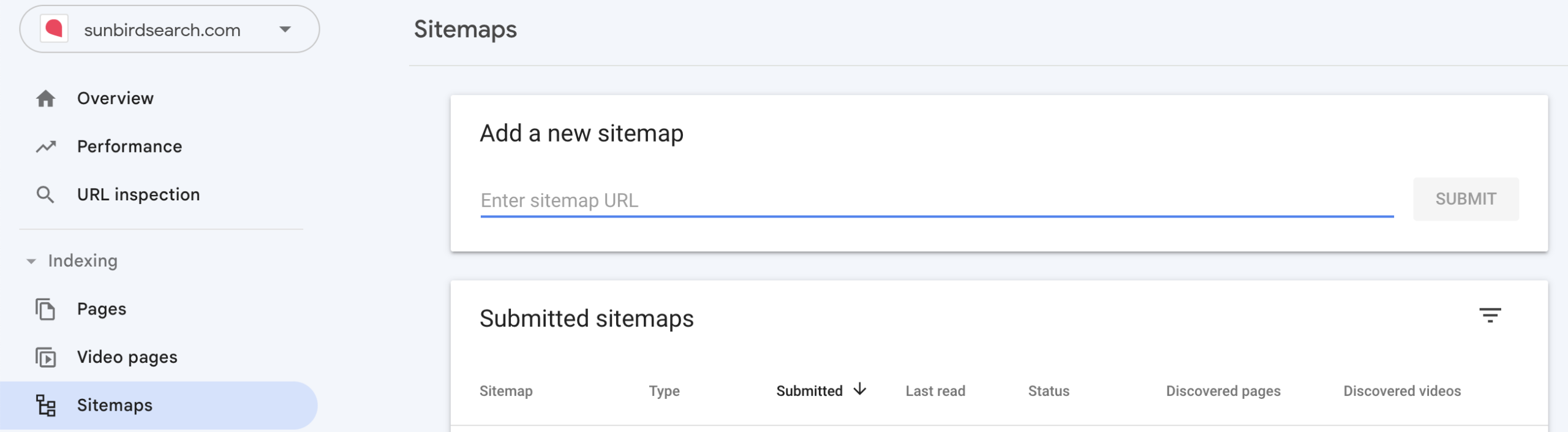
- Submit your sitemap in Search Console. Remember that it needs to be in .xml format.
- Check that your sitemap is listed in your robots.txt file. Since WordPress 5.5 (August 2020), core adds that line automatically through WP_Sitemaps::add_robots(), unless a plugin has switched it off. If you run an SEO plugin that takes over sitemap handling, it is worth double-checking that the line still points to the right place.
404 errors
Rank Math has a built-in 404 monitor that makes it easy to keep an eye on 404 errors. Yoast has no 404 log of its own; there you can use the Pages report in Search Console or a plugin such as Redirection, which logs 404 errors. Either way, it is a handy way to find:
- URLs you changed without adding a 301 redirect
- Old external links that still send you traffic but now land on a 404 page
- Mistakes in your internal links
This matters most around a launch; see our SEO checklist for a new website.
301 redirects
You should add a redirect whenever a URL changes. The easiest way is with Rank Math, or with Yoast Premium (the redirect manager is not in the free version of Yoast).
Point the old URL (which will no longer exist) to the new one.
Use 301 if the page has moved permanently, and 302 or 307 if the move is temporary.
Typical cases are a product that is no longer sold or a job vacancy that has been filled.
Mobile optimisation
Google indexes the mobile version of your website first, so review your SEO on mobile. Even though mobile brings in more traffic than desktop for many companies, it is still often not a priority.
A common mistake is leaving out important content on mobile that is there on desktop.
Another common mistake is optimising the links in the navigation for desktop while the mobile menu looks completely different.
It is also common to check loading speed on desktop but not on mobile.
Categories and tags in WordPress
Categories and tags are a slightly more advanced part of WordPress SEO.
Categories are a broader division, while tags are narrower.
On a website about shoes, categories could be running shoes or formal shoes.
A tag for running shoes could be “Beginners”.
Many websites use only categories, and that is usually enough. If you have a lot of content, a sensible structure of categories and tags makes it easier for both users and Google to understand it.
A tip that saves many WordPress websites: set tags to noindex in your SEO plugin (Rank Math or Yoast), or switch them off altogether. Tags usually create large numbers of thin, overlapping archive pages with no unique content. If you let them be indexed, you can suddenly have hundreds or thousands of pages wasting Google’s crawl budget and competing with your real pages. Keep categories few (a rule of thumb is five to ten that form clear main topics), so that authority is concentrated where it does the most good.
Canonical URLs
WordPress usually handles canonical URLs automatically, so there is nothing you need to set up for this in WordPress.
Images and WordPress SEO
WordPress lets you add alt text to images, which is good for your SEO.
Alt text is there to describe the image, so do not just stuff the keyword in.
In WordPress, the alt text you set in the media library is a default that is copied in when you insert the image. In the block editor, each Image block keeps its own alt text, so you can describe the same image differently in different places, and changing the alt text in the media library later does not update images already placed in posts.
If you want the same alt text everywhere, set it in the media library before you insert the image.
WordPress themes and SEO
If SEO is an important channel for you, we do not recommend ready-made WordPress themes.
Only one website can come first, and the limits of a ready-made theme are a real disadvantage.
We will not go into the differences between Elementor, Divi and similar themes and page builders here.
These are the drawbacks we see in ready-made themes:
- Usually slow loading times
- Often generic design
- Weaknesses on mobile
- Generally weaker technical SEO overall
The biggest obstacle by far is the second point: the design ends up generic.
There are certainly cases where a ready-made WordPress theme is the right choice. But our SEO recommendation is to avoid one.
WPML and SEO
WPML (WordPress Multilingual) is a plugin for running a WordPress website in several languages. It handles a lot automatically. Here we go through the most important points.
Choosing a URL structure for WPML
WPML lets you put each language on a separate domain (example.co.uk and example.de), on subdomains (uk. and de.) or in subdirectories (/en/ and /de/). We usually prefer subdirectories, but there are sometimes reasons to choose one of the others.
Hreflang with WPML
To make things easier for Google, you should specify which language and market each page is for. WPML adds these hreflang tags automatically.
XML sitemaps with WPML
If you have installed WPML together with one of the SEO plugins we recommend, all your languages are covered by the sitemap. With languages in subdirectories you usually get one sitemap index that lists every language, and with a separate domain per language each domain has its own sitemap. Add every sitemap you have to Google Search Console.
Common WordPress SEO mistakes
Having analysed many WordPress websites, these are the most common mistakes to avoid in your WordPress SEO.
Watch your post types and URL structure
When it is time for a new WordPress website, it is common for the WordPress developer not to think about SEO. The whole structure can then change at its core through new post types. A post type could be services, jobs or similar. Services and jobs then get the URL structure:
- .co.uk/services/service-1/
- .co.uk/jobs/job-1/
If your previous website had URLs such as .co.uk/service-1/, you will now be forced to change the URL of every one of those pages, which can put your organic traffic at risk.
Auto-generated pages in WordPress
One of the first things I look at when I do a technical SEO audit of a WordPress website is the XML sitemap. It is the rule rather than the exception to find auto-generated content that creates thin pages.
You can remove entire post types, or individual pages that add nothing.
The modified date updates every time you save
Your XML sitemap shows when each page was last modified.
That date updates as soon as you click “Update”, however small the change. Google’s sitemap documentation says the date should reflect the last significant update to the page.
We therefore recommend a plugin called “WP Last Modified Info”, which has a “Lock modified date” option so the date stays unchanged when you have only made a minor edit.
“My WordPress website isn’t being indexed by Google”
First of all, there is a big difference between not being indexed at all and being indexed poorly. The quickest check is to search Google for “site:yourcompany.co.uk”.
If your WordPress website is not indexed at all, there is one thing you should always check first: go to Settings → Reading and find “Search engine visibility”. The box “Discourage search engines from indexing this site” must not be ticked.
If you are only indexed poorly, try verifying your site in Search Console and submitting your XML sitemap.
If that still does not help, a technical review usually finds the cause, and our free search audit is a good place to start.
Good luck with your WordPress SEO!
Frequently asked questions about WordPress SEO
Can you do SEO yourself in WordPress?
Yes, you can do the basics yourself in WordPress. With an SEO plugin such as Yoast or Rank Math you can set titles, meta descriptions, the sitemap and 301 redirects without writing code. The technical side (performance, URL structure and silo architecture) often needs a developer or an agency to get right, though, especially if SEO is an important channel for you.
Which SEO plugin is best for WordPress?
Yoast and Rank Math are the two we recommend. Yoast is the easiest to get started with and suits most websites. Rank Math has more advanced features and works well with WooCommerce. Neither improves your rankings by itself; they simply make SEO work practical to manage.
Do I need a plugin to make WordPress search-engine friendly?
You do not need a plugin, but it makes life easier. WordPress core already handles the sitemap, canonical URLs and some performance features automatically: the WP_Sitemaps class has been in core since version 5.5 and also adds the sitemap to robots.txt. An SEO plugin, on the other hand, gives you one interface for titles, meta descriptions, indexing and redirects, which would otherwise require code.
Is WordPress outdated in 2026?
No. WordPress still powers a large share of all websites, and core has gained modern performance features such as native AVIF support and speculative loading. The question is not whether WordPress is modern, but whether your particular installation is configured properly.
If you would like help with your WordPress SEO, get in touch. See how we work as an SEO agency, or start with a free search audit of your website.