
Technical SEO: A Complete Guide and Checklist
Technical SEO makes sure Google can crawl, index and understand your website. What to fix first, and a checklist to work through on your own site.

Technical SEO is the work of building and maintaining a website so that search engines can crawl, render, understand and index it without getting stuck. Get it right and your content and links have something to stand on, which shows in rankings, traffic and enquiries. Get it wrong and the quality of your content hardly matters, because Google may never see it.
This guide covers:
- What technical SEO is and how it affects enquiries and sales
- How to decide which fixes come first
- How Google crawls, renders and indexes your website
- Practical advice on indexing, Core Web Vitals, structured data and AI search
Further down is a checklist to work through on your own site, and the rest of the guide explains each point on it.
Five Technical SEO Fixes to Start With
If you only have time for five things, make them these:
- Make sure your website can be indexed – if Google cannot index a page, it cannot rank. Check robots.txt and the Page indexing report in Search Console.
- Get your Core Web Vitals into the green – loading (LCP), responsiveness (INP) and visual stability (CLS) are used by Google’s ranking systems. Make sure the site works properly on mobile too, because the mobile version is the one Google indexes.
- Add structured data – it helps Google understand your content and keeps you eligible for rich results.
- Build a logical internal linking structure – your most important pages need the most internal links, with descriptive anchor text.
- Clean up duplicate and thin content – duplicates split your signals across several URLs, and thin pages add nothing for the reader.
The rest of this guide takes each area in turn.
What Is Technical SEO?
Technical SEO is the part of search engine optimisation that makes it easy for search engines to crawl, render, understand and index your website. Content and links decide what you say and who vouches for you. Technical SEO is the foundation underneath: it decides whether Google can read your pages at all, and whether it can trust what it finds.
The main areas, each covered below, are:
- Crawling and indexing: robots.txt, XML sitemaps and JavaScript rendering
- Site structure and internal links
- Duplicate and thin content
- Page speed and Core Web Vitals
- Mobile and HTTPS
- Structured data
Technical SEO Checklist
Work through this list on your own website and tick off each point as you go. Every item is explained further down the guide.
Crawling and indexing
- robots.txt does not block Googlebot or any page you want to rank
- Your important pages are indexed (check the Page indexing report in Search Console)
- No important page carries a stray noindex tag
- The XML sitemap lists only pages you want indexed and is submitted in Search Console
- Body text, H1s and internal links are in the HTML the server sends, not added later by JavaScript
Site structure and links
- Your most important pages get the most internal links, with descriptive anchor text
- No page you want to rank is an orphan
- Every important page has a unique page title and a single H1
- No broken internal links, and links point straight to the final URL rather than through redirect chains
- The navigation on mobile contains the same important links as on desktop
- URLs are short, readable and stable, and any changed URL has a 301 redirect
Duplicate and thin content
- http, https, www and non-www all redirect to one version of the site
- Canonical tags, internal links and the sitemap all point to the same URL
- Parameter, filter and sort URLs are canonicalised or kept out of the crawl
- Paginated pages have self-referencing canonical tags
- Thin pages have been improved, merged, removed or set to noindex
Speed and page experience
- Core Web Vitals pass on field data: LCP within 2.5 seconds, INP under 200 milliseconds, CLS below 0.1
- Everything you want to rank for is visible on mobile
- Every page is served over HTTPS
- Tracking scripts and cookie banners do not hold up the first thing a visitor does
Structured data, images and languages
- Organization, Article and Product markup where relevant, with no errors in Search Console
- Images have alt text that describes them
- Hreflang is set up correctly if you have versions for other languages or countries
AI search
- Googlebot and search crawlers such as OAI-SearchBot are not blocked
- The Search generative AI setting in Search Console is set the way you intend
How to Prioritise Technical SEO Fixes
A checklist tells you what to look at, not where to start. We sort every fix by two questions: how much difference will it make to rankings, traffic and enquiries, and how much work is it?
The Four Impact and Effort Groups
High Impact, Low Effort (Start Here)
- Fix a robots.txt file that blocks Google
- Fix broken internal links
- Add missing H1s to important pages
- Add basic structured data (Organization, Article)
High Impact, High Effort (Schedule It)
- A full overhaul of page speed and Core Web Vitals
- Changing the URL structure of a large website
- Advanced structured data, such as Product markup across a large range
Low Impact, Low Effort (When You Have Time)
- Alt text on images that do not need to rank
- Tidying up less important category pages
The fourth group, low impact and high effort, is the one to leave alone. Reworking templates for gains that neither visitors nor search engines would notice usually belongs there.
Would you like a second opinion on what to fix first on your own site? Our free search audit shows which fixes will make the biggest difference.
Technical SEO vs On-Page SEO
Technical SEO is about whether Google can crawl and index your website; on-page SEO is about the content on each page and how visitors experience it. Both happen on your own website, so the line is not always clear-cut: page titles and headings, for example, come up in both.
Is Technical SEO Important?
Yes, but how much it matters depends on the website and the situation. Too many people chase perfect scores in SEO tools, when many of the points they lose make little difference to results. What matters is fixing the issues that stop Google crawling, indexing and understanding your pages, starting with the ones below.
Technical Issues You Should Always Fix
- The website cannot be indexed
- Errors in your canonical tags
- Missing H1s
- Missing or broken page titles
- Important pages with no internal links
As a rule, technical SEO matters more the larger the website. Many fixes improve the whole site at once, which counts for more when there are thousands of pages. The aim is to put your effort where it helps you rank.
Technical SEO for AI Search
Google’s AI Overviews and AI Mode, and other AI search services such as ChatGPT search, can only use what their crawlers can reach and read on your website. If you want your website used as a source in AI-generated answers, three things matter.
Structured Data for AI Search
Google says you do not need any special markup or structured data to appear in its AI features. Structured data is still worth doing as part of your SEO, because it keeps you eligible for rich results and makes the facts about your organisation, products and articles unambiguous. Concentrate on Organization, Product and Article markup.
Keep the HTML Structure Clean
A logical hierarchy of H1, H2 and H3 headings makes a page easier to follow for readers, for screen readers and for any system that pulls passages out of it. Google says the order of your headings matters little to its own systems, so this is about clarity rather than a ranking trick. Avoid building the structure with styling alone, such as bold text dressed up to look like a heading.
Crawlability and Speed Carry Over to AI Search
Google’s AI features draw on the same index as its ordinary results, so anything that holds back crawling and indexing also holds back your visibility in AI answers. A fast, stable server lets Google crawl more of your site without overloading it, and other AI services run their own crawlers that benefit in the same way.
If you want your website ready for both traditional and AI search, see how we approach AI search optimisation.
Why User Experience Matters
In the end, Google wants its users to be happy with the results they get. Google says its core ranking systems look to reward content that offers a good page experience (there is more in our article on user signals as a ranking factor). So technical SEO is more than a checklist: the aim is a better experience for the people who use your site.
Technical Factors Google Looks At
- Page speed
- How the site works on mobile
- Broken links
- Errors in the code, such as JavaScript that fails to run
Google does not only look at what you get wrong; its systems also look at whether people find a page useful. A website that is genuinely good to use can earn signals that help it rank.
If you would like the technical side of your SEO handled end to end, our SEO team can take it on.
Thin Pages
Thin pages are pages with little or no value to the reader. The name is slightly misleading, because it is about the value of the content, not the amount of it. A glossary entry or the answer to a simple question does not have to be a long post.
Why Thin Pages Are a Problem
- They dilute the site’s link equity
- In large numbers, they can affect how Google assesses the site as a whole
- On very large sites, they waste crawl budget
Thin pages are often generated automatically without anyone noticing, or simply left behind after a redesign. A technical SEO audit goes through every page. To find them, crawl the site with Screaming Frog, search Google for “site:yourdomain.co.uk” or work through your sitemap (usually at /sitemap.xml).
There is usually no need to 301 redirect a thin page, because it has no value to pass on. The exception is a page that other websites link to. If there is a thin page you want to keep, such as a thank-you page used for conversion tracking, set it to noindex.
Duplicate Content
Duplicate content means the same or almost the same text at more than one URL. It can arise for many reasons, and it is not always a problem.
Google shows only one of the versions in its results, and if you do not say which one is the original, it chooses for itself. Links and other signals are then split across several URLs, and on large websites the duplicates take crawling away from the pages that matter.
Unique, well-written content on each page also gives you more chances to be found for long-tail searches.
How to Find Duplicate Content
We use a few methods. Siteliner is a simple tool for a quick check. Alternatively, crawl the site in Screaming Frog and sort by word count: two pages with exactly the same number of words are worth comparing.
You can also search Google for a distinctive sentence from the page in quotation marks: any other URL that carries the same text, on your site or elsewhere, will show up.
Some duplication is there for good reasons, such as the same product description in two categories. Keep it where it serves the visitor, but tell Google which version to show with a canonical tag (more on those below); otherwise the wrong page may rank, and rankings can slip in ways that are hard to trace. If you are unsure, get in touch.
Orphan Pages
Orphan pages are pages that no other page on the site links to, and they usually rank poorly. If you want to keep a page without linking to it, consider a canonical tag pointing to a similar page (where that fits) or a noindex tag.
As with any page that does not matter for search, leave it out of your sitemap. Most WordPress SEO plugins do this automatically when you set a page to noindex.
Canonical Tags
A canonical tag tells Google which of several similar pages is the original. If two pages have duplicate content, you can add a canonical tag to page B that points to page A.
Both pages can still be visited. Unlike a redirect, a canonical tag does not send the visitor anywhere; it tells Google which page you want indexed and shown in the search results.
A canonical tag is a signal, not an instruction. If the canonical points to page A but your internal links and XML sitemap point to page B, Google will often choose B. Make sure the canonical, the internal links and the sitemap all point to the same URL, or Google may ignore the work you have done.
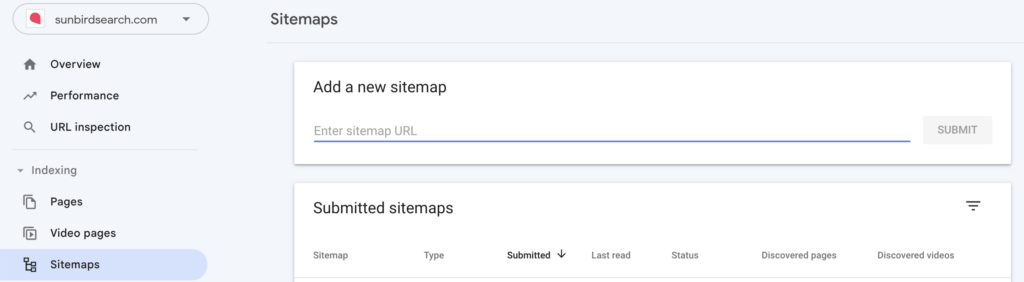
XML Sitemaps
A sitemap lists the URLs you want search engines to find. Google accepts several formats, including RSS feeds and plain text files, but XML is the usual choice and the one most tools produce. On WordPress, SEO plugins such as Yoast and Rank Math create the sitemap for you; our WordPress SEO guide covers the set-up. In a technical SEO audit we check that:
- Thin and noindexed pages are left out
- Every page, category and so on that you want found is included
Reference the sitemap in your robots.txt file and submit it in Search Console.
Internal Links
Internal links are a strong SEO signal, for three reasons:
- They pass link equity to the pages they point to
- The text around a link tells Google what the target page is about
- Anchor text is a strong signal in itself
In an audit we want to see that the most important pages get the most internal links, with relevant, varied anchor text in a sensible context, and that unnecessary links have been removed.
Placement matters too. In our experience, links higher up a page carry more weight than links further down.
If you know some SEO, you may have thought of adding nofollow to links that point at pages you do not want to rank. It does not work, and it can do more harm than good.
To find pages worth linking from, search Google for “site:yourdomain.co.uk” followed by your keyword. The pages that come up are the ones Google already sees as relevant, which makes them good places to link from to the page you want to rank.
Broken Links
In a technical SEO audit we always check for broken internal (and external) links. Siteliner, Screaming Frog and WordPress plugins will all find them.
Broken links make for a poor experience and send link equity to a page that does not exist (a 404). Correct every place the broken link appears rather than relying on a 301 redirect alone.
Navigation and Breadcrumbs
Your navigation, meaning menus, footer and breadcrumbs, is part of your internal linking and shows Google which pages you consider most important. Important pages belong in the main navigation and, ideally, in the footer.
Check mobile as well. The navigation sometimes differs because of how the site is built, and that matters more than it used to: Google indexes the mobile version of your site (more on that below), so a link that only exists in the desktop menu may never be seen.
Breadcrumbs are common on larger websites with many categories. They show the hierarchy and where on the site the visitor is.
Visitors often find them helpful, and they help Google understand the structure. They are also a neat way of adding relevant internal links with matching anchor text.
Google Search Console
Search Console is Google’s free tool for site owners, and we recommend every business uses it, especially for technical SEO.
Start with the Page indexing report, which shows which pages are indexed and why others are not. Under Experience you will find the Core Web Vitals and HTTPS reports, which draw on data from real visitors and from Google’s crawl. Go through them and fix the issues they flag.
Page Speed
Checking loading speed is a standard part of a technical audit. If the Core Web Vitals report in Search Console shows no data, which happens with new properties and with sites that have too few visitors, use Google’s free PageSpeed Insights instead.
GTmetrix and Pingdom are useful as well. These lab tools are good for troubleshooting a single page, but base your decisions on field data from real visitors (more on that under Core Web Vitals below). The advantage of Search Console is that it covers the whole site rather than one URL at a time, and it alerts you when a new problem appears.
If the field data shows warnings and red results, fixing loading speed is fairly urgent, because it can affect both rankings and how many visitors stay and buy. Check mobile in particular, which is often where the problems are. If you are building a new website, that is the moment to get the foundations right.
HTTPS and SSL Certificates
Almost every website now has an SSL certificate. It gives you https rather than http, and browsers show visitors that the connection is secure. Search Console’s HTTPS report shows whether any pages are still served over http.
Even when https works, make sure the http version redirects to it. It is quite common to find a certificate in place without https being enforced.
Mobile-First Indexing
Since July 2024, Google has crawled and indexed every site with its smartphone crawler, Googlebot Smartphone. If your content cannot be reached on a mobile device, it cannot be indexed, and Google only uses the content shown on the mobile version for indexing. Content, menus or structured data that exist only on desktop do not count. Google still uses its desktop crawler now and then for a few features, such as product listings and Google for Jobs, but the first thing to check is that everything you want to rank for is visible on mobile.
In a technical SEO audit we do not judge how good the mobile design looks. We look for concrete problems that tools and Search Console report.
Where to Find Mobile Issues
Search Console’s Mobile Usability report and Google’s Mobile-Friendly Test were retired on 1 December 2023, and Google now points to Lighthouse in Chrome instead. Run Lighthouse in mobile mode, use URL Inspection in Search Console to see the page as Googlebot Smartphone fetched it, and check the mobile view of the Core Web Vitals report.
Problems you find this way should go near the top of the list. Once you have fixed an issue that a Search Console report has flagged, open the issue and click “Validate fix”.
Core Web Vitals: LCP, INP and CLS
Core Web Vitals are three metrics Google uses to judge how fast and stable your website feels to real visitors: LCP (how quickly the largest piece of content loads), INP (how quickly the page responds to a click or tap) and CLS (how much the layout shifts around). Google’s targets are an LCP within 2.5 seconds, an INP under 200 milliseconds and a CLS below 0.1. Passing all three will not lift a weaker page above a more relevant one, but Google says page experience can make the difference when there are many relevant results to choose from.
On 12 March 2024, INP (Interaction to Next Paint) replaced the older FID metric. INP measures the full delay from a visitor’s tap until something changes on screen, across all interactions on the page, not just the first one.
The key point: Google uses field data from your actual visitors (what you see in Search Console), not one-off lab tests in tools such as Lighthouse. A green lab result on your own fast computer says little about how the page feels to a visitor on an average phone over 4G, so always look at the field data when you decide what to fix.
JavaScript Rendering and the Render Queue
How your website is built affects how quickly Google can read it. If the content arrives ready-made from the server (server-side rendering), Google can read and index it straight away. If the page is instead built in the browser with JavaScript (client-side rendering), Google has to render it first. Google says a page can wait in its render queue for a few seconds, but that it can take longer.
For a site that adds new products, services or prices often, any delay matters, because new pages cannot appear in search until they are indexed. If view-source on a page is almost empty and the content is loaded in afterwards, treat that as a warning sign. Google also points out that not every crawler can run JavaScript.
Make sure the essentials are in the raw HTML: body text, H1, image references and internal links should come straight from the server, not be fetched by scripts afterwards.
How Long JavaScript Tasks Hurt INP
Long JavaScript tasks are a common cause of sluggish interactivity. Any task that takes more than 50 milliseconds blocks the browser’s main thread, and the visitor’s click has to wait.
The fix is to break heavy scripts into smaller pieces so the browser can respond to the click first. Heavy tracking scripts and cookie consent banners are common culprits; load them so they do not block the first thing a visitor does on the page. The site feels faster, INP improves and visitors are less likely to give up and go back to Google.
Crawl Budget
Crawl budget is how much resource Google spends on crawling your website. It only becomes a real factor on large websites. Google’s own guidance is written for sites with a million or more unique pages whose content changes about once a week, or 10,000 or more pages whose content changes daily, and Google describes those figures as rough estimates. For smaller websites it is rarely worth spending time on.
How Crawling and Indexing Work
To carry out a technical audit, you need to understand how indexing works:
- Google does not index in real time
- If you rarely update your website, Google has little reason to visit it often
- Google is a business and does not want to spend more on computing power than it needs to. Its aim is good results for its own users, not keeping your site up to date in its index.
Changes can take a while to be picked up, and longer on pages Google rarely visits. There is more in our guide to crawl budget for SEO.
Google’s documentation also makes clear that how often it crawls you depends not only on what your server can handle but on demand. URLs that are more popular on the internet tend to be crawled more often, and Google recrawls pages often enough to pick up changes. A faster server lets Google crawl more without overloading it, but it does not create demand for pages nobody is interested in.
How to Optimise Crawl Budget
If your website is in that size range, these are the practical ways to make the most of its crawl budget:
1. Keep Crawlers Away From Low-Value URLs
Use robots.txt to stop Google spending time on admin pages, internal search results, filter URLs and other pages with no search value.
2. Fix Broken Links and Redirect Chains
Broken internal links send Google to dead ends, and Google says long redirect chains have a negative effect on crawling. A redirect chain looks like this: page A → page B → page C, and Google has to follow every step. Link straight to the final URL instead.
3. Remove or Consolidate Thin Pages
The more low-value pages Google finds, the more crawling goes to waste. Remove pages that have no value (a 404 or 410 status tells Google not to keep crawling them) or merge them into a stronger page. Noindex keeps a page out of the index, but it does not save crawl budget, because Google still has to fetch the page to see the tag. Clean up regularly.
4. Use Internal Links Strategically
Google discovers pages by following links, and in our experience pages with more internal links are crawled more often. Make sure your important pages get plenty of relevant internal links.
5. Keep Your XML Sitemap Clean
Remove pages that are noindexed, redirected or blocked in robots.txt from your sitemap. It should only contain pages you want Google to index.
If you run a large website and suspect a crawl budget problem, we can help you find and fix it. Get in touch and we will take a look.
Images and Alt Text
Alt text describes an image for people who cannot see it, and for search engines. In WordPress you add it in the image block’s settings in the right-hand sidebar, in the field labelled “Alternative text”.
Alt Text Dos and Don’ts
- Alt text is there to describe the image
- If you can describe the image and include the keyword naturally, so much the better
- Do not reuse the same alt text across many images
- Do not over-optimise
There is more in our full guide to image SEO.
Robots.txt
Robots.txt is one of the first things we check when a website has serious problems ranking, because it sometimes blocks Google completely.
What to Block, and What Never to Block
Robots.txt tells search engine crawlers which parts of your site they should not crawl. It is useful for:
- Admin pages and internal search results
- Filter and sort URLs that do not need to be crawled
Used this way, it helps Google spend its crawling on the pages that matter. Robots.txt controls crawling, not indexing: a blocked URL can still appear in Google if other pages link to it. A page that should stay out of the search results needs a noindex tag instead, and it must not be blocked in robots.txt, or Google will never see the tag. Do not use robots.txt to deal with duplicate content either; canonical tags are the tool for that.
You can also use it to block other crawlers, such as AI crawlers and various analysis tools.
AI crawlers need care. You can block crawlers that collect content to train AI models, such as OpenAI’s GPTBot, without affecting your Google rankings. Google-Extended does the same for Google’s Gemini models and does not affect Google Search, although it also decides whether your content is used to ground answers in the Gemini apps. Never block Googlebot or search crawlers such as OAI-SearchBot. Block Googlebot and you disappear from Google’s results and its AI Overviews; block OAI-SearchBot and you will not be shown in ChatGPT’s search answers.
Search Console also has a Search generative AI setting, under Settings, which decides whether your site’s content can appear in AI Overviews, AI Mode and the generative AI features in Discover. Including your site is the default, but it is worth checking that nobody has changed it. Protecting your content and being visible in search are two separate decisions.
URL Structure
Rules of Thumb for SEO-Friendly URLs
- Include the keyword in the URL, for example /technical-seo/
- Leave out filler words such as “for”, “to” and “on”
- Keep URLs short and readable rather than buried several folders deep
- Only change a URL when you have a good reason to
- If you do change a URL, set up a 301 redirect from the old URL to the new one
- A clear folder structure such as /blog/ or /careers/ makes reporting easier, for example /blog/technical-seo/
- You can deliberately place less important pages further from the root, such as job adverts that do not need organic traffic
In a technical SEO audit we look for anything that breaks these rules. We also check Google Analytics for visits to 404 pages, which shows whether URLs have been changed without a 301 redirect.
When a client plans a new website, we make sure the structure is logical and gives priority to the pages that matter for search.
www vs Non-www
Our technical audits quite often find a website that can be reached both with and without www. Technically, www is a subdomain, so the two are not quite the same website. Google usually works this out, but fixing it yourself removes the risk.
Redirect Every Variant to One Address
- http://example.co.uk
- http://www.example.co.uk
- https://www.example.co.uk
All of these should redirect, with a 301, to https://example.co.uk/ (or all to the www version, if that is the one you use).
URL Parameters
A URL parameter is anything that follows a “?” in a URL. Parameters are used for sorting, filtering, site search and tracking.
Tread carefully here if you are not sure what you are doing. It is one of the trickier areas, and mistakes can have a big impact.
Two Common Problems With Parameters
- Internal links point to the parameter URL instead of the clean one (for example to /?q=running-shoes rather than /running-shoes)
- Pages are generated automatically and cause keyword cannibalisation, thin content and duplicate content
Both confuse Google and spread your link equity thin. Fixing them often makes a noticeable difference to results.
Always link to the URL without the parameter. For automatically generated pages, use canonical tags: /running-shoes?colour=yellow, for example, should have a canonical URL pointing to /running-shoes.
Pagination
Pagination is how content is split across several pages, for example /page/3/ or ?page=3. Pagination often triggers warnings in Search Console and in SEO tools during a technical audit.
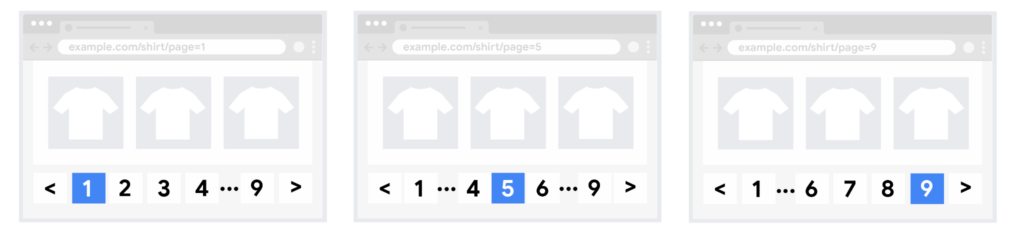
What matters most is that each page links clearly to the next and previous pages with ordinary HTML links, so Google can find the whole series. The advice has changed over the years, from rel prev/next to pointing everything at the first page; what applies now is clear linking between the pages. Each paginated page should have a self-referencing canonical tag. Never canonicalise the series to page 1, or the products on page 2 onwards may never be indexed.
Structured Data
Structured data is code that describes a page’s content to search engines in a standard, machine-readable format. It helps Google form an accurate picture of your business and make the right connections.
Most SEO plugins add the common types for you. For anything more, you need a developer, or some confidence with code yourself. Google recommends the JSON-LD format where your set-up allows it.
In a technical audit we check whether any structured data is invalid. The quickest place to look is the rich result reports in Search Console, and you can test individual pages with Google’s Rich Results Test.
Which Structured Data to Prioritise
- Authors
- Local business details
- Products
- Reviews (of products, for example; reviews a business marks up about itself on its own site are not eligible for review stars)
Some things have changed. Google stopped showing How-to rich results in 2023, and FAQ rich results, limited to well-known government and health websites since 2023, stopped appearing in Google Search on 7 May 2026. So do not put your effort there. Concentrate on Organization, Product and Article markup, which helps Google understand who you are and what you sell.
Markup that makes clear who wrote a page and who is behind the site also supports the signals described in our guide to E-E-A-T in SEO. Structured data can also make you eligible for rich results, which give you a larger, more informative listing in the search results.
Hreflang
If you have versions of a page in different languages or for different countries, define them with hreflang. It matters most when you have versions for several countries, including countries that share a language, such as separate UK and US pages, where Google might otherwise show the wrong one.
What Hreflang Tags Look Like
<link rel="alternate" hreflang="en-gb" href="https://example.co.uk/" />
<link rel="alternate" hreflang="en-us" href="https://example.com/" />
<link rel="alternate" hreflang="x-default" href="https://example.com/" />
Each version lists itself and all the others. The x-default value marks the page to show when no other version matches the visitor’s language or region.
Technical SEO Tools
The Tools We Use Most
Screaming Frog: canonical tags, hreflang, H1s, page titles, and internal and external links.
Search Console: indexing, Core Web Vitals field data, HTTPS and the structured data reports. PageSpeed Insights and the Rich Results Test sit alongside it.
Siteliner: broken links and duplicate content.
For WordPress specifically: Rank Math and Broken Link Checker.
If everything above is in order on your website, your technical SEO is in good shape.
Frequently Asked Questions About Technical SEO
What Are the Most Common Technical SEO Mistakes?
The most common mistakes are pages that cannot be indexed, incorrect canonical tags, broken internal links, missing H1s and content that is only loaded afterwards with JavaScript. Almost all of them can be found in a technical audit with Search Console and Screaming Frog.
When Should You Carry Out a Technical SEO Audit?
Carry out a technical audit when you build a new website, change platform, change your URL structure or see an unexplained drop in traffic. On larger websites it is worth reviewing the technical side at least once a year, because faults there affect many pages at once.
How Does Page Speed Affect Google Rankings?
Google’s ranking systems use Core Web Vitals, which measure loading, responsiveness and visual stability. What counts is field data from your real visitors, not lab scores. Relevance still comes first, but a faster site is also easier for visitors to use and buy from.
Which Tool Is Best for Technical SEO?
There is no single best tool. We mostly use Screaming Frog to crawl the website and Google Search Console for data on indexing, Core Web Vitals and structured data. Siteliner is useful for broken links and duplicate content.
Need Help With Your Technical SEO?
Technical SEO can feel like a lot to take on, especially without a developer on the team.
We help businesses with everything from a basic technical audit to work on AI search and Core Web Vitals, and we judge every fix by what it does for enquiries and sales. Sunbird is a search marketing agency working on SEO, AI search and paid search.
Book a free search audit. We will go through your website and show you what needs fixing, and in what order.