
Blog SEO: How to Write Posts That Rank
Search engines reward posts that answer the reader's question, not keyword stuffing. How to plan, write and update blog posts that rank.

This is how I write blog posts that rank: what to settle before you start, how to write for the reader and for search engines, and how to keep a post earning traffic once it is live. It covers traditional on-page SEO and the user signals that follow once people arrive.
Decide Whether You Are Writing for a Keyword or a Topic
Not every post you write for SEO needs to target a specific keyword.
If a post is written for a keyword, use that keyword in the meta title, the H1, the URL, the subheadings and the body text. That is traditional on-page SEO, and it starts with keyword research: knowing what your audience types and how often.
But a post does not have to be built around a keyword to bring in search traffic. In our experience, a good post also picks up visits from many longer, more specific searches that it never set out to target.
Mixing the two works well. Some posts can explore a subject your audience cares about, and others can be written to rank for a specific keyword.
Match the Search Intent, Not Just the Keyword
SEO used to revolve around individual keywords and keyword density. Today it is far more about the intent behind a search. To rank for a keyword, your page has to give searchers what they are actually looking for, and it does not necessarily have to repeat their exact words (although it usually will).
Search google.co.uk for “how to make carbonara” and the results are mostly recipes and cooking videos. Several of them, such as BBC Good Food’s “Easy spaghetti carbonara” and “Classic Carbonara Recipe” from an Italian cookery blog, do not use the words “how to make” at all. Google has understood that the searcher wants a recipe.
So to be visible for a keyword, you have to match the intent behind it.
Avoid writing one post per keyword. Many related keywords share the same intent, and they belong on the same page.
Get the Introduction Right
Much is decided in the first few lines of a post. Does the reader feel they have come to the right place, or do they go back to Google and pick another result?
That moment shapes how the post performs in search, and whether the reader goes on to do anything else on your website, such as subscribing to your newsletter.
My approach to an introduction is simple. Say what the post is about and what the reader will learn, keep it short, and give them a reason to read on. If you can answer their question straight away, do.
Our post on how long SEO takes is an example. It answers the question in the opening lines, then gives the reader a reason to keep going.
Give the Headline an Edge
The headline is part of the opening, and it is one of the few things almost everyone reads. Most of the rest gets skimmed, so use the headline to make a good first impression and to tell the reader exactly what they will get.
Does the Post Have a Clear Purpose?
People do not read a post because you wrote it. They read it because it meets a need: a gap in their knowledge, say, or a worked example with real figures.
There are already plenty of vague “5 tips for …” posts, and one more is unlikely to persuade either Google or your readers that you are an expert.
For every post, be clear about which need it meets. Answer it properly, and aim to be the most useful and relevant source on the subject.
Make the Post Easy to Skim
Most people skim on screen rather than read every word, and long paragraphs are hard to skim. Break the text up with:
- Checklists
- Short paragraphs
- Headings and subheadings
- Bold text for key points
- Images
- Quotes
- Links
Avoid Keyword Cannibalisation
Keyword cannibalisation is when more than one page on your website is trying to rank for the same keyword. There is not room to cover it in detail here, but our guide to keyword cannibalisation covers how to find and fix it.
Your blog posts should not compete with each other, or with the service pages you want to rank. When they do, rankings tend to suffer for all of the pages involved.
Link to Your Most Important Pages
An internal link is a link from one page to another on your own website. Our guide to internal links for SEO goes into more detail.
In a blog post, take every natural chance to link to your important pages. If you mention a subject you have covered in more depth elsewhere, link to that page.
You can stretch a point to fit in a link to a page you want to rank, but do not overdo it, or the post stops being relevant to the reader. Add the links that fit naturally first, then see whether there is a sensible place for one of your key service pages.
A Template for the Meta Title and Meta Description
Your meta title and meta description are what people usually see of your page in Google’s results. They do two jobs:
- The meta title helps the post rank for its keyword.
- Both set the reader’s expectations before they click.
Put the keyword in the meta title as an exact match, ideally near the start. Google cuts off long titles to fit the screen, so keep it short enough to show in full on a phone.
The meta description does not help rankings directly, and Google says it builds snippets primarily from the page content itself, using the meta description only when it might describe the page more accurately. Write one anyway: when Google uses it, it is your chance to persuade the searcher to choose your result.
This is the template we use for a blog post:
- Meta title: [Keyword]: [what the reader gets] | [Brand]
- Meta description: [The answer or promise in one sentence, with the keyword]. [What the post covers, or why it is worth the click].
And this is how it works for this post:
- Meta title: Blog SEO: How to Write Posts That Rank | Sunbird Search
- Meta description: Blog SEO starts with what the reader searched for. How to match intent, write the title and description, and update posts so they keep ranking.
Setting the right expectations also matters for user signals once people reach the page. If what the title promises does not match the introduction, or what the reader manages to skim, they leave quickly.
How Long Should a Blog Post Be?
There used to be formulas for how long a post should be for SEO and what keyword density it should have. Ignore them.
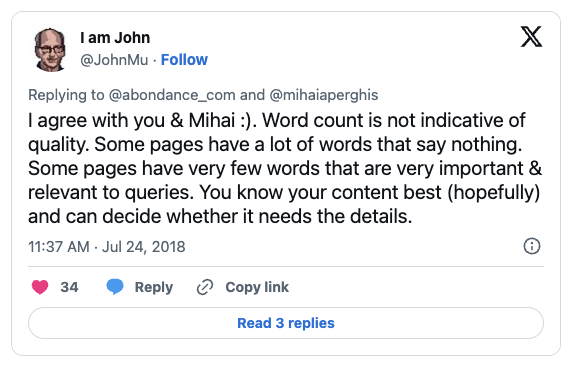
A post about technical SEO will naturally be much longer than a post listing synonyms for a word. That is an extreme example, but the point stands: let the subject decide the length, and focus on making the post as valuable as you can.
Padding an article with words that add nothing is what we all did at school when an essay fell short of the word count. Google’s own guidance on helpful content says it has no preferred word count.
Take what Google says with a pinch of salt, but John Mueller of Google put this one well:
Why Consistent Publishing Matters
If you want blog posts to improve your rankings, you need to publish steadily over a long period rather than in bursts.
At first, it can take time before Google crawls your new pages at all: Google says a crawl you request can take anywhere from a few days to a few weeks.
How often Google comes back depends partly on your site. In its guide to crawl budget for large sites, Google says crawl demand varies with “a site’s size, update frequency, page quality, and relevance”. A blog that is updated regularly with useful posts gives Google a reason to come back.
Show Experience and Expertise (E-E-A-T)
E-E-A-T stands for Experience, Expertise, Authoritativeness and Trustworthiness. Google added the first E, for Experience, to its search quality rater guidelines in December 2022. Google says E-E-A-T is not a specific ranking factor in itself, but its systems use a mix of factors that can identify content with good E-E-A-T.
How much each part matters depends on your sector.
A blog is a good place to demonstrate experience and build a reputation for expertise. If you supply industrial pumps and write about choosing the right seals for different fluids, you are showing the kind of first-hand knowledge that Google’s helpful content guidance asks about.
Be open about who wrote each post, with a short author bio that explains why they know the subject. Show the date the post was published and the date it was last updated, too.
Update Old Posts as Well as Writing New Ones
Don’t just write new posts. Once you have a good number of them, updating an older post can do more for your SEO than adding another new one.
In our experience, a refreshed post that answers its question better than before often outperforms one more new post on a crowded blog. A simple rhythm works:
- At first, concentrate on new content.
- Once the blog is established, alternate between updating existing posts and writing new ones.
How often a post needs updating depends on the subject. SEO changes quickly, so a post we have not touched in a couple of years is probably out of date. A post about a law that has not changed in years can be left largely as it is.
Use Google Analytics to Find Posts to Update
Google Analytics 4 is a good place to find posts worth updating. Go to Reports, then Engagement, then Landing page, and filter for your blog’s URLs. Look for posts with an unusually short average engagement time per session compared with the rest of the blog. Bounce rate is not in that report by default, but you can add it by customising the report.
Make sure the numbers are solid before you act on them. A post with only a handful of visits does not tell you much yet.
Add Structured Data
Structured data describes a page to search engines in a format they can read reliably. For blog posts, Google says Article markup “can help Google understand more about the web page and show better title text, images, and date information” in search results. It is optional, and Google has been phasing out support for some less-used structured data features, so treat it as a way to describe your posts clearly rather than as a ranking shortcut.
Article markup also tells Google that the page is an article, who wrote it and when it was published and updated. In WordPress, SEO plugins such as Yoast and Rank Math add it to posts automatically.
Can I Use ChatGPT to Write Blog Posts?
Google’s guidance on generative AI says it can be particularly useful for researching a topic and adding structure to original content. If you use it, the result still has to meet Google’s Search Essentials, and using AI tools to generate many pages without adding value for users may breach its spam policy on scaled content abuse.
We have run tests with largely AI-written content ourselves. It worked well at first, but in many cases the results faded over time.
I do not use it much for posts like this one, because I end up rewriting so much that I save no time. On subjects where ChatGPT knows more than I do, it is more useful.
Use it if it makes the post better. Bear in mind that ChatGPT draws on what has already been written, and rewording what already exists will not put you at the top of the results. You have to add something, especially where competition is stiff. When someone asked Google’s John Mueller in September 2023 whether Google dislikes unique content written by ChatGPT or Bard, he replied: “In which way do you think it’s unique?”
Shorten the URL
Most content management systems create the URL from the headline, and a headline usually contains far more than the keyword. The headline of this post, “Blog SEO: How to Write Posts That Rank”, would become “/blog-seo-how-to-write-posts-that-rank/”. We shortened it to “/seo-blog-posts/”.
Write the Outline Before You Start
When I start a post, the first draft is just the headings, with a short note under some of them on what the section has to achieve. The outline for this post began roughly like this:
- Does the post have a clear purpose?
- The introduction matters (note: do we sum up the post and give a reason to read on within the first 100 words?)
- Give the headline an edge
- Make the post easy to skim (note: checklists, short paragraphs, headings and subheadings)
- Avoid keyword cannibalisation
- Internal links
- A template for the meta title and description
- How long should a blog post be?
- Can I use ChatGPT?
- Optimise for E-E-A-T
- Shorten the URL
- Structured data
The outline usually changes a good deal before the post is finished. I merge headings, change the order and add new sections. Even so, having it in place makes the post quicker to write, and the finished piece follows an order that makes sense to the reader.
Summing Up
Blogging works well for SEO. It is not the only way to show expertise in your field, but it is a straightforward one, and every post is a chance to link to the pages that matter most to your business.
Good posts also bring in traffic of their own, which builds awareness of your brand among the audience you want to reach.
If you want your blog to bring in more of the right readers, see how we work as an SEO agency.
You can also book a free search audit with me, or get in touch for an informal conversation.