
How to optimise images and alt text for SEO
Stock photos appear on countless other sites, so you rarely stand out with them. Unique images, clear file names and accurate alt text decide close contests.

Images can help you rank better for keywords in the standard text results and bring in more traffic through image search.
Summary: Unique images that people like, with the right alt text, are good for your SEO. Alt text and file names should be short and concise but describe the image. Images should load quickly and not weigh down the website.
Here we go through what you need to know about images and SEO.
Do images matter for SEO?
Short answer: yes. Images matter for SEO.
There are more important ranking factors, so images are rarely one of the first things we tackle. They are best optimised alongside your work on user signals for SEO.
SEO is about reaching the top, so you need to master every part, and do each one properly. For images, these are the things that matter most:
- Alt text
- File name
- File size
- Title
- File format
- Structured data
- Unique images
- User experience
Images are part of your on-page SEO.
Write good alt text for SEO
Alt text should describe the image, not cram in keywords. Examples from Google:

A common mistake we see is simply dropping the keyword in without further thought. It shows, and it won’t hold up if you want to win in the long run.
Does the file name of my images matter?
Short answer: yes. The image’s file name is an important part of your SEO. The best file name is short but descriptive.
- IMG_999.jpg [Worst]
- puppy.jpg [Better]
- my-new-puppy.jpg [Best]
Of these three examples, the last one in the list would be the best file name.
Image titles
An image’s title is the text that appears when you hover over the image.
It isn’t an important part of your SEO. Only add one if you think it is needed or matters to the user, which is rarely the case.
Structured data for images
Structured data for images helps Google understand your website and improves the chance of your image appearing in the search results. There is no guarantee that it will, but the odds go up.
There are a few guidelines from Google to follow to improve your chances further:
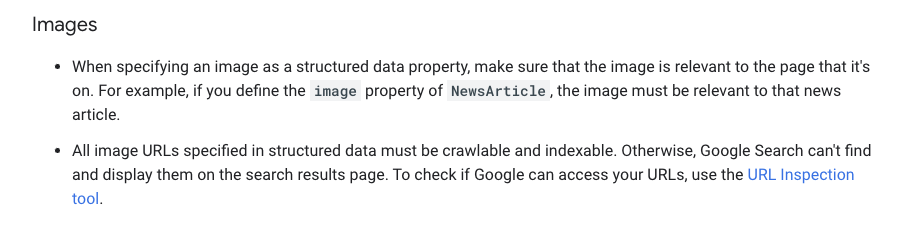
- The image must be relevant to the page
- The image must be indexable
Beyond that, we find that unique images tend to appear more often than stock photos.
Do you need unique images?
Unique images are better for SEO than free stock photos. They are not one of the most important ranking factors, though, so commissioning photos purely to rank for individual keywords is not always the top priority.
If you are in a niche where Google Images can bring in a lot of traffic, make unique images a priority, as they tend to appear more often. If you are one of many sites using the same stock photo, the chance that yours is the one that shows is low compared with a unique image.
Take your own photos of your team and premises as part of a broader plan: to improve the user experience, raise your conversion rate, and to use in email signatures and on social media.
The site that wins on Google is the one with the best overall package. This is part of E-E-A-T.
Handling images properly in WordPress
WordPress has its pros and cons when it comes to images.
When you upload an image to the media library, you can use it on any page. The alt text you set in the library is copied in when you insert the image. In the block editor, each Image block then keeps its own alt text, so you can describe the same image differently on different pages. The flip side is that changing the alt text in the library later does not update images already placed in posts; those you edit one by one.
For more on getting WordPress right for search, see our guide to WordPress SEO.
Optimise load time
Fast load times are something users (and therefore Google) value. So make sure you don’t weigh down your website more than necessary.
- Choose the right file format (see below)
- Compress your images
- Use the right size and dimensions
- Lazy-load images further down the page
Ultimately, we think the user experience matters more than a few extra points in a page speed tool. So don’t push your developer to compress images so hard that they look low-resolution.
Choose the right file format
The four most common file formats and when to use them:
- JPEG for photographs and larger images. JPEG gives colour and clarity at a relatively small file size.
- PNG when you need transparency, for example for the background. It is somewhat heavier, though, so avoid it when you don’t need transparency.
- WebP for high-quality results at a small file size. You can convert JPEG and PNG to WebP through your hosting or with WordPress plugins.
- SVG for icons and logos. These are vector files that scale better on responsive websites.
Use HTML to embed images
Here is another example from Google of how to add images, and how not to:
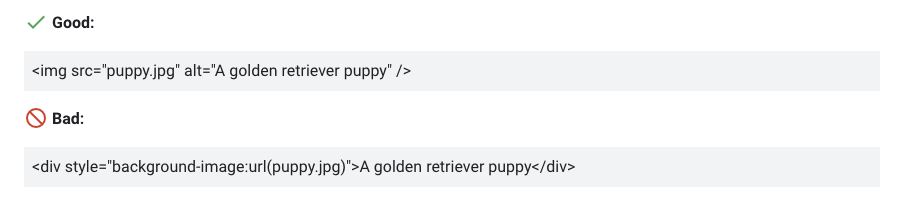
Google doesn’t index CSS background images. You can inspect the code on your website to see how the images are added, or ask your developer.
Make your images mobile-friendly
When you work on your website, you usually look at it on a computer. But a large share of your visitors will arrive on a phone.
It matters that your images look just as good and work just as well on mobile devices.
Images and SEO: the conclusion
Images are not the most important ranking factor. But since SEO is about reaching the top, they are a part you need to master. If you handle images properly while your competitors don’t, you have an advantage.
Use images first and foremost with a wider purpose in mind: relevant, good-looking images that suit you on every channel where potential customers see you.
If you would like help with your SEO, see how our SEO service works, or start with a free search audit.