
16 tips to improve your SEO with Screaming Frog
One crawler can reveal redirect chains, thin pages and wasted crawl budget, and that is only part of what Screaming Frog can do.

Screaming Frog’s SEO Spider is a crawler that most people working in SEO know well. Here are 16 tips that can make a real and fairly quick difference to your SEO.
If you would like help with your SEO, take a look at our SEO services or start with a free search audit.
Tip 1: Optimise internal links and anchor text
- Hack: Improve your internal links and anchor text by finding pages with few internal links or poor anchor text.
- How to do it:
- Run a crawl and go to the
Internaltab, then theInlinkscolumn. - Sort pages by number of inlinks to find those with few internal links.
- Click the page you want to analyse and study its anchor text in the
Inlinkstab of the lower window. - Add relevant internal links from other pages and make sure the anchor text matches the search intent of the page it points to.
- Run a crawl and go to the
- Why it matters: Internal links spread link equity where it should go, make navigation easier for visitors and help search engines find and understand your content. Anchor text reinforces what the target page is about.
Tip 2: Find duplicate content
- Hack: Find pages with duplicate content on your site.
- How to do it:
- Go to the
Contenttab in Screaming Frog. - Filter by
Exact DuplicatesorNear Duplicates. - Decide what to do page by page. If you are unsure, read the article on duplicate content linked above.
- Go to the
- Why it matters: Removing duplicate content prevents keyword cannibalisation and stops search engines being unsure which page is most relevant, which holds back your rankings.
If no results appear, check three things:
- That
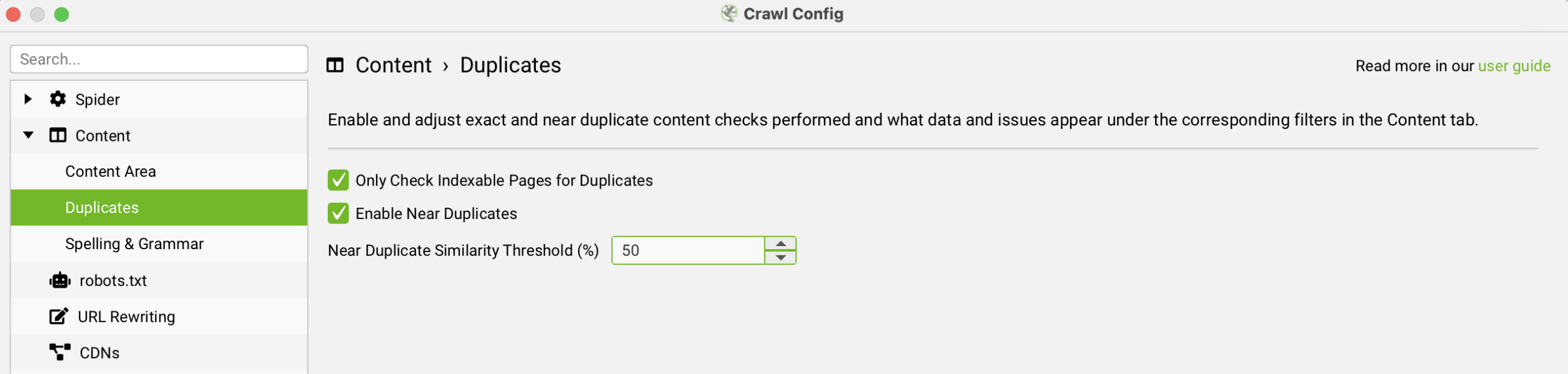
Enable Near Duplicatesis ticked underConfiguration > Content > Duplicates, as shown below. Adjust the similarity threshold (90% by default) to suit the site. Two location pages, say for Leeds and Bradford, can reasonably share a fairly high percentage of content, whereas two different blog posts should have almost none in common.
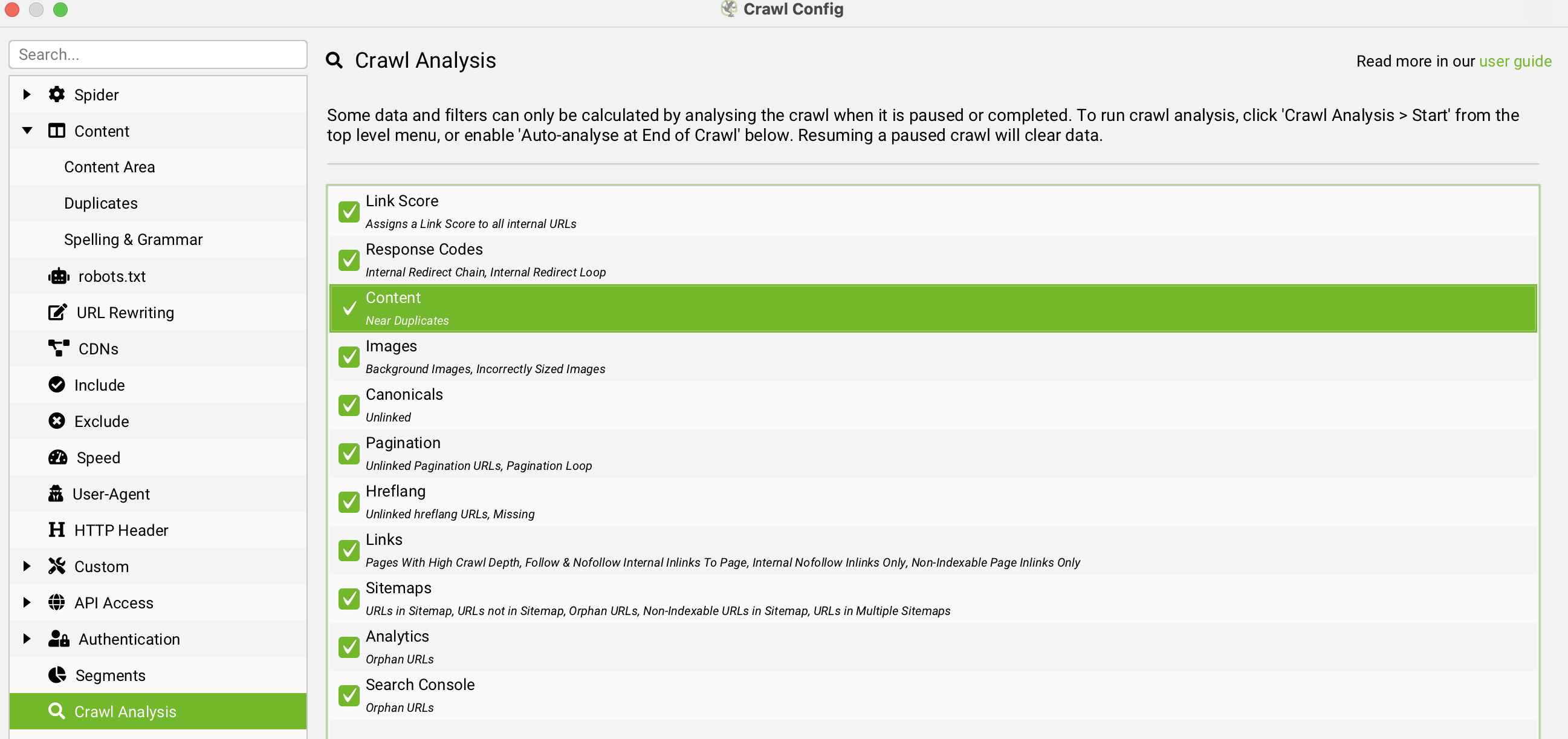
2. Make sure Near Duplicates is ticked under Crawl Analysis in the configuration.
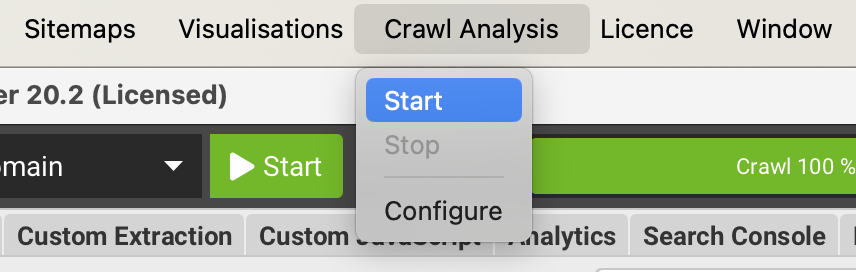
3. Click Crawl Analysis > Start. You only need to do this if Auto Analyse At End of Crawl isn’t ticked.
Tip 3: Visualise internal links
- Hack: Get a visual overview of your own (or a competitor’s) internal links.
- How to do it:
- Go to
Visualisations > Crawl Tree Graphin Screaming Frog. - Analyse the map of internal links on your site.
- Go to
- Why it matters: We covered internal links above. Seeing them visually makes it easier to understand how everything fits together, and it works as a summary you can act on.
Tip 4: Find redirect chains
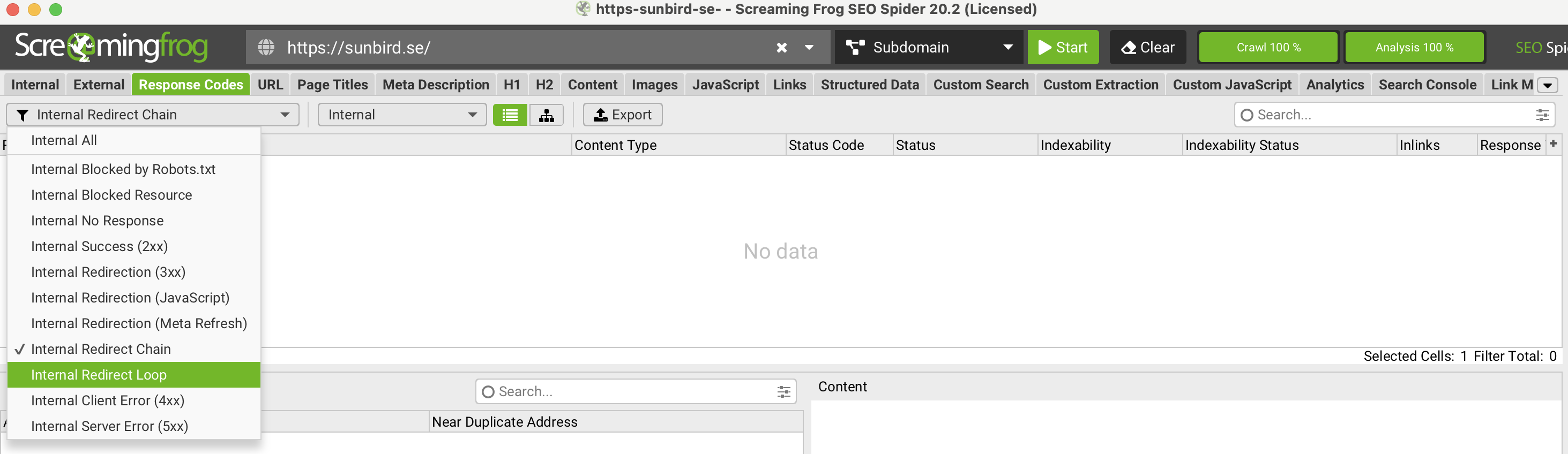
- Hack: Find redirect chains and redirect loops across the whole site.
- How to do it:
- Go to the
Response Codestab. - Filter by
Internal Redirect ChainandInternal Redirect Loop.
- Go to the
- Why it matters: Fixing redirect problems helps your crawl budget and speeds up the site. In some cases a broken redirect also stops visitors reaching the page they wanted, which can cost you customers.
Tip 5: Connect Google Analytics and Search Console
- Hack: Combine data from Google Analytics and Search Console with your crawl for a fuller picture.
- How to do it:
- Go to
Configuration > API Access. - Connect your Google Analytics 4 and Google Search Console accounts.
- Use the combined data in the relevant tabs to spot new insights and refine your SEO strategy.
- Go to
- Why it matters: A page with no traffic is worth questioning. Improve it, merge it into a stronger page, or remove it. Google’s guidance on core updates says that deleting unhelpful content can help the good content on a site perform better, and on large sites, low-value URLs also take up crawl budget. You can see the traffic data directly in Google Analytics and Search Console too, but the crawl puts it next to everything else.
Tip 6: Find spelling mistakes across the whole site
- Hack: Find spelling and grammar mistakes on your website.
- How to do it:
- Enable the checks under
Configuration > Content > Spelling & Grammarin Screaming Frog. - Run a crawl.
- Review the
Spelling ErrorsandGrammar Errorsfilters in theContenttab, and theSpelling & Grammar Detailstab in the lower window, to find and correct mistakes.
- Enable the checks under
- Why it matters: Visitors and Google both prefer a site without spelling and grammar errors.
Tip 7: Get an overview of H1s, meta titles and meta descriptions
- Hack: See every H1, meta title and meta description in one view.
- How to do it:
- Go to the
Internaltab. - Move the
Title 1,Meta Description 1andH1-1columns next to each other so you can see them all at once. - Update them on your site one by one.
- Go to the
- Why it matters: The H1 and meta title help explain to Google what the page is about. The meta title and meta description matter for click-through rate.
Tip 8: Find thin pages
- Hack: Find thin pages that may struggle to rank because they have too little content, and expand them.
- How to do it:
- Go to the
Contenttab. - Use the
Low Content Pagesfilter, or sort by theWord Countcolumn.
- Go to the
- Why it matters: There is no magic rule for how many words a page should have. Where you think a page is too thin, expand the text, and compare it with the competitors ranking above you.
Tip 9: Find images with missing alt text
- Hack: Find images that have no alt text.
- How to do it:
- Go to the
Imagestab in Screaming Frog. - Filter by
Missing Alt Textto find images without a descriptive alt attribute.
- Go to the
- Why it matters: Alt text for image SEO improves accessibility for people with visual impairments and helps search engines understand what the image shows.
Tip 10: Validate structured data for rich results
- Hack: Get a quick overview of your structured data (schema): which types you use and whether there are any errors.
- How to do it:
- Before crawling, enable JSON-LD (and Microdata or RDFa if you use them) plus Schema.org and Google Rich Result Feature validation under
Configuration > Spider > Extraction, then use theStructured Datatab in Screaming Frog. - Review any errors or warnings.
- Check which types you use and that the pages that should carry structured data actually have it.
- Before crawling, enable JSON-LD (and Microdata or RDFa if you use them) plus Schema.org and Google Rich Result Feature validation under
- Why it matters: Correct structured data can make your pages eligible for rich results, which improves how they appear in search.
Tip 11: Use ChatGPT with Screaming Frog
- Hack: Use Screaming Frog’s AI integration with OpenAI (ChatGPT) to get AI-generated suggestions for improving your content.
- How to do it:
- Go to
Configuration > API Access > AIand choose OpenAI (Gemini, Anthropic and Ollama are also available) - Enter your API key on the
Account Informationtab and clickConnect - On the
Prompt Configurationtab, clickAdd from Libraryand choose what you want to do, or write your own prompt - If the prompt uses page text or HTML, enable
Store HTMLunderConfiguration > Spider > Extraction - Run the crawl and read the results in the
AItab
- Go to
- Why it matters: Speeding up work that used to take a long time helps you get more done in less time than your competitors.
Bear in mind that you pay per API request. If you are analysing a lot of URLs, keep an eye on the cost.
Tip 12: Check PageSpeed for a large number of URLs
- Hack: Use Screaming Frog’s integration with Google PageSpeed Insights to get a better overview of which pages are slow.
- How to do it:
- Go to
Configuration > API Access > PageSpeed Insights. - Enter your
Secret Key. - Run a crawl and check the
PageSpeedtab.
- Go to
- Why it matters: A fast site gives a better user experience, and Google recommends good Core Web Vitals for success in Search. You can also check this in Search Console, but Screaming Frog puts every metric for every URL in one place.
Tip 13: Crawl staging and password-protected sites before launch
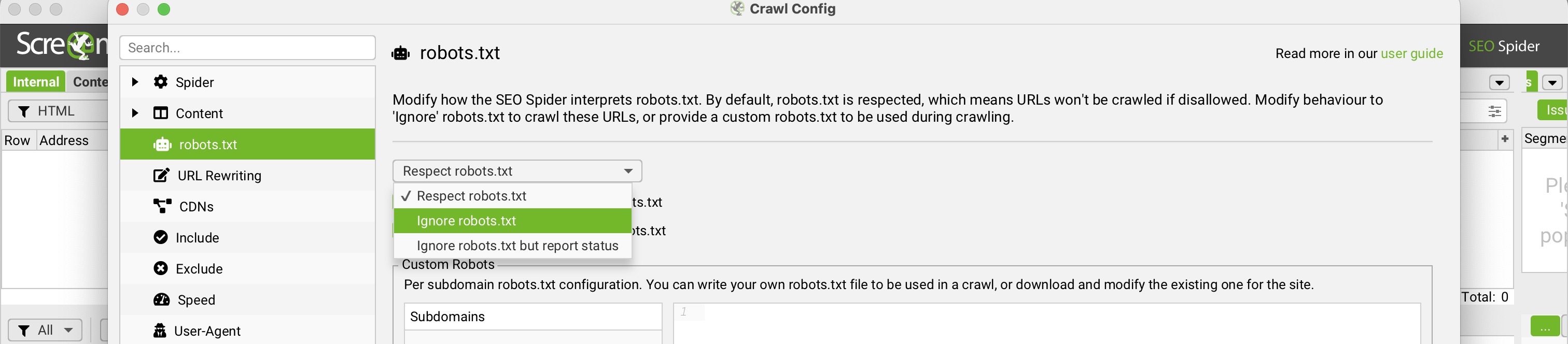
- Hack: Audit staging environments and password-protected sites before they go live, so you can find and fix SEO problems in good time.
- How to do it:
- If the site blocks crawlers with a disallow rule, go to
Configuration > robots.txtand chooseIgnore robots.txt. Do this before you crawl. - If the site is password-protected with a browser login, Screaming Frog will ask for the username and password. For a login form, add it under
Configuration > Authentication > Forms Based.
- If the site blocks crawlers with a disallow rule, go to
- Why it matters: The time you need Screaming Frog most is usually while a site is being built. Read our SEO checklist for launching a new website.
Tip 14: Use custom search to find specific problems
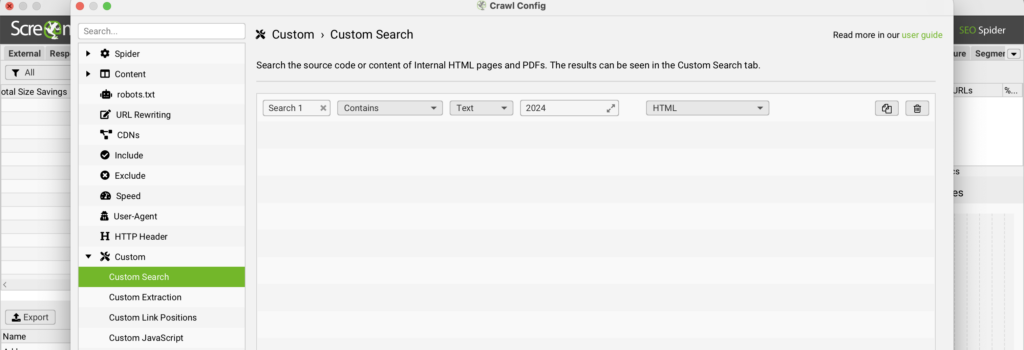
- Hack: Search for outdated text or code with Screaming Frog’s custom search. A site: search on Google, or similar methods, only finds pages that are indexed.
- How to do it:
- Go to
Configuration > Custom > Searchin Screaming Frog. - Enter the text, code or pattern you want to find, for example an old year.
- Go to
- Why it matters: Above all it saves time, so you get more done. Neither visitors nor Google like out-of-date information.
Tip 15: A visual overview of word choice with n-grams
- Hack: N-grams give you a visual overview of the most common words and phrases on a page. You can use them, for example, to understand search intent.
- How to do it:
- Before you crawl, enable the feature
Configuration > Spider > Extraction, tickStore HTMLandStore Rendered HTML
- Crawl your site in Screaming Frog.
- When it has finished, click the page you want to analyse in the
Internaltab. - Open the
N-gramstab in the lower window and choose how many words to analyse (2-gram, 3-gram and so on, up to 6-gram).
- Before you crawl, enable the feature
- Why it matters: N-grams show you the word combinations that appear most often on your site, as search engines see them.
Tip 16: Semantic similarity and content cluster visualisation
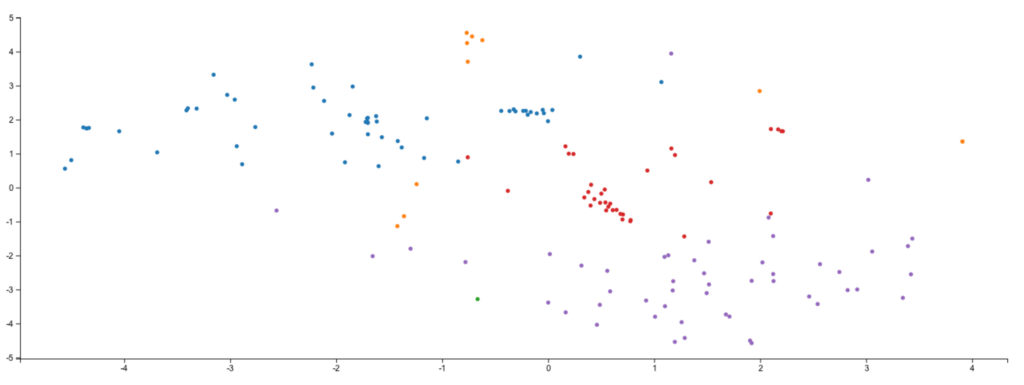
- Hack: Screaming Frog added this in version 22.0, released on 10 June 2025. It uses embeddings from an AI model to measure how semantically similar pages are, so two pages with entirely different wording can still turn out to be near-identical in meaning.
- How to do it:
- Go to
Configuration > Content > Embeddingsin Screaming Frog, enable the embedding functionality and tick “Semantic Similarity” (and “Low Relevance”). - Connect an AI provider (OpenAI, Gemini or Ollama) via
Configuration > API Access > AI. - On the
Prompt Configurationtab, useAdd from Libraryto add the preset “Extract Semantic Embeddings from Page”, and make sure “Store HTML” is ticked underConfiguration > Spider > Extraction. - Run a new crawl once you have changed the settings above, then run crawl analysis. You will then find these filters in the
Contenttab:- Semantically Similar: shows pages with high similarity (on a 0–1 scale; above 0.95 by default)
- Low Relevance Content: flags pages that sit outside the site’s main semantic focus.
- For the visualisation shown above, choose
Visualisations > Content Cluster Diagram.
- Go to
- Why it matters: Clearing out pages that compete for the same intent can make a clear difference to your rankings. Read more about duplicate content and SEO.