
Duplicate Content: How to Find and Fix It
Pages that answer the same question can hold each other back even when the wording differs. Here is how to find duplicate content and fix it.

Duplicate content is no longer just about identical wording. Pages that answer the same question can compete with each other even when the text on each one is different.
This guide covers what duplicate content is, why it holds back your SEO, and how to find and fix it. As an SEO agency, we often start a new client’s work by cleaning up duplicate content, so that Google shows the pages that matter most.
What Is Duplicate Content?
Duplicate content is when several pages carry the same or almost the same main content. That main content is what Google compares when it groups pages together as duplicates. It can happen between pages on your own site or between your site and someone else’s, and dealing with it is part of technical SEO.
The odd matching sentence isn’t a problem. It becomes one when the overlap grows, because search engines rarely show multiple pages that say the same thing.
Duplicates Across Websites
External duplicate content is when your page carries the same text as a page on another website. A common example is a product description from a manufacturer or distributor that you and your competitors have all copied word for word.
Duplicates Within Your Own Website
Internal duplicate content is when two pages on your own website carry the same text, such as the same service description copied onto two pages, or a post that can be reached at two different URLs.
Pages That Say the Same Thing in Different Words
Duplicate content used to mean text copied word for word. But pages that target the same search intent can run into the same problems, even when the text on each one is entirely original.
Screaming Frog can find these pages by comparing what they mean rather than their exact wording: see tip 16 in our Screaming Frog guide.
Why Is Duplicate Content Bad for SEO?
Duplicate content can cost you anything from a little traffic to Google grouping the pages together and leaving all but one of the URLs out of the search results, sometimes the very one you wanted to rank. The more serious consequences come when Google treats it as spam. Google’s spam policies cover content scraped from other websites and large volumes of unoriginal pages, whether people wrote them or AI generated them.
There are other reasons to keep your content unique, too.
Your Own Pages End Up Competing
The biggest risk with internal duplicates is that your pages compete with each other. It becomes unclear to Google which page should rank, and that usually means lower positions.
Internal Link Equity Gets Spread Thin
Internal links pass authority around your site, so every link that points to a duplicate sends some of it to a page that shouldn’t have it. You want that authority concentrated on one page.
Duplicates Can Take Crawl Budget from Important Pages
Google spends a limited amount of crawling on each website, known as crawl budget. How much your site gets depends on, among other things, its size, how often you update it and the quality and relevance of its pages.
If your site has a lot of duplicate content, some of Google’s visits go to the duplicates instead of your most important pages. In practice it matters on large websites. Google’s guide to crawl budget (updated in 2026) is written mainly for sites with more than a million pages whose content changes weekly, or more than 10,000 pages whose content changes daily. Google calls these figures rough estimates, and the guide also covers sites where a large share of URLs are listed in Search Console as Discovered – currently not indexed. It advises eliminating duplicate content so that crawling focuses on unique content.
Local Service Pages
If you offer a service in several towns or cities, much of the text on those pages is often the same. Near-identical city pages can rank, but Google’s spam policies list “pages targeted at specific regions or cities that funnel users to one page” as doorway abuse. Give each page something that belongs to that place, such as the area you cover or the work you have done there.
Product Pages in Ecommerce
Duplicate product descriptions are common, and products can still rank despite them. For important products in competitive markets, though, write your own descriptions: content that adds something, such as your own review of the product or guidance through the purchase, gives you a better chance of ranking than the text every other retailer uses.
Buyers expect certain information on a product page, so cover what every other retailer covers, then add what only you can say about the product.
How to Fix Duplicate Content
There are three main fixes. Which one to use depends on whether you need to keep both pages and whether the pages have any value at all.
Merge the Pages and Set Up a 301 Redirect
Each search intent should have one page. If several pages cover the same intent with more or less the same content, merge them. If they are exact duplicates, simply remove one and redirect it to the other. In practice it looks like this:
- Page A (merge in content from page B if it improves the page)
- Page B → 301 redirect → Page A
This removes keyword cannibalisation and brings the authority and user signals together on one page.
Use a Canonical Tag If You Need to Keep Both
Google’s guide to canonicalisation calls a canonical tag “a hint, not a rule”: it tells Google which page you consider the original, while both pages stay open to visitors.
Set Thin Pages to Noindex
If pages have been auto-generated, or could for some other reason look spammy, don’t use a 301 redirect or a canonical tag. Set them to noindex so they drop out of Google’s index. Google still has to crawl a page to see the noindex tag, so don’t block those pages in robots.txt as well. If a page is no use to visitors either, removing it so that it returns a 404 or 410 is the cleaner fix.
Auto-Generated Pages in WordPress
The duplicates we most often find on WordPress websites are auto-generated pages, such as tag archives and attachment pages. WordPress 6.4, released in November 2023, switched attachment pages off for new installations, but older websites often still have them. Open your XML sitemap and look for pages you didn’t know existed.
Different Versions of the Same URL
Technical errors can quickly leave you with several URLs showing the same content. These are the most common causes.
URL parameters. A parameter is the part of a URL that follows a “?”. Parameters are used for tracking (UTM tags, for example), sorting and filtering, but each combination can be indexed as a separate page.
Here are two examples of pages that end up with duplicate content because of URL parameters:
- /running-shoes?colour=yellow and /yellow-running-shoes
- /?q=running-shoes and /running-shoes
Because both URLs may be needed, a 301 redirect isn’t the answer. A canonical tag tells Google which version is the main one, while visitors can still use both.
With and without www. Try visiting your website with and without www, for example:
- https://example.co.uk/
- https://www.example.co.uk/
Either version is fine, as long as you choose one: both addresses should end up on it, and if they don’t, ask your web developer to redirect one to the other.
HTTP and HTTPS. Visit your website with http and https in front, for example:
- http://example.co.uk/
- https://example.co.uk/
Both should end up on the https version.
With or without a trailing slash. Some websites have both of these indexed:
- https://example.co.uk/services/
- https://example.co.uk/services
Choose one form and redirect the other to it.
How to Find Duplicate Content
These are the four tools we rely on at Sunbird.
Google Search Console
Google Search Console has a report for this. If you already have it set up, it is the quickest way to find duplicate pages: go to Indexing → Pages and look under Why pages aren’t indexed for the statuses that start with Duplicate.
Screaming Frog
Screaming Frog’s SEO Spider is free for up to 500 URLs, which is enough for many smaller websites. It takes a few more steps than Search Console, but it works on any website straight away. Finding near duplicates, as opposed to exact copies, needs a paid licence. To go further, follow Screaming Frog’s guide to checking for duplicate content.
Paid SEO Tools
There are plenty of paid SEO tools. You don’t need to buy one just to find duplicate content, but if you or your SEO agency already use one, it should flag duplicate content when it becomes a problem. Semrush and SE Ranking are two examples.
Siteliner
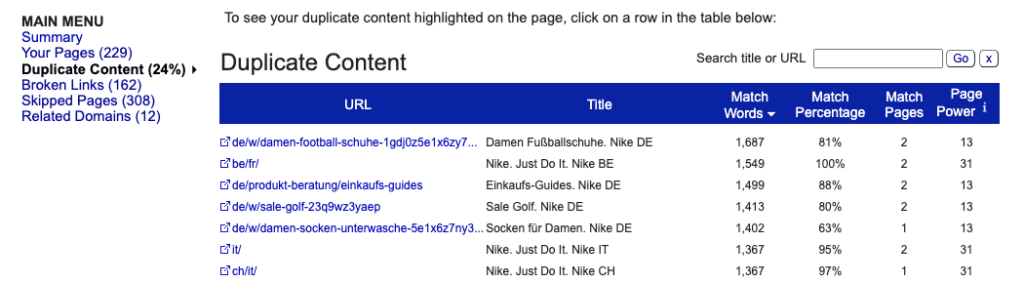
Siteliner’s free version checks websites of up to 250 pages once a month, and Siteliner Premium goes up to 30,000 pages. It is one of the quickest and simplest ways to find duplicate content on your own site: enter your address at siteliner.com and it lists the pages that share text with others, with the number and share of matching words for each.
Final Thoughts
Duplicate content is one of the easier parts of technical SEO to fix, and fixing it can make a real difference to how your important pages rank.
If you’d like to know where duplicate content is holding your website back, start with a free search audit, or read more about working with our SEO agency.
Frequently Asked Questions
Short answers to the questions we hear most about duplicates, based on Google’s own documentation.
Does Google Penalise Duplicate Content?
Not as such. Google’s guide to canonicalisation says that some duplicate content on a site is normal and doesn’t break its spam policies.
Copying other websites’ text at scale, or publishing unoriginal pages in bulk, is a different matter: Google’s spam policies cover both.
How Does Google Choose Which Page to Show?
Google groups the duplicates into a cluster and picks the version it considers the most complete and useful. According to Google’s guide to consolidating duplicate URLs, 301 redirects and rel=”canonical” are strong signals, while listing a URL in your sitemap is a weak one.
Make sure all your signals point to the same URL. If your sitemap says one thing and your canonical tag another, you leave it to Google to decide which page gets the visitors.
Should You Block Duplicates from Crawling?
Not to choose which page is the original. Google’s guide to consolidating duplicate URLs is clear that robots.txt shouldn’t be used for canonicalisation.
The exception is filter URLs in online shops that Google doesn’t need to crawl, such as filters for colour and size. For those, Google’s guide to faceted navigation gives robots.txt as one way to stop the crawling. Bear in mind that a blocked URL can still end up in the index, just without its content.
What About Syndicated Content?
If a partner republishes your article on their website, they should block their copy from being indexed, for example with a noindex tag. Google’s page on fixing canonicalisation issues calls that the most effective solution and advises against relying on a canonical tag for syndication.
Where Do Duplicates Show Up in Search Console?
In the Page indexing report. Three statuses relate to duplicates:
- “Duplicate without user-selected canonical”
- “Duplicate, Google chose different canonical than user”
- “Alternate page with proper canonical tag”
The first means you haven’t set a canonical and Google has chosen one itself. Check the second one first: there, Google has picked a different page from the one you pointed to. The third is usually nothing to worry about, because your canonical tag is doing its job.
How Long Does Google Take to Reassess Duplicates?
Up to two weeks. Google may hold pages in a duplicate cluster for that long even after you have fixed the content, according to its page on fixing canonicalisation issues (updated in 2026). If you fixed your canonical tags today, don’t draw any conclusions tomorrow.
Where Should the Canonical Tag Go?
In the head of the page, before any invalid elements such as iframe or img. Once Google meets an invalid element in the head, it stops reading the rest of it, according to Google’s page on valid page metadata. JavaScript shouldn’t change the canonical either: Google’s JavaScript SEO basics say a script shouldn’t set it to a different URL from the one in the original HTML. If your theme writes one canonical into the HTML and a script then swaps it, you’re giving Google two different answers about the same page.