
What Is Conversion Rate Optimisation (CRO)?
More traffic is not always the answer. CRO gets more of the visitors you already have to get in touch, using data and A/B tests instead of guesswork.

Conversion rate optimisation (CRO) is the work of getting a larger share of your visitors to do what you want them to do: send an enquiry, call, buy or sign up. It runs on data, hypotheses and A/B tests rather than opinion, and it starts with the traffic you already have.
This guide covers:
- What conversion rate optimisation is and what it is worth to you
- What your website needs before you can test anything
- The tools to start with
- How to decide which A/B tests to run first
- The common mistakes that hold back your conversion rate
We run SEO and paid search for our clients, and the conversion rate on their pages decides how much that traffic is worth to the business.
The Short Version
- Conversion: a visitor does something you value, such as sending an enquiry, calling, buying or subscribing.
- Conversion rate: the share of visitors who convert.
- A good conversion rate depends on your sector, your offer and where the traffic comes from.
- It is rarely about button colours. It is about finding out why visitors leave without getting in touch.
A worked example: if 100 people visit your website and four of them call or send an enquiry, your conversion rate is 4 per cent. To judge it, compare it with your own history and with similar businesses rather than with a single industry benchmark.
CRO aims to lift that figure. If you pay for clicks through Google Ads or Microsoft Ads, a higher conversion rate means every pound of that budget brings in more enquiries.
What Do You Gain from Conversion Rate Optimisation?
Instead of buying or earning more traffic, you get more from the traffic you already have, which makes CRO one of the most direct ways to grow enquiries.
A page that converts well also pays off in three other places:
- Organic search. Some of what makes a page convert, such as quick loading and a page that works well on a phone, is also part of the page experience Google says it wants to reward: its documentation states that its core ranking systems “look to reward content that provides a good page experience”. Better rankings bring more traffic, and more traffic at a higher conversion rate means more leads.
- Google Ads. Landing page experience is one of the three components of Quality Score, and Google says Ad Rank takes the quality of your ads and landing page into account. A better page can win better positions for the same bid, so the same budget brings in more leads.
- Everything else you pay for. Remarketing, display, email and social campaigns all send people to your pages, so each of them earns a better return when those pages convert.
If you want more enquiries from the same Google Ads budget, see how we run Google Ads accounts with the landing pages in view.
Check That Your Website Can Be Tested
CRO depends on three things: changing a page quickly, tracking what visitors do and sending part of your traffic to a variant. Before you plan any tests, check that your website allows all three.
How much freedom you have depends largely on how the site was built:
- Hosted website builders. Quick and inexpensive to launch, but you work within the builder’s templates and settings. Some restrict the tracking scripts you can add or how far you can change a page’s layout.
- Off-the-shelf themes. Most of the design and functionality comes ready-made, and you can change a fair amount. Beyond a certain point, though, each change takes longer than it would on a site built around your needs.
- AI-generated websites. Tools such as Lovable, Framer AI and v0 can produce a working site in minutes. They are useful for trying out an idea, but check how much control you have over the code before you plan a long programme of tests.
- Custom-built websites. A developer builds the site around your needs, so almost any change is possible. The trade-off is that most changes need a developer’s time.
None of these rules CRO out. Many A/B testing tools change the page in the visitor’s browser, so you can test headlines, layouts and forms without touching the site’s code. What matters is knowing where your limits are before you commit to a test plan.
Landing pages are where your SEO, paid search and email traffic all end up, so the control you have over them affects every channel. CRO pays off most when it runs alongside your SEO and content work rather than as a separate project.
Which Tools Do You Need to Analyse Your Traffic?
If you are not analysing your traffic yet, start there. Two kinds of tool give you most of what you need: one shows how individual visitors behave on a page, the other shows the numbers across the whole website. CRO is an ongoing process, and both stay in use long after your first test.
Heatmaps and Session Recordings
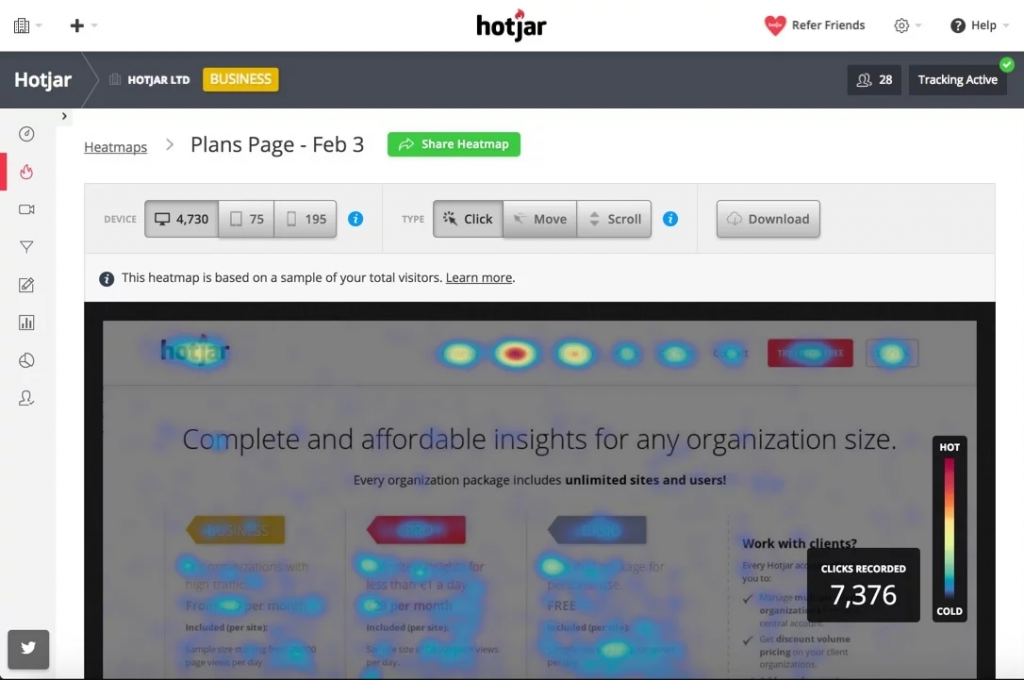
Heatmaps show where visitors click and how far they scroll. Session recordings let you watch real visits, page by page. Between them, you can see where visitors lose interest and leave, and which buttons or links they miss.
We have relied on Hotjar for this. Hotjar is now part of Contentsquare, and new Hotjar accounts can no longer be created, so new users sign up to Contentsquare instead. Its free plan includes heatmaps, session replays and surveys. Microsoft Clarity is a free alternative with heatmaps and recordings. Both are quick to install, and either is enough to start with.
Google Analytics 4: See Where Visitors Drop Off
Google Analytics 4 shows where visitors come from, how they engage and, in aggregate, how they move around your website. It also shows what share complete the actions you have marked as key events, which is GA4’s term for what it used to call conversions. Every website needs it, and CRO depends on it.
You cannot run a meaningful A/B test without analytics behind it, because every test needs a goal you can measure.
We recommend installing GA4 through Google Tag Manager, which makes it easier to add and change the events you track.
Filter out your own traffic as well, using GA4’s internal traffic setting, which identifies visits by IP address. Otherwise your own visits skew metrics such as average engagement time, since you are likely to spend far longer on your website than a typical visitor does. The filter only works from the moment you apply it: it does not change historical data, and the data it excludes is gone for good. Google moves the setting from time to time when it updates the interface, so search for “GA4 internal traffic” if you cannot find it.
Track Leads You Can Trust
For a test to give a reliable answer, the leads it counts have to come in often enough and mean what you think they mean. A click on your phone number, for example, could just as easily be an existing customer calling about an invoice.
Decide what counts as a lead before you start, and check the figures in your analytics against what actually arrives in your inbox or CRM. How much effort that takes depends on how many leads you get.
If You Have Plenty of Traffic and Leads
With plenty of traffic and leads, the job is to reduce the noise. Feed the outcome of each lead back from your CRM as offline conversions, so that you can see which enquiries turned into business. Many CRMs can do this directly; if yours cannot, Google Sheets and Zapier will do the job.
If You Have a Fair Number of Leads
If your leads vary in quality, with job applications, sales pitches and time-wasters mixed in with real enquiries, add some form of qualification.
A B2B company might, for example, stop counting form submissions from personal email addresses such as @gmail.com and @hotmail.com.
You could also add a field where people choose what their enquiry is about. Every extra field makes people less likely to finish the form, so we do not usually recommend it. But if lead quality varies a great deal, seeing which campaigns bring the right enquiries matters more, and you can remove the field once the test is over.
If You Have Few Leads
With very few leads, A/B testing may not pay for itself, because a test needs enough conversions to reach a reliable result. A full CRO programme makes little sense on very low traffic either, and you are better off working on the traffic first. Ask yourself whether it would be easier to double your conversion rate or your traffic. The honest answer usually lies somewhere in between.
If traffic is the bottleneck, our SEO work brings more of the right visitors to your site, and you work directly with our SEO specialist, Nils Fridlund. A free search audit shows where that extra traffic could come from.
How to Build a Conversion Rate Optimisation Plan
A conversion rate optimisation plan sets out what you will test, in what order and how you will judge the result. Without one, tests tend to follow whoever has the strongest opinion, and the ones that would have made the biggest difference never get run.
This is the framework we use with our clients:
- Goals and KPIs. Decide exactly what you are optimising for: qualified enquiries, revenue, average order value or similar. One main goal per landing page.
- Baseline. Run your heatmap tool and GA4 for at least 30 days to see where visitors drop off. Is it the form? The service page? The checkout?
- Hypotheses. List every possible improvement and write each one as a hypothesis: “If we change X, we expect Y to rise, because Z.”
- Prioritisation. Rank the hypotheses with ICE or PIE (see below).
- Test schedule. Run one A/B test per landing page at a time, or the results become impossible to read.
- Review. Record every test, the result and what you learnt. The winner becomes the new baseline for the next challenger to beat.
How to Run Your First A/B Test
With tracking in place and leads you trust, you can start A/B testing. This is where the optimisation work itself begins, and it does not stop: ideally, there is always a test running.
How an A/B test works. The testing tool splits your traffic between the current page (A) and a variant (B), usually half each, and measures the conversion rate of each against the goal you have chosen. When the difference is large enough to be statistically significant, you have a winner. The winner becomes your page, and the next test challenges it.
How long a test takes. That depends on how much traffic and how many conversions the page gets. A busy page can give an answer within a week or two; a quieter one may need a month or more. Run tests for whole weeks, so that weekday and weekend behaviour are both included, and decide in advance how long each test will run rather than stopping the moment the tool shows a leader.
What it can do for you. A successful test can lift your sales considerably, and raising traffic by the same amount is often harder. The first tests on a page that has never been optimised tend to be the easiest wins.
Many testing tools let you change a page through a visual editor without touching your website’s code, so you do not need a developer to get started. VWO is one we recommend.
How to Prioritise Tests with ICE or PIE
You will have more ideas than time to test them. Two simple frameworks help you rank them.
ICE scores each hypothesis from 1 to 10 on three factors:
- Impact: how much difference do you expect the change to make?
- Confidence: how sure are you, based on the data you already have?
- Ease: how easy is it to build and launch?
PIE works the same way with different factors:
- Potential: how much room for improvement does the page have?
- Importance: how much traffic and revenue does the page carry?
- Ease: how easy is the test to run?
Add up (or multiply) the scores and run the highest first. Here is an illustration with ICE, using made-up scores for three ideas:
- Cut the enquiry form from seven fields to four: Impact 7, Confidence 7, Ease 9 = 23
- Rewrite the headline on the main service page: Impact 6, Confidence 5, Ease 8 = 19
- Redesign the pricing page: Impact 8, Confidence 4, Ease 3 = 15
The form goes first: a decent expected effect, good evidence behind it and little work. Which model you use matters less than using one consistently. Start with the tests that combine high potential with low effort, because that is where CRO pays back fastest and where you build the momentum that keeps the rest of the plan moving.
Check Devices, Page Speed and Customer Feedback
- Check every device and browser. Make sure your website works and looks right on phones, tablets and desktops in the main browsers. Your browser’s developer tools have a device mode for a quick first check, and a service such as BrowserStack lets you test on real devices without buying them.
- Check loading speed. Loading performance is one of the Core Web Vitals that Google’s page experience guidance refers to, and a slow page can lose visitors before they have read a word. Test your key pages in Google PageSpeed Insights and GTmetrix.
- Ask your visitors. On-page surveys put a short question to visitors, such as what stopped them getting in touch. More people answer than you might expect, and the same answers soon start to repeat. Contentsquare’s free plan includes surveys.
Use these alongside GA4, a heatmap tool and an A/B testing tool, and you will have a clearer picture of your visitors than many businesses ever get.
Page Changes That Often Lift Enquiries
Keep lines short. People scan web pages rather than read them word by word, and text that runs too wide is tiring to scan. Baymard Institute puts the optimal line length for body text at 50–75 characters.
Accept what people type. Let form fields accept as many formats as you reasonably can, so that nobody is turned away for typing something slightly differently. A phone number field, for example, should take the number with or without spaces.
Say clearly what you do. Spend time on one strong message. Say what you do, who it is for and why someone should contact you. A clear account of your products or services is what keeps a visitor reading past the first screen.
Remove steps. Make every journey on the site as short and simple as you can. Visitors notice each extra click and each extra field, so learn to dislike them as much as they do.
Lead with one product or service. You may sell a lot, but one product or service usually suits most buyers. Lead with that. When a page tries to sell everything at once, visitors struggle to choose.
Give people a reason to act now. A deadline on an offer, or limited stock, often prompts people to act, as long as it is true. A countdown that restarts every time someone visits does more harm than good.
Choose your audience. Decide who you are for, rather than trying to sell to everyone. To use ourselves as an example: Sunbird does search for growing companies. We do not work with private individuals, and we do not build apps or software. Buyers compare several options online, and when your message fits their situation exactly, you are the one they are likely to call. They want someone who is good at what they need, so show them that you are.
Follow the conventions. Visitors expect a website to work the way other websites do: the logo links to the home page, the menu sits at the top, and the back button is on the left with the next button on the right. Look at how the leading companies in your sector, and the web in general, handle the same page, and do something similar. Borrow the patterns, then make the content your own.
Common CRO Mistakes to Avoid
These are the mistakes we come across most often. Check your own pages against them.
Too Much Text, Too Early
You will have plenty of good things to say about your business. But visitors scan, and the first screen they see has one job: to tell them they are in the right place and what to do next. That does not mean leaving out what makes you good. It means choosing what goes first.
A strong opening is a short headline that says what you do and for whom, two lines on the service, and a clear choice between getting in touch and reading more. The detail on your process, your systems and your history belongs further down the page, or on a page of its own, for the visitors who want it.
No Clear Next Step
Far too often we see websites with no obvious next step, and when we raise it, the answer is that “people can use the menu”. Most will not. Give visitors your message briefly and follow it with a next step they cannot miss. On a good landing page, you arrive, read two or three lines on what the business does, and the next step is right there. It sounds simple, and it is surprisingly hard to get right.
Decide which action you want visitors to take on each page, such as sending an enquiry or completing a purchase, and give it a clear call to action (CTA). Then measure how visitors behave and remove whatever gets in their way.
Asking for Too Much Too Soon
Businesses often want their website to do a great deal: advanced booking systems, configurators, online payment. What works better is simplicity and a small first commitment. Leaving a name and phone number is already a big step for someone who has never dealt with you, and a potential customer who does not yet know how good you are will rarely work through a full booking system and pay online.
Ask for a small first step instead. If you do want a booking system, ask for an email address first and send the booking link automatically. If the customer does not finish, you still have their email address and can follow up.
Underinvesting in Your Landing Pages
It is easy to spend far more on bringing visitors in than on the pages they land on. The arithmetic is worth doing. As an illustration: if a page converts at 2 per cent instead of 3 per cent, every pound of advertising that sends people to it brings in a third fewer enquiries than it could. Organic search traffic, which you do not pay for per click, loses value in the same way.
Before you raise an ad budget or commission more content, check that the pages the traffic lands on can turn it into enquiries. Improving a landing page is often a smaller job than finding the same number of extra visitors.
Ignoring Constructive Criticism
It is remarkable how rarely businesses ask what others think of their website, and how rarely they act on criticism when they hear it. Run user tests with a handful of people who resemble your buyers and ask them what works and what does not. Anything that comes up more than once is probably worth acting on. Combine this with the tools above, and a higher conversion rate will make all your marketing go further.
CRO Terms You Should Know
Bounce Rate
Traditionally, a bounce is a visit where someone lands on a page and leaves without doing anything else. In Google Analytics 4, bounce rate is the percentage of sessions that were not engaged. An engaged session is one that lasts longer than 10 seconds, has a key event or has two or more page or screen views; a session that does none of these counts as a bounce. What counts as a normal bounce rate depends on your sector and the type of page. If a paid landing page has a high bounce rate, many visitors leave straight after clicking your ad, so check that the page delivers what the ad promised.
Exit Rate
Exits count how many sessions ended on a given page. Unlike a bounce, the visitor may have looked at several pages first. In GA4 you find Exits in Explore, by building a free-form exploration, and you can divide a page’s exits by its views to get an exit rate. A high exit rate on a page where visitors should carry on, such as a service page or a basket, is a reason to look at the page: something may be broken, or the content may not answer the question that brought them there. On a thank-you page, a high exit rate is normal.
Average Engagement Time
GA4’s measure of how long people actually spend with your website: the time the page was in focus in the visitor’s browser, averaged across active users. It takes the place of the average time on page that older versions of Google Analytics reported. What a good figure looks like depends on the page. On a guide or a service page, you generally want it high. On a page built to answer a quick question, such as opening hours or a reference look-up, a short time can be perfectly healthy.
Call to Action (CTA)
Any button or link that asks the visitor to take the next step, such as “Request a quote” or “Book a call”. A CTA does not have to be big and bright to count. What matters is that it stands out from the rest of the page and that its label says exactly what happens when someone clicks. On a long page, repeat the main CTA further down, so that it is in view when the visitor is ready.
Conversion Funnel
The steps a visitor takes from first arriving to becoming a customer. For a B2B company, that might be an advert, a service page, the enquiry form and a thank-you page. The term is used both when planning a website’s structure and in tools such as GA4, where a funnel exploration shows how many visitors drop out at each step.
Multivariate Testing (MVT)
A form of testing in which you change several elements at once, such as the headline, the image and the button, and test the combinations. Because the traffic is split across many versions, it needs considerably more traffic than an A/B test to give a reliable result in a reasonable time. Most of the testing tools mentioned above support it.
Conversion Rate Optimisation in Ten Steps
With the right data and tools, your website can bring in considerably more enquiries from the traffic it already gets. In practice, it comes down to ten steps:
- Set up conversion tracking you trust
- Filter out your own traffic
- Analyse how visitors use the website
- Choose the landing page (A) you want to improve
- Create an alternative version (B)
- Set up your first A/B test
- Add tools that collect more data, such as heatmaps and surveys
- Let the test run for the period you planned
- Learn from the result and from your tools
- Repeat
It takes less work than most people expect, and every improvement makes the traffic you already have worth more.
Frequently Asked Questions About Conversion Rate Optimisation
What does conversion rate optimisation mean?
Conversion rate optimisation (CRO) means working systematically to get a larger share of your existing visitors to convert: to send an enquiry, buy, call or take another action you value on your website. The work is based on data analysis, hypotheses and A/B tests.
What is a conversion?
A conversion is any action you have defined as valuable: submitting an enquiry form, phoning, booking a meeting, buying a product or subscribing to a newsletter. You decide what counts, based on your business goals.
What is a conversion rate optimisation plan?
A conversion rate optimisation plan is a document that sets out which tests you will run, in what order, against which goals and how you will measure the result. It is built on a baseline analysis, a list of hypotheses and a prioritisation model such as ICE or PIE.
If you want more enquiries from the search traffic you already pay for, see how we work as a PPC agency, or book a free search audit. Nils will show you what is working, where budget is being lost and what he would do next.