
Google indexing: how it works and how to improve it
An indexed page is not the same as a visible page. The most common reasons Google gets stuck, and how to fix them in Search Console.

An indexed page is not the same as a visible page. Here are the most common reasons Google gets stuck along the way, and how to sort them out quickly in Search Console.
In this post we answer:
- What Google indexing is and how the process works
- How to check whether a page is indexed
- Why a page is not indexed at all, or is indexed slowly
- How to speed up indexing
If you need help tracking down an indexing problem, feel free to get in touch. Our SEO team works on exactly this kind of problem.
What is Google indexing?
Indexing is how Google finds, analyses and stores pages in its index. A page Google has found will not necessarily appear in Google. In Search Console, the stages look like this:
- URL is unknown to Google: Google has not yet discovered your page.
- Discovered – currently not indexed: Google knows about the page but has not crawled it yet.
- Crawled – currently not indexed: the page has been crawled but is not shown in the search results.
- Indexed: the page has been indexed and can appear in Google’s search results.
Bear in mind that ranking poorly does not mean you are not indexed.
The difference between indexing and ranking
People often mix up indexing and ranking, but they are not the same thing:
Indexing means Google has found and stored your page, so it is able to appear in the search results at all.
Ranking is about where your page appears among other indexed pages when someone searches for a particular keyword. A page can be indexed and still sit far down the results, depending on ranking factors such as the quality, relevance and authority of the content.
How Google indexing works, step by step
Google indexing happens in five stages, and a page can get stuck at any of them:
- Discovery: Googlebot (Google’s crawler) finds the URL through internal links, external links or your XML sitemap. If the page has no links and is not in the sitemap, it stays unknown to Google.
- Crawling: Googlebot checks robots.txt first and then fetches the page. If the server responds slowly or with errors, Google slows down.
- Rendering: Google renders the page in a separate queue, running any JavaScript before the content built by scripts can be read (more on that further down).
- Indexing: Google analyses the content, chooses which version of the page is the canonical one and stores it if it clears the quality bar.
- Serving and ranking: only now can the page be matched to a search and given a position.
It pays to know which stage the page is stuck at. That decides whether you should spend money on a developer or on better content.
What the statuses in Search Console mean
The two most common statuses in Search Console are “Discovered – currently not indexed” and “Crawled – currently not indexed”. They sound almost the same but mean quite different things:
| Status | What it means | Common cause | What to do |
|---|---|---|---|
| Discovered – currently not indexed | Google knows the URL but has not fetched the page | Google says it typically postponed the crawl to avoid overloading the site. In our experience, too few internal links, a page buried deep in the structure or a site Google has little confidence in also play a part | Link to the page from strong pages and clear out low-value pages |
| Crawled – currently not indexed | Google has read the page but chosen not to store it for now | Thin content, duplicates or a page that adds nothing new | Improve the page or merge it with another one |
In short, the first status is about priority and the second is about quality. Mix them up and you spend time and money on the wrong fix.
Checklist for troubleshooting indexing problems
Here is a practical checklist if you suspect you have a problem with indexing in Google:
- Check robots.txt: make sure the page is not blocked. You can check individual URLs with URL Inspection in Search Console.
- Check for noindex tags: make sure the page does not contain <meta name=”robots” content=”noindex”> if it is meant to be indexed.
- Duplicate content: check that the page is not a duplicate of, or semantically very close to, another page that Google indexes instead.
- XML sitemap: make sure the page is listed in your sitemap.xml.
- Internal links: make sure at least one internal link points to the page.
- Loading speed and mobile: check that the page loads reasonably quickly and works on mobile.
- Content: check that the page has unique, useful and relevant content.
- Rendered HTML: check that the text, headings and links are present in the version of the page Google sees (see URL Inspection below).
There are more advanced explanations for why a page is not indexed. Sometimes there is simply no need for the page in Google.
So the answer is not always to get everything indexed. Sometimes you should merge pages instead.
How to check whether a page is indexed
You check whether a page is indexed with URL Inspection in Google Search Console, which is the only way to get a definite answer. A site: search in Google is quicker but only gives an indication. Below we go through both and what the answers mean.
The quick check: a site: search in Google
The fastest way to see whether a specific page is indexed is to search Google for “site:yourdomain.co.uk/your-page”. If Google returns no results for it, the page is probably not indexed.
That may be because the page is “URL is unknown to Google” or “Discovered – currently not indexed”: either Google has not got round to it yet (read: has not prioritised it), or there is a technical problem. Google itself points out that an indexed page is not guaranteed to show up in a site: search, so confirm with URL Inspection.
If you search for the whole domain, “site:yourdomain.co.uk”, Google gives an estimate of how many pages are in the index. That estimate becomes less reliable the larger the website is, so treat it as a rough reading rather than the final word.
The definite answer: URL Inspection in Search Console
Paste the URL into the search bar at the top of Search Console. Then look at four things in the result:
- Status: whether the page is on Google or not, and if not, why.
- Discovery: whether Google found the page through a sitemap, a referring page or both. If no referring page is listed, check the page’s internal links, although Google notes that a missing referring page does not prove there are none.
- Canonical: the user-declared canonical compared with the Google-selected canonical. If they differ, Google has chosen another page as the original.
- Last crawl: when the page was fetched and by which crawler (“Crawled as”). Normally it says Googlebot smartphone.
Then click “Test live URL” followed by “View tested page”. The HTML tab shows the page as Google sees it. If your text, headings or links are missing there, you have a rendering problem, not a content problem.
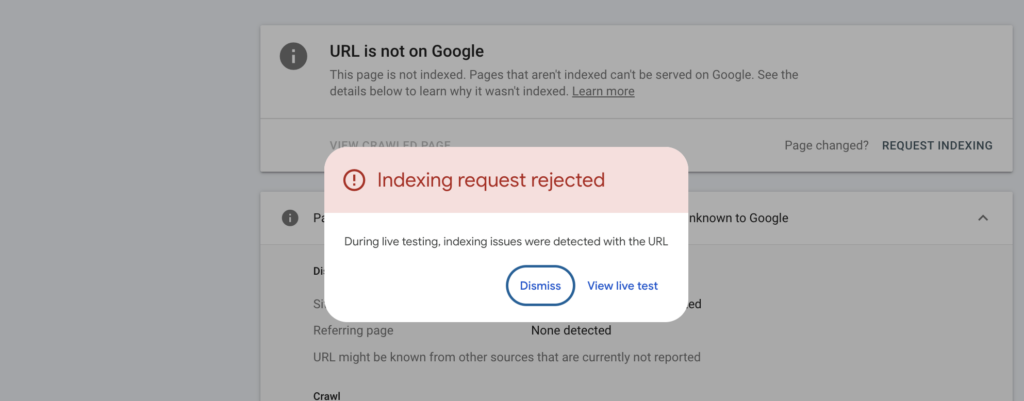
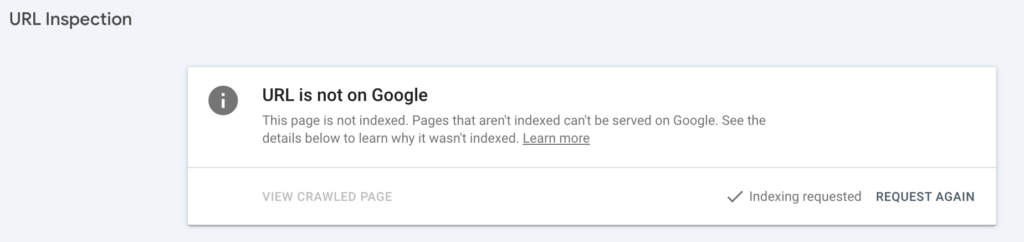
If the page is not indexed and you want it in Google quickly, enter the URL in the search bar in Search Console. Once Google has inspected it, click “Request indexing”. If the page passes a quick check, it is added to Google’s queue for crawling and indexing, nothing more. Clicking the button again and again for the same page therefore does not help, and if Google leaves the page out because of thin content or duplication, it is the page that needs to get better.
If you see something like the screenshot below, there is a technical problem to fix before the page can be indexed.
When the request goes through, you see “Indexing requested”, as below. That confirms the request, not that the page has been indexed:
A quarter of an hour in URL Inspection often saves weeks of guesswork. It is the difference between paying a developer for the right thing and rewriting copy that was never the problem.
Slow indexing or no indexing
Distinguish between a page that cannot be indexed and one that is indexed slowly.
- Pages that cannot be indexed: usually caused by technical errors, such as incorrect meta tags or a disallow rule in robots.txt.
- Pages that are indexed slowly: Google does not prioritise all websites equally. Websites with high quality and a steady flow of new pages tend to be prioritised higher.
We go through how to fix both below.
Why the page is not being indexed
A page is not indexed for one of two main reasons: a technical fault stops Google from reading or storing the page, or Google judges that the page does not add enough. Below we go through the causes in the order we usually check them, from the simplest technical faults to quality.
If the website does not appear in Google at all, the cause is usually technical. Start with a site: search so you know the page really is missing, because poor rankings are sometimes mistaken for a page not showing up.
Incorrect meta tags
The most common culprit is a noindex tag (a line of code telling Google not to store the page). A classic case is a WordPress site where the setting that discourages search engines from indexing the site was switched on during development and left on at launch. Google then gradually drops the whole website from its index.
- Detect: check the source code, use a Chrome extension or use Search Console as described above.
- Fix: if you use a WordPress plugin such as Yoast or Rank Math, there are usually indexing settings on each page; in Rank Math, for example, they sit under the Advanced tab as robots meta settings. In some cases you will need a developer.
Errors in robots.txt
- Detect: the robots.txt file can block Google from crawling parts or all of the website. You will find it at yourdomain.co.uk/robots.txt. What you do not want to see is important pages caught by a “Disallow:” rule.
- Fix: edit robots.txt so that only irrelevant or internal pages are blocked, such as admin pages. Avoid blocking important parts of the website that should be crawled and indexed.
Important: robots.txt and noindex do different things. A Disallow rule stops Google fetching the page, but the page can still appear in the search results without a description if other pages link to it. And if you block a page that has a noindex tag, Google can never read the tag. If you want to keep a page out of Google, it must be open in robots.txt and carry noindex.
Mixed canonical signals
Google decides for itself which URL is the original, weighing up your canonical tag (the tag that points to the original version of a page), internal links, redirects and the XML sitemap. If the canonical tag points to URL A, the menu to URL B and the sitemap to URL C, Google tends to ignore your instructions and choose its own.
- The canonical tag points to the page itself if the page is the original
- Internal links go to the same URL as the canonical tag
- The sitemap lists only that URL
- The same https version and the same trailing slash everywhere
Duplicate content
- Detect: when several pages have duplicate content, Google picks one of them.
- Fix: find the pages with Screaming Frog or the SEO tools you already use. Merge the pages or decide which one is relevant.
Thin content and low quality
- Detect: Google may choose not to index thin or low-quality pages at all. They would probably rank poorly anyway, so whether or not they are indexed, you should want to improve them. You can find them in Google Analytics (pages with very little traffic) and in Search Console under “Pages”.
- Fix: remove pages that have no value. Improve the ones that have a purpose but are not good enough.
More words are not enough. A page that only says what hundreds of other pages already say is often filtered out. In SEO, what such a page lacks is often called information gain: your own experience, your own data or answers that do not already exist elsewhere.
Index bloat
Index bloat means the website has far more URLs than it has valuable pages. Typical sources are filter pages in online shops, search parameters, tag pages and automatically generated pages. Googlebot then spends time on pages that will never sell anything while new product pages wait their turn. We cover how to prune the website further down.
Rendering and JavaScript
If the website builds its content with JavaScript in the browser (client-side rendering), Google cannot read the content straight away. Google first fetches the raw HTML and then puts the page in a separate queue, where the scripts are run when there is capacity. If the initial HTML is practically empty and the scripts take too long, the page may be indexed without its content or flagged as a soft 404 (a page that looks empty even though the server says everything is fine).
The fix is for the server to send finished HTML with the text, headings and links included (server-side rendering). Links should also be ordinary links in the code rather than buttons that only work with JavaScript, because Google can generally only follow links that are <a> elements with an href attribute.
Content that only exists in the desktop version
Google crawls and assesses websites with its smartphone crawler. Text, structured data or internal links that only exist in the desktop version, for example in a menu that is hidden on mobile, do not count when Google decides whether to index the page.
Every page that is not indexed is a page that cannot sell. If you work down this list from the top, the quick technical fixes are usually done before you spend budget on new content. If you would like a second opinion on your indexing, feel free to get in touch with Nils.
Practical ways to speed up slow indexing
If you want to improve your indexing, I recommend this post on crawl budget. Here are some quick, practical improvements:
- Make sure every page has internal links pointing to it
- Keep important pages no more than three clicks from the home page
- Improve loading speed
- Clean up your XML sitemap so that only the pages that matter are in it
- Only update lastmod in your XML sitemap when you have made a significant change
- Submit your XML sitemap in Search Console
- Add the address of your XML sitemap to robots.txt
- Check the mobile version for technical errors and internal links
- Update content regularly
- Remove thin and automatically generated pages
- Do not link to 301 redirects or 404 pages
- Earn more links to your website from other sites (off-page SEO)
Fewer pages can mean better indexing. Many people assume that more indexed pages means more traffic. Often the opposite is true: when you remove or merge thin pages (index pruning), Googlebot can spend its time on the pages that bring in leads and sales.
The same goes for structure. Pages that sit many clicks from the home page tend to be indexed late or not at all, so link your most important product and service pages from the home page or from strong category pages.
The lastmod date in your XML sitemap
An XML sitemap helps Google find and index your pages. If you use WordPress, Yoast and Rank Math can create it for you. Each entry in the sitemap lists a page’s URL and, usually, the date it was last modified.
Having a sitemap helps your indexing. What not everyone knows is that the last-modified date (the lastmod field) matters.
Of the sitemap’s three optional fields, it is also the only one Google uses. According to Google Search Central, Google ignores <priority> and <changefreq>, and Google has retired the sitemap ping endpoint, so automated pings now get a 404 response. Reference the sitemap in robots.txt and submit it in Search Console instead.
Some people try to game the date by changing it to today’s date. It can work at first, but after a while Google stops trusting the date.
Google has said itself that it only uses the date if it is consistently and verifiably accurate, matching real changes to the page.
Do not update this date unless the page has changed significantly.
If you are disciplined about only updating the date for significant changes, Google is more likely to keep trusting it when you publish something new.
Frequently asked questions about Google indexing
How long does it take Google to index a page?
There is no fixed time for how long it takes Google to index a page. Google’s own guidance is that crawling can take anywhere from a few days to a few weeks. New pages on websites Google already visits often, with internal links from strong pages, usually reach the index faster than pages on new websites or pages that sit in isolation. Some pages are never indexed, however long you wait. If the page has not appeared, checking its status in URL Inspection is better than waiting longer.
How do you get a website indexed?
You get a website indexed by making it easy for Google to find and read the pages. Submit an XML sitemap in Search Console, link internally to every important page and make sure no noindex tags or robots.txt rules are in the way. For individual pages you can request indexing in URL Inspection. The decision to store the page is still Google’s, so the content needs to be worth showing.
Why do pages get stuck at “Discovered – currently not indexed”?
Pages get stuck there when Google knows the URL but has not prioritised fetching it. Google says that typically it wanted to crawl the URL but expected this to overload the site, so it rescheduled the crawl. In our experience, the most common underlying causes are a lack of internal links from important pages, a server that has been unstable on earlier visits, or a website with many low-value pages that lower Google’s view of the whole site. The fix is almost never more clicks on “Request indexing”; it is more internal links and fewer weak pages.
Is the site: operator enough?
No, a site: search is not enough to know for certain whether a page is indexed. It is useful for a quick check, but the number of results only gives a rough picture. The Page indexing report and URL Inspection in Search Console are the only sources of exact index status.
Can you use the Indexing API to speed up indexing?
No, not for ordinary pages. According to Google’s own documentation, the Indexing API can only be used for pages with job postings or livestream videos. Tools that promise fast indexing of articles or product pages through the API go against Google’s guidelines, and Google says that attempts to abuse the API may result in access being revoked.
Summary
Being indexed by Google is a precondition for ranking. Fast indexing is a sign that Google likes what you are doing, and it tends to go hand in hand with better rankings.
Much of the work behind good indexing is technical SEO, and a lot of it is settled when the website is built. As an SEO agency, we are happy to help with your SEO from the ground up.
If you would like help with your indexing, do get in touch with Nils, or start with a free search audit.