
Crawl budget in SEO: what it is and how it affects your SEO
If new content takes more than two weeks to be indexed, something may be wrong. How crawl budget works and what you can do about it.

Crawl budget is an important part of SEO. It is not a direct ranking factor in itself, but when your pages are crawled and indexed efficiently, you see results sooner.
Even so, in our experience, sites that get indexed quickly also tend to rank well. In this post we look at what crawl budget is, why it matters and how to improve it.
If you would like help with your SEO, our SEO team is happy to take a look.
What is crawl budget?
Crawl budget is the set of URLs on your site that Google can and wants to crawl. It is decided by two things: how much crawling your server can handle without slowing down (the crawl capacity limit) and how much Google wants to crawl your pages (crawl demand).
The more of your site Google is willing to crawl, the faster new and updated content gets indexed. Crawl budget is part of technical SEO.
Crawling costs Google money. Google’s resources are large but finite, so it will not spend more of them than it has to on crawls it considers unnecessary.
What counts as fast indexing?
It depends on several factors, but since we like to be concrete, here are some rough guidelines. They are not an exact science; they are based on what we have seen on the sites we work on:
- If you are indexed within 0–2 days, Google likes your content.
- If you are indexed within two weeks, that is fine.
- If indexing takes longer than two weeks, there may be a problem.
Google’s own guidance is that crawling can take anywhere from a few days to a few weeks. For large websites and online shops, the guidelines above do not really apply, and indexing can take longer without it being a cause for concern.
Demand matters too. Google says that URLs that are more popular on the internet tend to be crawled more often. If there is little interest in something very specific, Google will prioritise content its users care more about. News sites, for example, are usually indexed faster than other sites.
Below we go through how to improve your crawl budget and get your pages ranking sooner.
How do you improve your crawl budget?
Many things affect your crawl budget. The most important are the quality of your content and how much demand there is from Google’s users for the topic.
The first two points below matter most. The rest are not things to do only for crawl budget; they are part of good search engine optimisation anyway.
Create more high-quality content
What counts as high quality is subjective. One useful test is to compare yourself with the competitors in your niche.
- Do not create content that already exists; add something new.
- Do not only create new content; update older pages as well.
- Spend more time on what you write.
Publish consistently
If nothing changes on your website, Google has no reason to visit it often.
Put the other way round, crawl budget is not a problem for you if you do not put much effort into the website and rarely update it anyway.
If, on the other hand, you have published a page that Google has not found for a while and you need it indexed soon, you can ask Google to index the URL directly in Search Console. We show how further down.
Link internally and avoid orphan pages
Google’s crawlers follow links. If a page has no internal links pointing to it at all, Google may struggle to find it.
Tip: avoid linking to 404 pages and redirects, and do not use nofollow on internal links.
Avoid duplicate content
Duplicate content means you have more than one page with identical (or almost identical) content. Google says that if many of the URLs it knows about on your site are duplicates, a lot of crawling time is wasted, so consolidate them.
Remove thin pages
Thin pages are low-quality pages that offer little value. They might be automatically generated pages, which are common in WordPress, for example. Your XML sitemap is usually the easiest place to find them.
If a page has no value at all, remove it; a 404 or 410 status tells Google not to keep crawling it, and there is no need for a redirect. Setting it to noindex keeps it out of the index, but Google still has to fetch the page to see the tag, so it does not save crawl budget.
Page speed
Google sets a crawl capacity limit so that it does not overload your server. If your site responds quickly and consistently, the limit goes up and Google can crawl more. If the site slows down or returns server errors, the limit goes down.
A faster site that takes fewer resources to crawl makes it easier for Google to get through more of your pages.
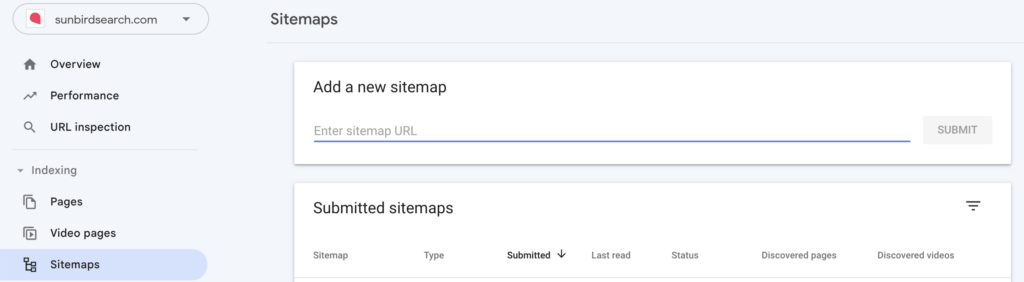
Submit an XML sitemap in Search Console
If you do not have an XML sitemap, start by creating one. In WordPress, plugins such as Yoast and Rank Math make this easy.
Then submit it in Search Console:
External links
Websites with more links pointing to them from other sites tend to have a larger crawl budget. This fits with what Google says: URLs that are more popular on the internet tend to be crawled more often.
How to check whether your pages are indexed
If you search Google for the keyword you wrote a page about and it does not appear however many pages of results you go through, it has probably not been indexed.
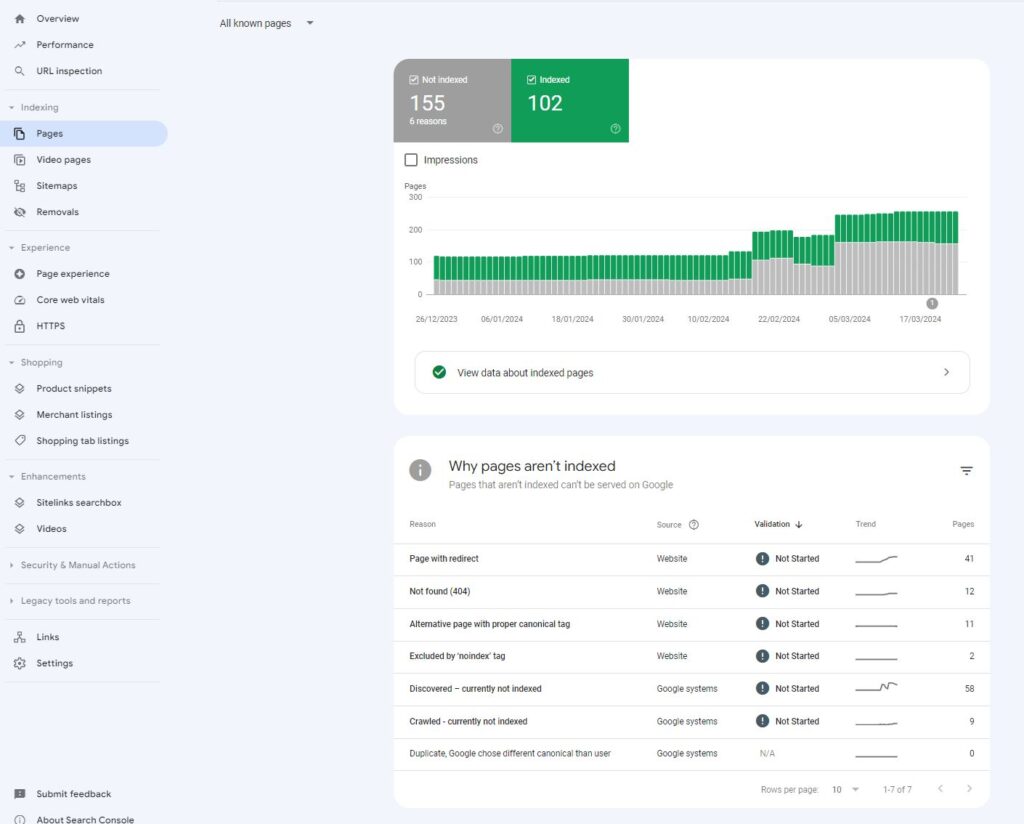
See which pages are not indexed in Google Search Console
The Page indexing report in Search Console shows the pages Google knows about and whether they are indexed. It is not real time, so pages you have only just published will not appear there yet.
Pay particular attention to “Crawled – currently not indexed” and “Discovered – currently not indexed”. “Discovered” means Google knows the page exists but has not crawled it yet, often because crawling it then was expected to overload the site; on a large site, a high share of these is a sign of a crawl budget problem. For important new or updated pages that are slow to appear, you can request indexing. For pages that are “Crawled – currently not indexed”, Google says there is no need to resubmit them; improving the page is the better route.
Check indexing with a WordPress plugin such as Rank Math
Rank Math uses data from Search Console but has two advantages:
- It flags pages that are unknown to Google.
- It has a simple interface for seeing when pages were last updated (useful when you have updated pages that are already indexed).
Check indexing manually with a site: search
There is also a manual way to check whether a page is indexed. If you search Google for "site:https://example.co.uk/page-you-want-to-check/", the URL appears if it is indexed. Google points out that this is not guaranteed, though, so if the page does not show up, use URL Inspection in Search Console for a definite answer.
How pages get indexed
Indexing happens in several stages. Google crawls your website and decides what to prioritise. In Search Console, the stages look like this:
- URL is unknown to Google: Google does not yet know the new page exists.
- Discovered – currently not indexed: Google knows the page exists but has not crawled it yet.
- Crawled – currently not indexed: Google has crawled the page, but it is not yet showing in Google.
- Indexed: the page can appear in Google.
Ask Google to index pages you have changed
If you have created new pages or changed existing ones and Google is taking too long to find them, you can use URL Inspection in Google Search Console and click “Request indexing”.

There is a daily limit on how many URLs you can submit this way, and Google says that requesting the same URL several times will not get it crawled any faster. For many pages at once, submit or update your sitemap instead.
In our experience, once Google sees that you are publishing a lot of new content, the rest of your site tends to get indexed faster too.
Final thoughts on crawl budget
A healthy crawl budget usually goes hand in hand with higher rankings, and websites Google likes generally have enough crawl budget for it never to become a problem.
If you have only just started your SEO work, however, it is common for indexing to take an unreasonably long time at first. Submitting your XML sitemap in Search Console and requesting indexing for key URLs is a good start.
If you would like a website that is technically sound for search, we can help with the SEO side. Start with a free search audit.