
Technical SEO: The Complete Guide With Checklist
Technical SEO is not about chasing every warning in an audit tool. It is about removing what actually stops Google reading your site.

In this post we go through technical SEO.
We recommend using our technical SEO checklist in this Google Spreadsheet. If there is something you are not sure about, just come back here and read up on it.
The most important points first
Before we get into the detail – here are the five most important things to fix in your technical SEO:
1. Make sure your website can be indexed – if Google cannot index you, you will not rank. Check robots.txt and Search Console.
2. Optimise for Core Web Vitals – loading speed and the mobile experience are confirmed ranking factors.
3. Use structured data – help Google (and AI search engines) understand your content correctly.
4. Build a logical internal linking structure – important pages need more internal links with relevant anchor text.
5. Clean up duplicate and thin content – it dilutes your link equity and confuses Google.
Now let us go through all of it step by step.
What is technical SEO?
Technical SEO is how you optimise a website for search engines and for the way crawlers work their way through it. Some of the more important aspects are:
- URLs
- Sitemap
- User signals
- Structured data
In this post we will go through the most important aspects of your technical SEO optimisation.
Technical SEO checklist
How to prioritise: impact vs. effort
A checklist is useful – but it does not tell you where to start.
Technical SEO is about prioritising correctly. Here is how I tend to think about it:
High impact, low effort (start here):
- Fix an incorrect robots.txt that is blocking Google
- Fix broken internal links
- Add missing H1s on important pages
- Implement basic structured data (Article, Organization)
High impact, high effort (plan it in):
- A full rework of page speed and Core Web Vitals
- Migrating the URL structure on a large website
- Implementing advanced structured data (Product, FAQ, HowTo)
Low impact, low effort (do it when you have time):
- Fix alt tags on images that do not rank
- Optimise less important category pages
Want help prioritising the right things for your website? Get in touch and we will run a free technical audit and show you what will make the biggest difference.
The difference between technical SEO and on-page SEO
Technical SEO is about how Google can crawl and index your website.
On-page SEO is about the content on the page itself and how users experience it.
Both happen on the website, which means the line between them is not always clear-cut.
Is technical SEO important?
The short answer: yes, technical SEO is important.
The longer answer is that it matters more at some times than at others. There is a widespread over-belief in scoring 100/100 in every SEO tool.
Serious technical SEO faults should always be fixed. Those can be, for example:
- 1. The website cannot be indexed
- 2. Errors in your canonical tags
- 3. Missing H1s
- 4. Incorrect meta titles
- 5. Important pages with no internal links
As a rule, technical SEO becomes more important the larger the website is. Many of the fixes benefit the whole site, which has a greater effect when the site has many pages. Chasing 100/100 in SEO tools usually means fiddling with details that have almost no effect on the results. SEO is about prioritising the right effort in order to rank higher.
Technical SEO for AI-driven search (AI Overviews)
Google’s AI Overviews and other AI search engines are changing how we need to think about technical SEO.
For your website to become a source in AI-generated answers, you need:
Structured data becomes even more important:
AI models prefer content that is clearly structured. Implement `Article`, `FAQPage`, `HowTo` and `Product` schema in particular. It helps AI understand the context and cite you correctly.
Clean HTML structure:
A logical hierarchy of H1, H2 and H3 plus semantic HTML makes it easier for AI to parse and understand your content. Avoid building structure with CSS alone.
Page speed affects AI crawling:
The faster your website loads, the more content AI models can fetch and process within their crawl budget. This becomes even more important as more AI agents start crawling the web.
If you want to prepare your website for the future of search, an SEO agency with experience of both traditional SEO and AI optimisation can help you.
The user experience of the technical aspects matters
Ultimately, Google wants its users to be satisfied with the results they get. For some time now, user experience has been a confirmed ranking factor. So the technical SEO you do should not just be a checklist – in the end it has to make the user experience better.
Examples of technical aspects Google looks at:
- Loading speed
- Mobile optimisation
- Broken links
- Code that does not work
But because Google does not only look at what you do wrong – it looks at what users like – this is not only about scoring well in a technical audit. A website that is genuinely good can earn positive signals that help you rank higher.
Sunbird combines search specialists and web developers in one team. If your website is built in WordPress, or you would like us to build it, we can handle your technical SEO optimisation end to end.
Thin pages
Thin pages are pages with little or no value. The term is slightly misleading, because it really refers to the value of the content rather than the amount of it. A glossary entry or the answer to a simple question, for example, does not have to be a long post.
The problem with thin pages is:
- They dilute the site’s link equity
- If there are enough of them they can worsen Google’s view of the entire site
- They waste crawl budget
Thin pages can be auto-generated without you knowing, or something you have simply left in place.
In a technical SEO audit you go through every page. You can use Screaming Frog, search Google for “site:yourdomain.co.uk” or use your sitemap (usually found at /sitemap.xml) to find them.
As a rule you should not 301 redirect thin pages, since they have no value anyway.
If you have thin pages you still want to keep, you can always set them to no-index – thank-you pages used for conversion tracking, for example.
Duplicate content
Duplicate content is treated as thin content. It can happen for a number of reasons and is not always a problem.
Duplicate content tends not to rank; it mostly just confuses Google. Like thin pages, it dilutes link equity and wastes crawl budget.
Broadly, duplicate content tends not to rank at all. New businesses with little trust from Google should avoid it completely. Established businesses that generally rank quickly and well can get away with it to some extent, above all for local searches.
Also bear in mind that long tail keywords account for around 70% of a website’s traffic. By having unique, well-written content on several pages you increase the likelihood of picking up long tail keywords.
How to find duplicate content
We use a few different methods to find duplicate content. One simple tool is Siteliner. Otherwise you can use Screaming Frog and sort by the word count on the page. If two pages have exactly the same number of words, it is worth checking whether they are duplicates:

If you have to keep both pages, you can work with canonical tags (more on that below).
For important keywords you can do a more manual job and search for them one by one. If duplicate pages exist here, they should show up near the top.
In the end it comes down to the visitor being satisfied. If you can see strong reasons why the content has to be duplicated, and others are doing the same, it may be worth testing. It carries risk, both obvious risk and a more subtle drag on rankings. If you are unsure, feel free to get in touch with me (Nils).
Orphan pages
Orphan pages are pages with no internal links pointing to them, and they usually rank poorly.
If you do not want to link to the page but still want to keep it, consider setting a canonical tag to another page (where that fits) or asking Google not to index it.
As with any page that is not important, you can remove it from your sitemap. Most WordPress plugins do this automatically when you set no-index.
Canonical links (canonical tags)
Canonical links are a way of telling Google which page is the original. If you have two pages with duplicate content, you can set a canonical link from page B to page A.
Sida A: <link rel="canonical" href="https://sunbirdsearch.com/sida-a/">

Sida B: <link rel="canonical" href="https://sunbirdsearch.com/sida-a/">
Both pages will still be reachable. But only “page A” is indexed by Google. This is called a “soft redirect”, because it does not force the user over to page A – they can still visit page B.
XML sitemap
A sitemap should be in XML format. If you use WordPress, we have a WordPress SEO guide. You can use SEO plugins such as Yoast and Rank Math, which handle this for you easily. In a technical SEO analysis we look for:
- Remove thin pages
- Make sure every page, category and similar that you want included is linked
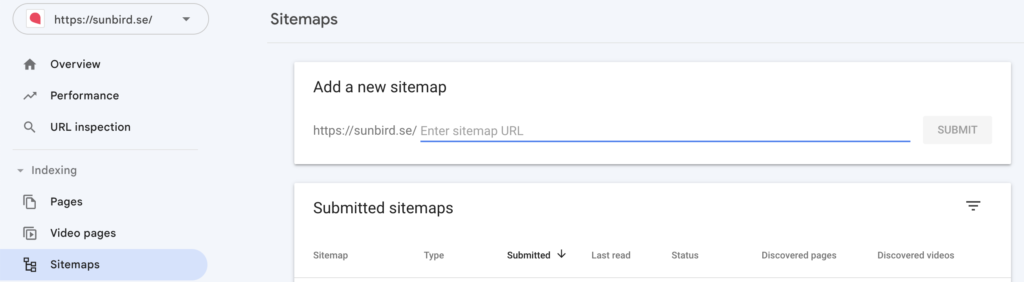
We recommend referencing your sitemap in your robots.txt and adding it in Search Console.
Internal links
Internal links are a powerful SEO signal, because:
- They direct link equity
- They carry the context the link sits in
- Anchor text is a strong signal
In a technical audit we want to see that important pages get the most internal links, that the links are relevant with varied anchor text, that they sit in a good context, and that unnecessary links are cleaned out.
Where the internal links are placed matters too. Links higher up the page carry more weight than those further down.
Tip: if you know a bit about SEO you have probably had the thought of adding no-follow to pages that should not rank. Unfortunately that does not work – it only does harm.
Tip 2: a good way to find relevant pages to link internally from is to search Google for your most important keyword. Pages 2, 3, 4 and so on can be good candidates to link internally from to the page trying to rank for that keyword.
Broken links
In a technical SEO audit we always check for broken internal (and external) links. You can do that with Siteliner, Screaming Frog and WordPress plugins.
Broken links are bad for the user experience and send link equity to a page (a 404) that does not exist.
It is best to change every place the broken link appears, rather than only setting up a 301 redirect.
Navigation
Navigation is part of your internal linking. Important pages should ideally sit in the top navigation and in the footer.
Tip: do not forget to check mobile. The navigation sometimes differs because of how the website is built.
Breadcrumbs are common on larger websites such as online shops. They show the hierarchy and where on the site the user is.
In many cases users appreciate this, and it also helps Google understand the structure. It is a smart way to add relevant internal links with matching anchor text.
Search Console
Search Console is a free tool from Google that we recommend everyone uses, above all for technical SEO.
Under the page experience and Core Web Vitals reports you will find data on loading speed, mobile optimisation and user experience. Work through these tabs and fix any errors that are flagged.
Loading speed
Checking loading speed is an important part of a technical audit.
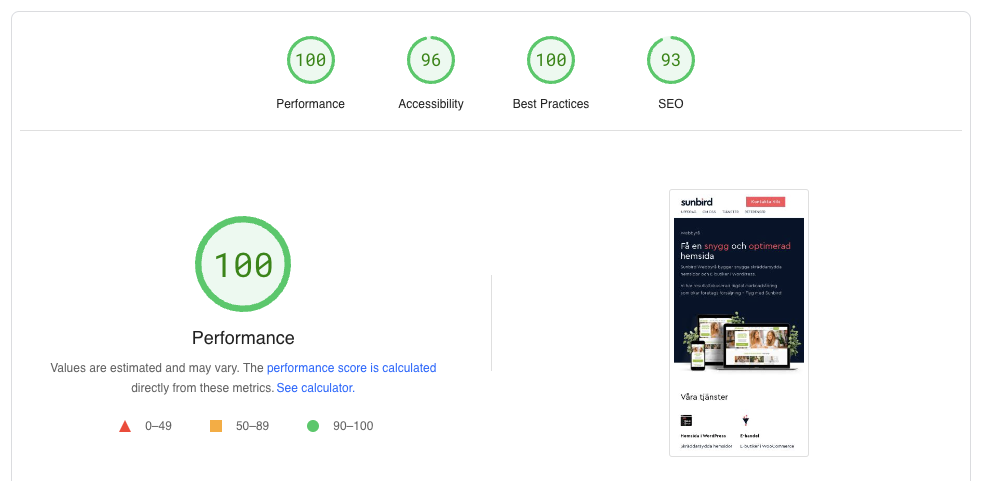
If you are reading this guide and have not used Search Console before, there will not be any historical data in the account. In that case you can use Google’s open PageSpeed Insights tool.
Beyond Search Console you can take a look at GTmetrix and Pingdom Tools.
The big advantage of Search Console is that it covers all of your URLs and warns you when something happens.
Bear in mind that there is a difference between scoring well in a tool and how the experience actually feels; both need to be good. Do not forget to check on mobile – that is often where the problems sit.
Practical tip: if you have warnings and red scores, fixing your loading speed is fairly critical. But maximising the score is rarely a priority. There is a point where it is more valuable to spend the time on something else. If you are building a new website, that is the moment to take your PageSpeed all the way to 100/100.
Https (SSL certificate)
Almost every website has this today: an SSL certificate. It gives you https instead of http and, in many browsers, a padlock saying the connection is secure. Search Console flags this as well if you are missing it.
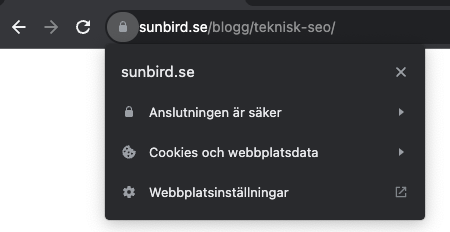
Make sure that, even when https works, the http variant cannot be reached. It is not unusual for an SSL certificate to be in place without that variant being enforced.
Mobile optimisation
In the technical SEO audit we do not look at how good we think the mobile design is; we primarily check whether there are any warnings from Search Console.
Warnings can look like this:
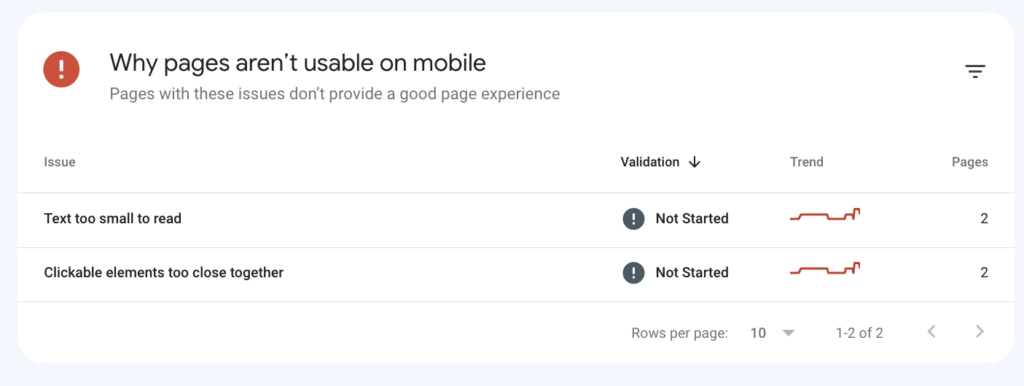
When you see something like that, it has to be prioritised. Once you have fixed the problem you can click “Validate fix”. You do that by clicking into the issue above and then into the top right corner.
Crawl budget
Understanding indexing: to run a technical audit you need to understand how indexing works:
- Google does not index in real time
- If you rarely update your website, Google will not visit you often for no reason
- Google is a company and does not want to spend more on computing power than necessary. They do not work for you – they are there to create a good experience for their users.
Things you do on the website can take weeks or months to be picked up. Read more about crawl budget for SEO.
How to optimise your crawl budget
Crawl budget matters most on larger websites with hundreds or thousands of pages. Here are concrete ways to optimise it:
1. Block unimportant pages in robots.txt
Stop Google wasting time on admin pages, search results, filter URLs and other pages with no SEO value.
2. Fix broken links and redirect chains
Every 404 and every extra redirect in a chain wastes crawl budget. A redirect chain looks like this: page A → page B → page C. Google has to follow every step.
3. Remove or noindex thin pages
The more worthless pages Google finds, the less trust your website earns. Clean up regularly.
4. Use internal linking strategically
Pages with more internal links get crawled more often. Make sure important pages get plenty of relevant internal links.
5. Keep your XML sitemap clean
Remove pages that are noindexed, redirected or blocked in robots.txt from your sitemap. It should only contain pages you want Google to index.
If you have a large website and suspect crawl budget problems, we at Sunbird can help you analyse and optimise it. Get in touch for a walkthrough.
Images and alt tags
Alt tags are used to describe an image. Below is an example of how you set one in WordPress (it appears on the right as “Alternative text”).
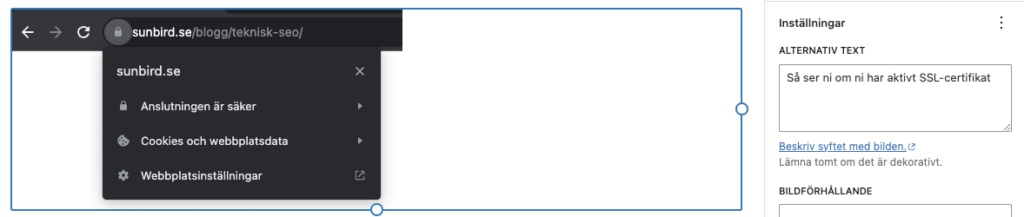
Below are the “dos and don’ts”:
- The alt tag is there to describe the image
- If you can describe the image and include the keyword, that is a bonus
- Avoid internal competition
- Do not over-optimise
Read the full guide to optimising images for search.
Robots.txt
Robots.txt is one of the first things we check if you have serious problems ranking a website.
In a robots.txt file you tell Google what it must not crawl. That can help you with:
- Things you simply do not want to appear
- Duplicate and thin content
This is an effective way to optimise your crawl budget.
It can also block crawlers such as ChatGPT and various analysis tools.
The reason we check this file when there are serious faults is that it sometimes blocks Google completely.
URL structure
For SEO the URL is one of the more important components. A few important rules of thumb:
- Include the keyword in the URL, for example: /technical-seo/
- Avoid stop words such as “for”, “to” and “the”
- Keep the keyword as close to the root domain as possible
- Never change URLs unless it is a deliberate decision
- If you do change a URL, set up a 301 redirect from the old URL to the new one
- A clear URL structure such as /blog/ or /careers/ can help your analysis work, for example: /blog/technical-seo/
- You can deliberately push less important pages further away from the root, for example temporary job adverts you do not need organic traffic to.
What we look for in a technical SEO analysis is where the above goes wrong. We sometimes set up a 404 report in Google Analytics to see whether you have changed URLs without adding a 301 redirect.
When we build a new website we make sure the structure is logical and prioritises the important SEO pages.
www and non-www
In our technical SEO analyses it is not unusual to find that a website can be reached both with and without www.
www is a subdomain of the version without www, so it is not technically 100% the same website.
Even though Google generally handles this well, it is better to fix it. It also reduces the risk.
All of the variants below:
- http://example.co.uk/
- https://www.example.co.uk/
- http://www.example.co.uk
Should all end up at: https://example.co.uk/.
URL parameters
Put simply, a URL parameter is any URL with a “?” in it. They can be used for sorting, search or values, for example.
If you do not know what you are doing here, be careful. This is considered one of the trickier areas and it can have a big impact.
There are two common problems with them:
- People link internally to them instead (for example to /?q=running-shoes rather than /running-shoes)
- Pages are auto-generated that create internal competition, thin content and duplicate content
Both of these confuse Google and spread your link equity thin. Fixing it can in many cases have a big impact on results.
The solution is to always link to the URL without a parameter in it. For the auto-generated pages you need to handle it with canonical tags. For example: /running-shoes?colour=yellow should have a canonical URL pointing to /running-shoes
Pagination
Pagination is how you split content across several pages, for example /page/3/ or ?page=3.
Pagination usually triggers warnings both in Search Console and in SEO tools when you run a technical audit.
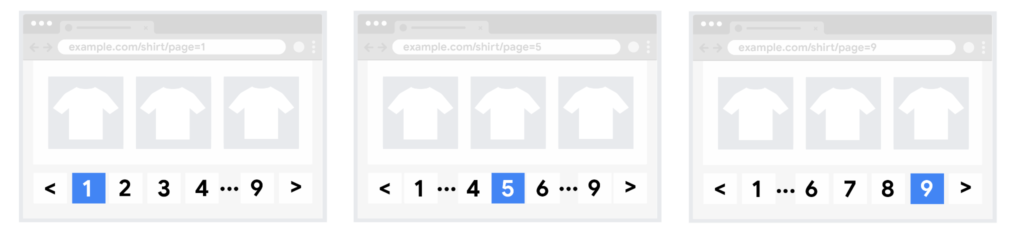
To make sure search engines understand the relationship between pages of paginated content, include links from each page to the following page using <a href> tags. This can help Googlebot (the Google web crawler) find subsequent pages.
Guidance on pagination has gone back and forth over the years: whether to point at the first page, or to use rel prev and rel next. The current position is that what matters is clear linking between the pages, as in the quote above.
Structured data
Structured data is also one of the more important parts of technical SEO. In essence it is information presented to Google in an organised way.
This can help Google get an accurate picture of you and make the right connections.
To implement it you need a plugin or help from a developer (unless you are handy yourself).
In a technical audit we check whether any structured data is incorrectly formatted. The easiest way to do that is via Search Console:
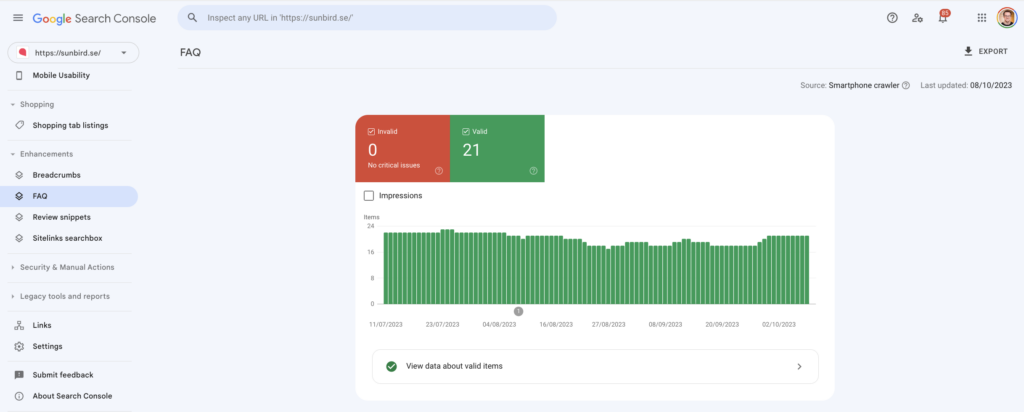
If you want help generating the code, we recommend Google’s Structured Data Markup Helper.
Above all we recommend sorting out structured data for:
- Authors
- Local places
- Products
- Reviews
In an era where E-E-A-T is becoming more and more important for your SEO, structured data is an important part of your SEO work.
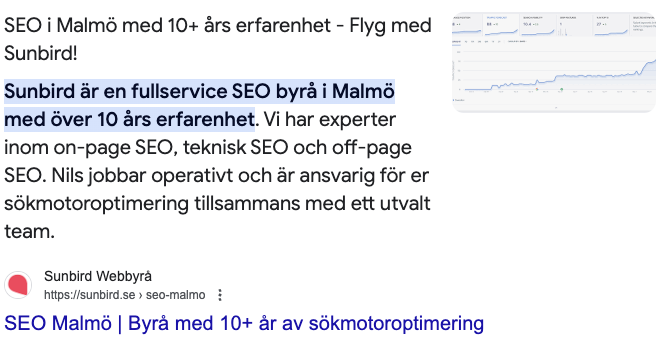
Structured data can help you earn rich snippets. That gives you a larger result, which also increases the likelihood of a click:
Hreflang
Hreflang should always be defined. It becomes especially important if you have a website covering several languages in several countries.
Below is an example of what hreflang can look like:
<link rel="alternate" hreflang="x-default" href="https://example.com/" />

<link rel="alternate" hreflang="en-gb" href="https://example.com/" />

<link rel="alternate" hreflang="sv-se" href="https://example.com/sv/" />
The x-default hreflang value signals to Google that the page is not aimed at any specific language or region. It becomes the default page when no other page is a better fit.
SEO tools for technical SEO
The tools we use most are:
Screaming Frog: canonical tags, hreflang, H1s, page titles, internal and external links.
Search Console: PageSpeed, Google’s mobile test and Rich Results (structured data).
Siteliner: broken links and duplicate content.
For WordPress specifically we use: Rank Math and Broken Link Checker.
If everything above is correct on your website, you have good technical SEO!
Want help with your technical SEO?
Technical SEO can feel overwhelming, especially if you do not have a developer on the team.
We help businesses with everything from a foundational technical audit to advanced optimisation for AI search and Core Web Vitals. Sunbird is a search marketing agency that combines technical expertise with commercial understanding.
As always, you are welcome to get in touch with me, Nils, for a free technical SEO audit. We will go through your website and show you concretely what needs fixing – and in what order.