
Internal links for SEO: how to make them work
Internal links connect the pages of your own website. Why they matter for SEO, and how to link so Google understands which pages count.

Sunbird is an SEO agency based in Malmö, Sweden, with 14 years in search. If you would like help with your internal links or the rest of your SEO, do get in touch.
The basics of internal links for SEO
Internal links are the links between the pages of your own website. Unlike external links, they are entirely under your control.
What is an internal link?
An internal link is a hyperlink from one page to another page on the same domain. It is always clickable for the visitor.
Visitors use internal links to find their way around. Google uses them to crawl your website and understand it.
The difference between an internal link and an external link is that an external link comes from another website to yours. Read more about off-page SEO.
Why are internal links important for SEO?
Internal links matter for SEO because they show Google how your pages fit together, which pages matter most and how to get to them. There are four reasons to spend time on internal linking.
They help Google understand relevance and structure
When you link from page A to page B, you are telling Google the two are related.
Internal links help search engines understand the structure of your website.
If the paragraph and the anchor text on page A are relevant to the keyword page B is trying to rank for, that usually gives page B a certain boost. It reinforces and confirms the basic SEO work done on page B.
They distribute link equity across your site
You decide how link equity flows around your website. When page A links to page B, a share of page A’s link equity passes to page B.
The more internal links page B has, and the stronger they are, the more link equity it receives, and that goes hand in hand with better rankings. Up to a point, though. Pages with an extreme number of internal links usually get them from the menu and footer, not from relevant paragraphs.
They make the site easier to use
Internal links should be easy for visitors to use, which ought to improve both the user signals that feed into SEO and your conversion rate.
They help Google index your pages
Google’s crawlers follow links to index websites. Pages without links can still be found, for example through an XML sitemap, but they tend to rank worse. Pages with no internal links pointing to them are known as orphan pages. Read more about crawl budget.
Internal links in Google and AI search
Internal links matter for AI search for the same reasons they matter for Google. They are the paths between your pages, and they decide what gets found and in what context it is understood.
Google has not said exactly how AI Overviews choose their sources. But the answers are built on pages Google has already found, indexed and placed within a topic. A page that no other page on the website links to is hard to find, and even harder to place in context.
Bear in mind that an AI answer usually summarises a whole topic rather than a single keyword. That makes it a question of how well your pages on the same topic link to each other, in both directions:
- A broad guide links down to the pages that go into depth.
- Each in-depth page links back up to the guide.
- Pages on the same topic link sideways to each other where it helps the reader.
It is the same idea as the pillar pages and topic clusters further down this article, and it worked for ordinary SEO long before anyone talked about AI search.
If a competitor is cited as the source in the AI answer instead of you, theirs is the name the buyer sees first, before they have even clicked. At that point your link structure is a question of leads as well as rankings.
Examples of where to add internal links
A common distinction is between contextual and structural links. Below are some practical examples of good places to add internal links for SEO.
- Main navigation: A link in the main navigation is a good internal link from every page, in a prominent position at the top of the page. Pages linked from here tend to rank better.
Tip: It is not unusual for the navigation to differ between desktop and mobile, so check both versions of the website.
- Footer: Similar to the main navigation, but a less important position because it sits further down the page. Footer links carry less weight, but they are still good internal links.
Tip: The footer is a block many visitors look at. The message and the links there matter for your conversion rate.
- Sidebars: Not every website has them. They are usually found on blogs and online shops. They do not normally give links from every page, but they sit in a slightly more important position than the footer, so they can pass a good amount of link equity and relevance.
- Breadcrumbs: Mostly used on online shops, but also found on larger websites. They tend to help Google understand the structure even better, and they usually give your internal link a natural, useful anchor text.
- Body copy: Done well, these links give strong contextual relevance. How much they pass depends entirely on where they sit. Natural links that visitors click, high up on the page, in a relevant paragraph and with good anchor text (matching the keyword of page B) will improve your rankings.
Internal linking is easiest to get right when it is planned from the design stage of a website, before the templates and menus are fixed.
Footer, menu and breadcrumbs
The footer, menu and breadcrumbs are internal links that appear on almost every page. That is why each decision there weighs more than a single link in a blog post.
The link equity on a page is shared between all the links on it. Add a link to a global template and you add one more link to every page on the website, and it takes a slice of what the other links would have received.
It is easy for a footer to grow into a table of contents with policy documents, old campaign pages and every subcategory. Take two footers as an example:
Footer 1: Contact, about us and your three most important service pages.
Footer 2: 80 links to everything you have ever published.
Which one gives the service pages the most link equity, if the rest of the website is identical? Footer 1, without question, because there the equity is not shared with lots of pages that never lead to business.
It is not black and white. Large websites with many strong external links usually cope well with broad menus and footers. Smaller websites have less link equity to share, and they tend to notice more when it is spread thin.
Breadcrumbs are links up the structure, from product to category and on to the main category. They give Google the hierarchy, a natural anchor text and a shorter way back. It is worth marking them up with BreadcrumbList from Schema.org, so that Google understands what they are.
Then there is the anchor text in menus and buttons. According to the WebAIM Million (2026), 15.2 per cent of the top one million home pages contain ambiguous link text such as “click here”. A link like that tells Google nothing about where it leads, and tells someone using a screen reader nothing either. Icon links without text should get an aria-label for the same reason.
| Type of link | Appears on | Typical anchor text | Bear in mind |
|---|---|---|---|
| Main menu | Every page | Short and generic, for example "Services" | Can fix the anchor text that counts for the page (see first link counts below) |
| Footer | Every page | Short | Keep it to what matters for the business |
| Breadcrumbs | Subpages | The name of the page or category | Mark up with BreadcrumbList |
| Body copy | A single page | Descriptive, ideally including the keyword | Place the link high up, in a relevant paragraph |
What makes good anchor text for an internal link?
Anchor text is the clickable text in a link. The best anchor text is short and relevant. It is a strong signal to Google about what the target page is about.
Aim for a natural internal link profile, but you do not need to be as careful as you are with external links to your website.
Focus on including the keyword, in full or in part, in the anchor text.
Do not use other words, or words that other pages are meant to rank for. That creates keyword cannibalisation.
If you choose a call to action such as “Read more here”, the paragraph the link sits in should be relevant.
Google does not penalise exact-match anchor text on internal links. According to Zyppy (2022), pages with at least one exact-match internal anchor are associated with more search traffic. But variation is also associated with more traffic, so mix the keyword with partial matches and natural phrasing that describes the same thing.
First link counts
“First link counts” refers to what SEO tests have repeatedly indicated: when the same page is linked more than once from a single page, Google usually only takes the anchor text of the first link into account. Google has not documented this.
If your service page sits in the main menu as “Services”, that is probably the text that counts. The far better anchor text “ecommerce SEO” further down in the body copy will then not have the same effect.
There are two ways around it:
- Link from the body copy to a specific part of the page with a fragment, for example /seo/#ecommerce.
- Keep the main menu to the main pages, and let the deeper subpages get their links from body copy.
Step 1: Find good places to link from
Use a site: search
The quickest way to find relevant places to link from is a “site:” search on Google.
It is a search that only returns Google results from one domain. If we were working on the keyword “running shoes”, for example, we would search for: “site:yourwebsite.co.uk running shoes”
All the results that come up are good candidates for internal links.
A slightly more advanced trick is to use Search Console. You need to have had it set up for a while (at least a few weeks) for this to work.
It is really a method for finding keyword cannibalisation, but it works well for finding relevant paragraphs to link from too.
- Log in to Google Search Console
- Click “Search results”
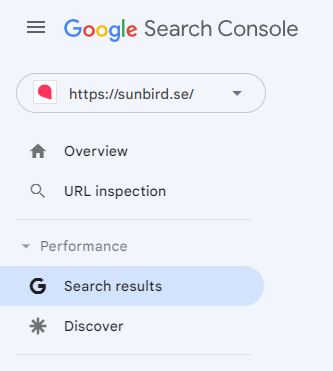
- Click “New”, then “Query”, and enter the keyword you want to look into.
- Click “Pages”
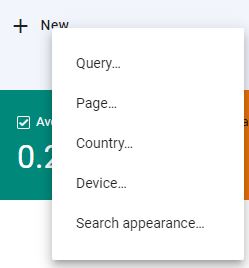
You can now see which pages appear on Google for the keyword. This should give similar results to the site: search, so you only need to pick one of the two methods.
Find strong pages
The strong pages on your website should link to your most important ones. A page becomes strong when it has many internal and/or external links pointing to it.
External links pointing at a page also make it stronger (the home page usually has the most). You can find these through Search Console, a paid SEO tool, or Ahrefs’ Backlink Checker, which has a free version.
In Search Console, click “Links” in the left-hand sidebar and then “More” to see the pages that have links pointing to them.
Bear in mind that it is mainly dofollow links that pass value (a link is dofollow unless it is marked nofollow). Social media links, for example, are usually nofollow.
Pages with many links here can be candidates for internal links.
Link equity is distributed around your website through links.
You increase the total value your pages share by earning external links (only those Google trusts, and only dofollow links, count here).
Pages linked from the main navigation, the footer and the home page are examples of pages that tend to be relatively strong.
To check this, we prefer Screaming Frog. For a large website you need the paid version.
Tip: You can do this on any website, including your competitors’. If they are good at SEO, the number of internal links will show you which pages they prioritise.
Step 2: Create new places to link from
Beyond your existing pages, it is worth having an underlying plan for creating new landing pages and linking from relevant existing paragraphs.
Blog posts
Blogging, as we do here, and linking internally can be a good idea. Take the chance to link where it fits.
You can link internally both to the pages you want to rank and to pages that in turn link to the pages you want to rank.
You can, and should, also link to other pages that matter to you, such as your customer reviews or your company story. It is a natural part of a website, and even if it is not a direct ranking factor, it tends to pay off over time.
Bonus: Blogging is not only good for internal links. It is also an excellent way to build expertise and cover the subtopics around the keywords you are trying to rank for. If you are trying to rank for running shoes, say, blog posts about knee injuries, running technique and training plans (and which shoes suit which kinds of session) are excellent places to show expertise and link internally.
Pillar pages and topic clusters
Pillar pages and topic clusters are pages that cover a whole topic rather than a narrow keyword. They can of course try to rank for a keyword, but it is usually a broad one, such as “marathon training”.
Our post on on-page SEO, for example, does not go deep into every part, but links to the pages that do.
Pillar pages usually get internal links from every subtopic, which makes them strong pages to link from directly to your most important pages.
SEO and content marketing often go hand in hand. In our view, a good search agency should handle both, not least given the SEO factors that matter today.
Our best tips for internal links
The best tips for internal links are mostly about what to avoid, and fortunately the most common mistakes are easy to fix.
Do not send mixed signals
Do not use the same anchor text for several different pages. It creates confusion about which page should rank for that keyword. Nor should the anchor texts pointing to different pages share the same search intent.
Do not link to redirects
Always link directly to the page, and avoid linking to a redirect. For example: page A links to page B. Page B moves to page C. Page A still links to page B, which has a 301 redirect to page C. It works for the visitor, and Google understands it.
Link equity usually passes through a 301 redirect without any noticeable loss, and a controlled split test by SearchPilot found no detectable short-term traffic uplift from fixing links like these. Still, it is worth changing the link so that it goes straight to the right page. It is good housekeeping and means fewer unnecessary requests to the server, but do not prioritise it ahead of the overall structure. Only on very large websites with a great many URLs does it start to matter for your crawl budget.
Do not link to URL parameters
Do not link to URL parameters. As we cover in our guide to technical SEO, it is not unusual for internal links to point to pages such as /?q=running-shoes rather than directly to the static page /running-shoes.
Do not link everywhere, all the time
Do not add internal links everywhere from every page. The effect cancels itself out. Link most to the pages that matter most.
Do not use nofollow on internal links
We often see internal nofollow links to pages such as contact or about us. Google still divides the link equity across all the links on the page, including the nofollow link. But the share that goes to the nofollow link is lost; it is not moved over to your other links. So never put nofollow on internal links unless you have a clear purpose and know what you are doing. Instead, try to add natural links on the pages you do not consider important but that can pass relevant, useful links to other pages.
Click depth and orphan pages
Click depth is the number of clicks it takes to reach a page from the home page. In internal linking for SEO, it is the clicks that count, not the folder structure in the URL.
A page at /services/seo/ can be five clicks away if nothing links to it. A page deep in the blog’s folder structure can be one click away if the home page links to it. Google’s John Mueller has said that the number of clicks from the home page carries more weight than what the URL looks like.
Google prefers to spend its resources on pages that sit close to the home page and that many other pages point to.
Page A: The service page is one click from the home page and gets links from five blog posts.
Page B: The same service page is five clicks away and can only be reached through a category page.
It is page A that Google will usually visit most often and value most highly.
Internal links are also the most common kind of link. The median desktop page has 43 internal links against 6 external ones, according to the HTTP Archive Web Almanac (2025). Most linking on the web happens within a website, and that is where you have full control.
Orphan pages sit furthest out of all, because there is no path to them at all. An XML sitemap gives them no link equity.
How to find them:
- Crawl the website from the home page in Screaming Frog, without uploading the sitemap. That shows you the website the way Google’s crawlers see it.
- Compare the crawl with your XML sitemap and with the pages that have impressions in Search Console.
- Pages that are in the sitemap or in Search Console but missing from the crawl have no internal links.
- If the page is worth keeping, give it links from relevant pages on the same topic. If it is out of date, remove it or 301 redirect it to the closest relevant page.
- Check how deep your business-critical pages sit. If they are far down, give them links from pages close to the home page, or a place on a hub page for the topic.
Find internal links to 404 pages
Especially on large websites, we often find internal links to 404 pages (pages that no longer exist).
That means you are passing internal link equity to pages that are gone. In WordPress there are plugins that report broken links regularly as they appear.
If you remove a page or change its URL, update or remove every internal link pointing to it.
If you would like help reviewing click depth, orphan pages and broken links on your website, do get in touch with our SEO agency.
Summary
Internal links can be one of the more important parts of your SEO. If you understand and work through the list below, you will get a long way:
Internal links checklist
- Link most to the important pages
- Link from strong pages to important pages
- Place important internal links high up on the page
- Link from relevant paragraphs
- Use relevant anchor text within the search intent, and vary it for a natural profile
- Avoid sending signals outside the search intent
- Link from existing pages, and create new relevant content to link from
- Make the links easy to see and click
- Keep your most important pages few clicks from the home page
- Make sure no page you want to rank is without internal links
- Keep the menu and footer to what matters for the business
Internal links are one of the few parts of your SEO where you do not have to wait for anyone else. The job is smaller than it looks, but it is also the one that all too often gets left undone.
Good luck! Either do it yourselves with the checklist above, or bring in an SEO agency.
If you would like a second opinion first, book a free search audit with me (Nils). It takes 30 minutes and there is nothing to prepare. You are also welcome to message me on LinkedIn.